
Running marketing campaigns is a familiar part of life for any WooCommerce professional. Whether you’re launching a seasonal sale, rewarding loyal customers, or trying to increase average order value, discount coupons remain one of the most powerful tools to boost your conversions.
But sometimes we face the challenge as many store owners do: “I want to create a coupon that only works when customers buy a certain quantity – not just a simple 10% off”
Unfortunately, once you try to set this up with default WooCommerce coupons, things quickly become confusing or limited. That’s exactly why we’re writing this guide.
In this blog post, we’ll guide you step-by-step on creating restricted WooCommerce discount coupons based on advanced quantity rules using the powerful YayPricing plugin, helping you maximize your store’s potential and deliver tailored offers that truly resonate with your customers.
Why Your WooCommerce Store Needs Quantity-Based Coupon Restrictions?
Before jumping into the setup, let’s quickly talk about why quantity-based discounts work so well with your WooCommerce business.
Quantity-based discounts are one of the most effective promotion strategies in WooCommerce because they benefit both you and your customers:
- Increase your average order value: Encouraging customers to buy more items per order is often easier than acquiring new customers.
- Control your profit margins: Instead of offering blanket discounts, you reward customers only when they meet your quantity goals.
- Perfect for promotions and campaigns: You decide when the discount applies, to which products, and under what conditions, no unnecessary profit loss, such as Buy-more-save-more campaigns, bulk purchase incentives, clearance or stock-moving promotions, B2B or wholesale-style pricing, and much more.
The Problem with Default WooCommerce Coupons
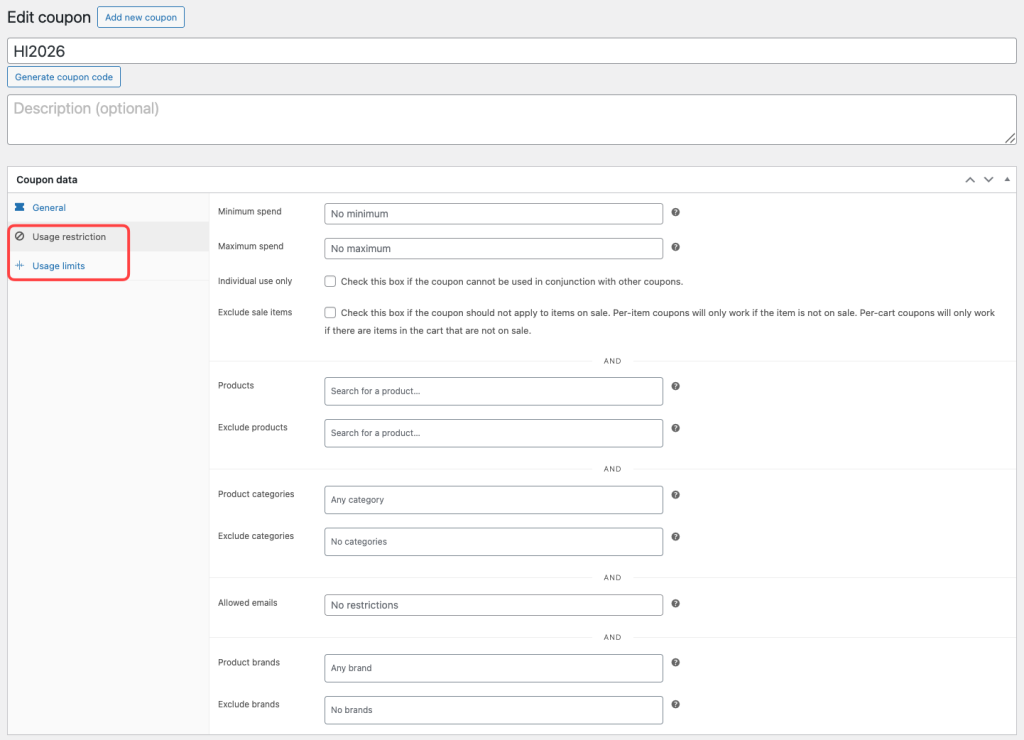
WooCommerce does include a built-in coupon system, but it’s designed for basic use cases. When you create or edit a coupon in the Marketing dashboard, you’ll see two vital tabs of the restriction system:
- Usage Restrictions: specify the eligibility rules
- Usage Limits: regulate the amount and frequency of use.
Once you try to do something more advanced, like:
- Applying a coupon only when a minimum quantity is met
- Restricting coupons to specific products or categories
By default, with WooCommerce, you’ll start hitting limitations. This is where many store owners feel stuck.
Why YayPricing Is the Right Tool for This Campaign?
YayPricing is explicitly built to solve these kinds of problems. This is a powerful WooCommerce pricing and discount plugin that allows you to create flexible pricing rules, including:
- Advanced quantity-based discounts
- Conditional logic for pricing rules
- Product, category, and cart-based rules
- Clear pricing tables for better customer understanding
Instead of forcing complex rules into WooCommerce’s basic coupon settings, YayPricing lets you create pricing logic visually, in a way that actually makes sense. Best of all, it’s built with marketers and store owners in mind, not developers.
In short, it turns your promotion ideas into real campaigns.
Step-by-Step Guide: How to Set Up Restricted WooCommerce Discount Coupons Based on Advanced Quantity with YayPricing?
Step 1: Install and Activate YayPricing
First things first, you have to activate the pro version of YayPricing on your WordPress site. On the other hand, you can download the free version from the WordPress repository, but in this case, we would need to use the pro version for the advanced conditional logic features.
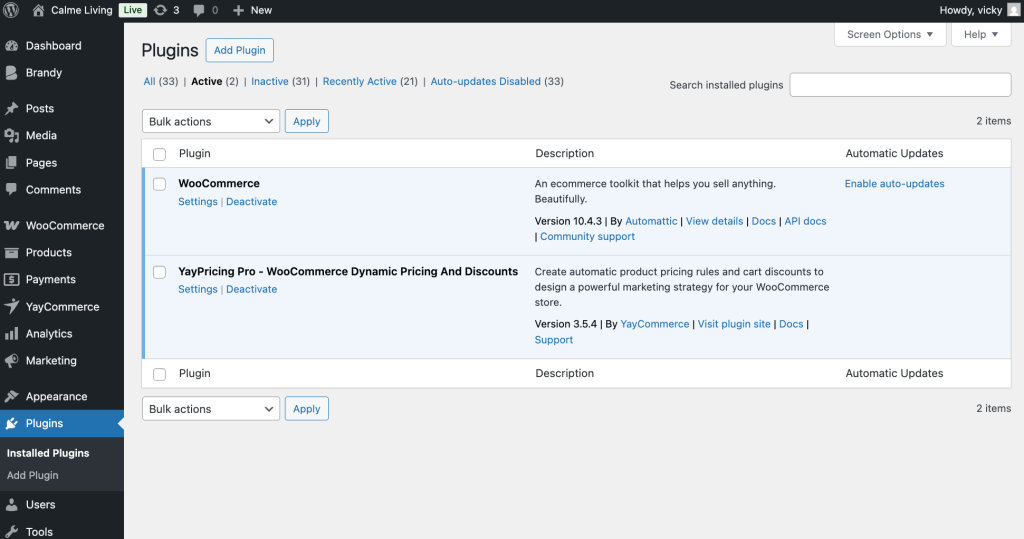
Once activated, you’ll see YayPricing inside your WooCommerce menu.
Step 2: Create a Coupon Code for Your Discount Campaign
Now, on your WordPress dashboard, head over to the Marketing tab > Coupons. There, you can create a new coupon code and set its value to 0.
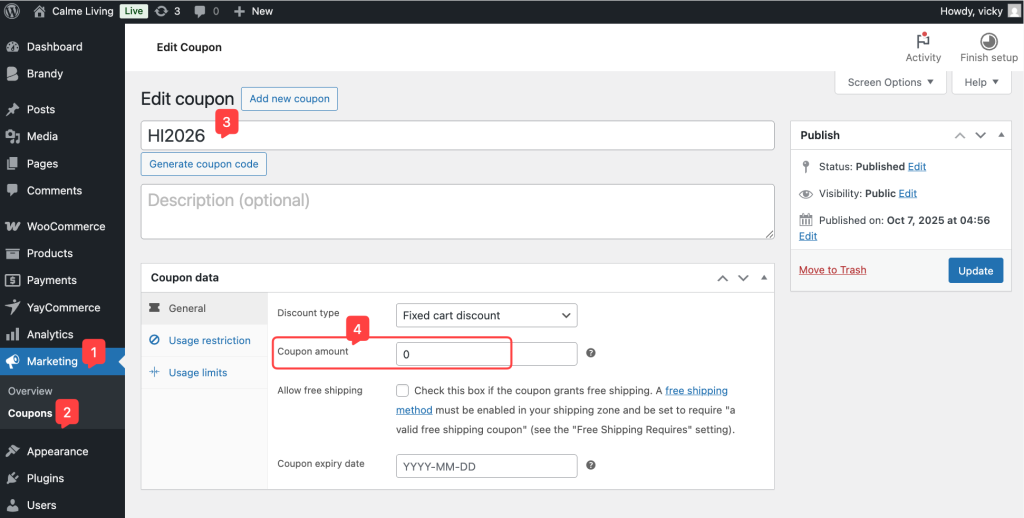
Save it, then go back to the YayPricing panel to figure out the campaign.
Step 3: Set Up Pricing Rule for Coupon Code
In the YayPricing settings, start by configuring a new rule in Product Pricing. We will apply a 10% discount to this campaign.
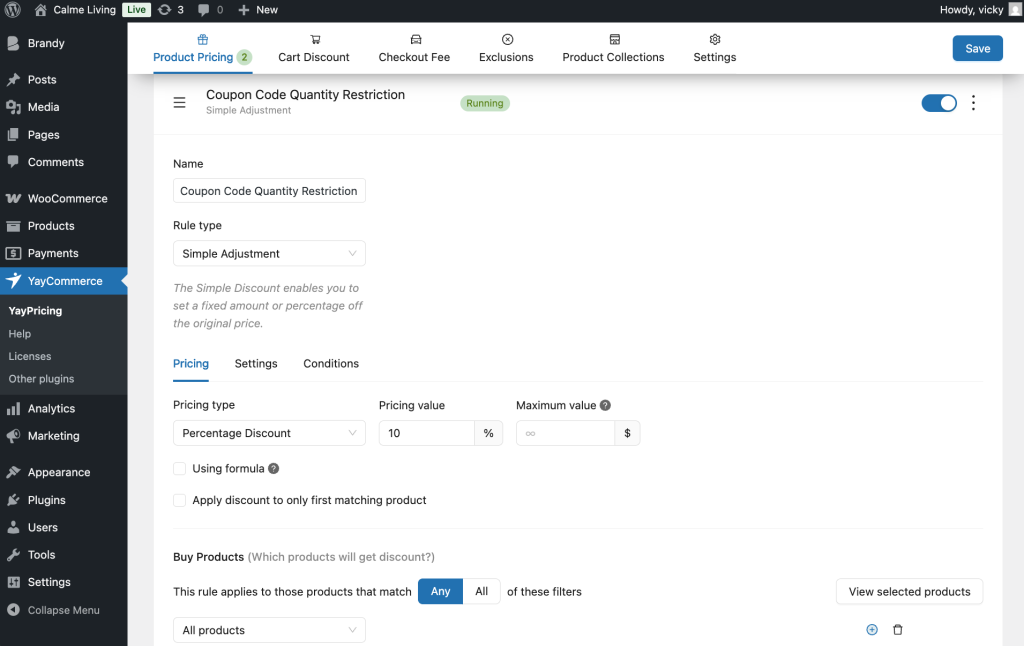
Then, move forward to the Conditions tab and do something magic with the conditional logic feature.
The very first step, we set a condition for this rule: “Applied Coupons.” Which means that when customers enter the coupon, this rule will apply.
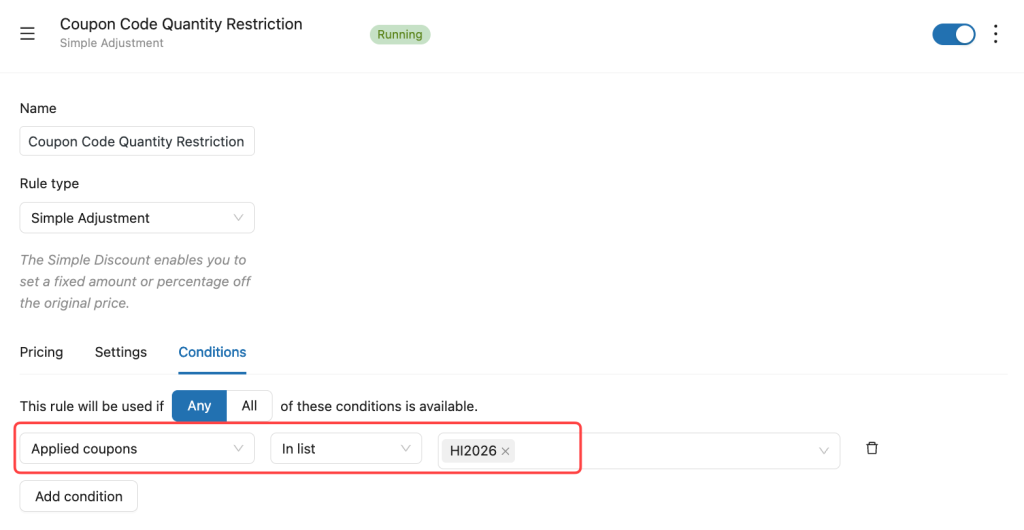
Step 4: Restrict the Discount Coupon Based on Advanced Quantity
To enforce quantity-based restrictions on discount coupons, we will continue to configure with the YayPricing condition. Then we set the cart quantity to be greater than 10 items.
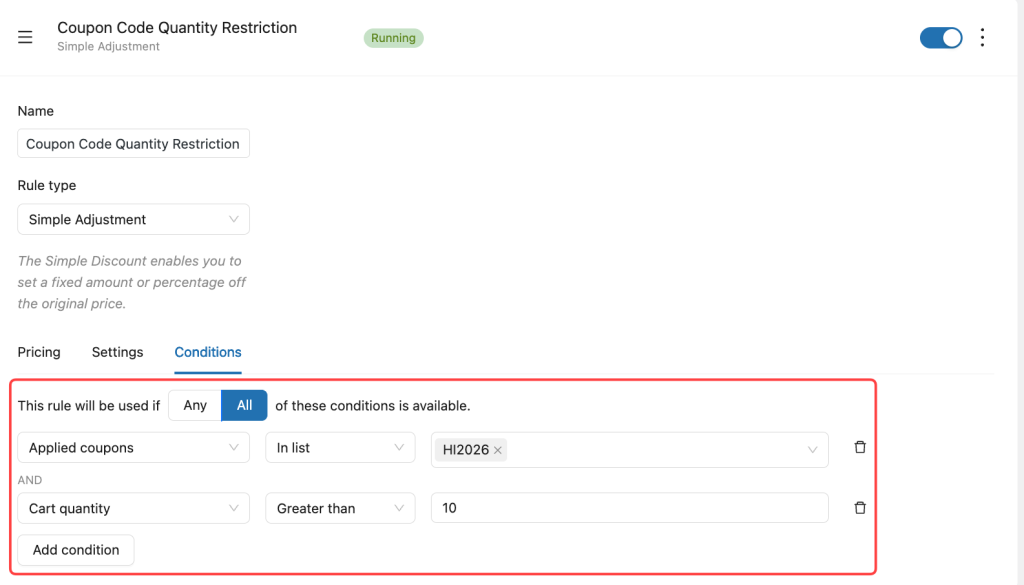
YayPricing combines these conditions to restrict the coupon based on cart quantity.
Save it and make a test on your WooCommerce storefront to see how it works.
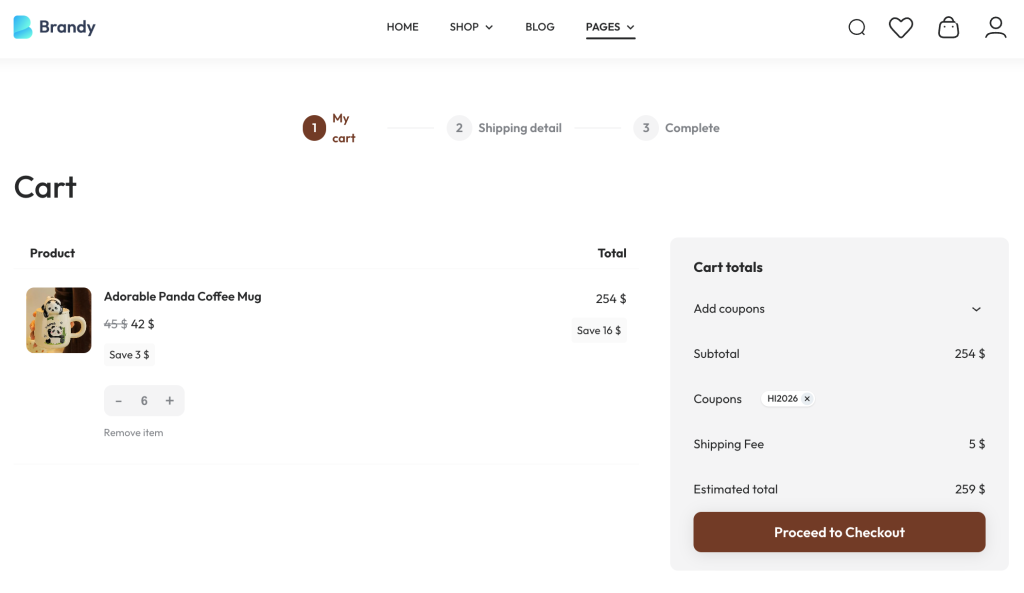
Add varying quantities of products to your cart to ensure the discounts apply correctly according to the rules you set, and enter the coupon code as you generated.
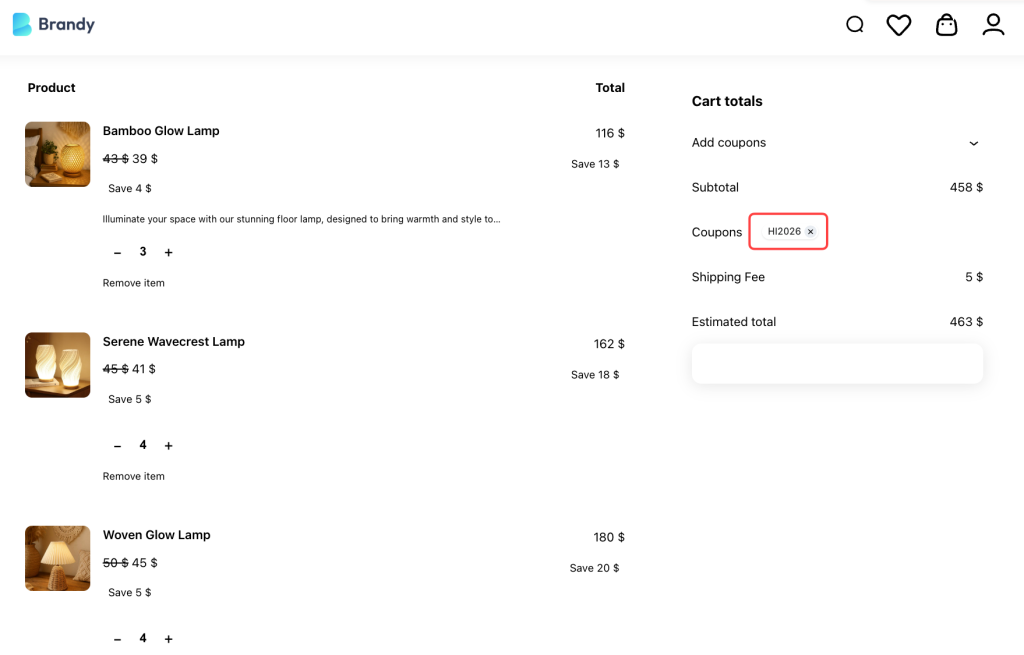
Thus, instead of forcing WooCommerce coupons to do things they weren’t designed for, YayPricing lets you build smarter promotions with confidence.
Bonus: Advanced Quantity-Based Campaign Ideas You Can Build with YayPricing
Once you understand the basics of quantity-based discounts, you’ll quickly realize how far you can take your campaigns with YayPricing.
This is where your promotions stop being “generic” and start feeling smart, strategic, and revenue-driven.
Below are four real-world campaign ideas that many WooCommerce store owners want to run – but struggle to set up without the right tool. Let’s see how YayPricing makes each one possible.
Multi-Category Mixed Quantity
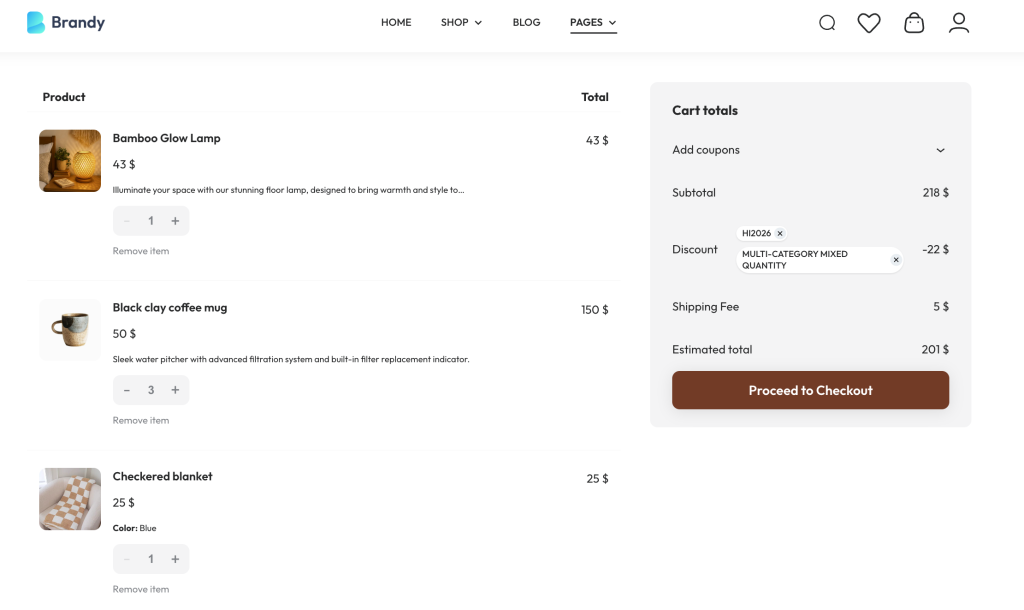
Let’s see, we want to set: 1 Bamboo Glow Lamp + 3 Black clay coffee mug + 1 Checkered Blanket → qualify for a discount
This type of promotion is perfect for bundle-style campaigns without forcing customers to buy a fixed product bundle.
How to set it up with YayPricing
- Create a Cart Discount rule
- Set the discount type: 10% discount off
- Add multiple Product Category + Quantity conditions: 1 Bamboo Glow Lamp + 3 Black clay coffee mug + 1 Checkered Blanket
- Apply the rule only when all conditions are met
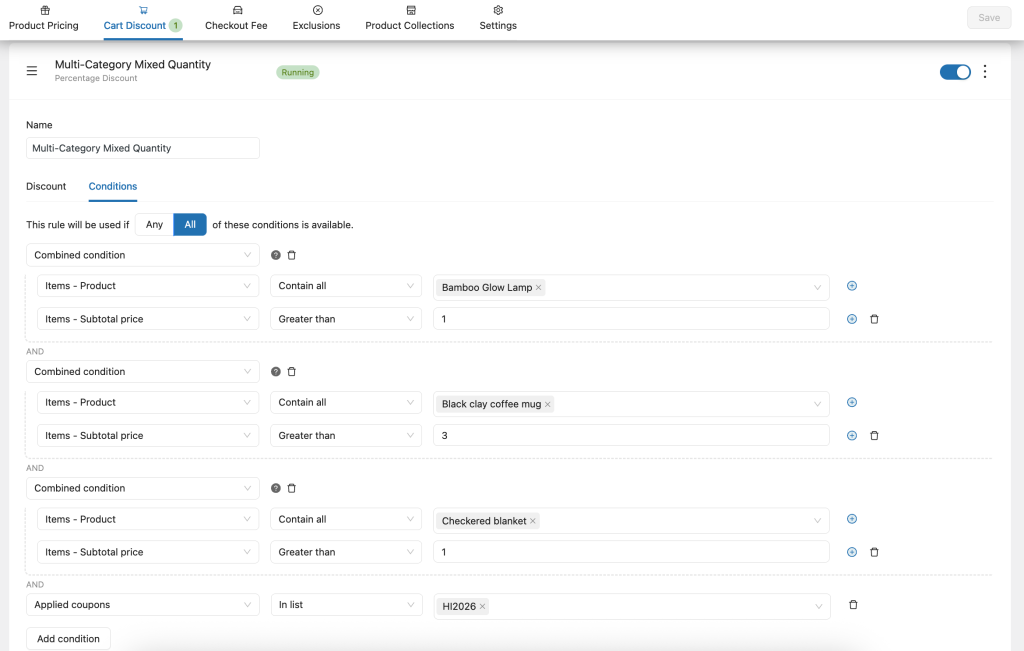
Thus, the discount triggers only when the exact mix is in the cart.
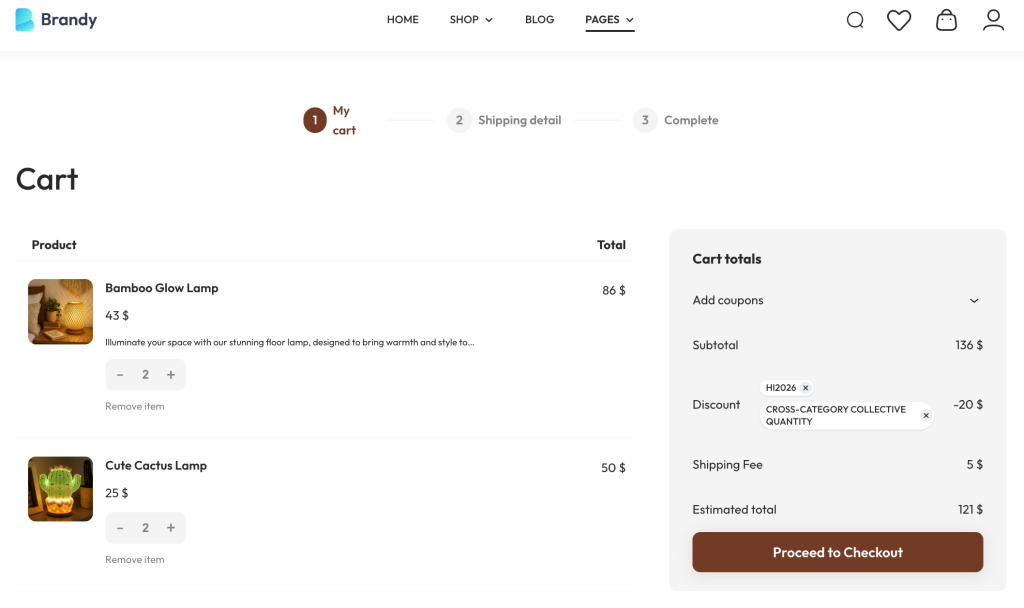
Cross-Category Collective Quantity
In this case, we will set up as follows: Buy any two different products from the same category, and the combined value is over $100.
This is a great way to reward larger purchases within a category without forcing customers to buy specific items.
How to set it up with YayPricing
- Create a Cart Discount rule
- Choose the discount amount: discount $20
- Set conditions: target category, the quantity is 2 (different products allowed), subtotal is greater than $100
- Optionally exclude sale products
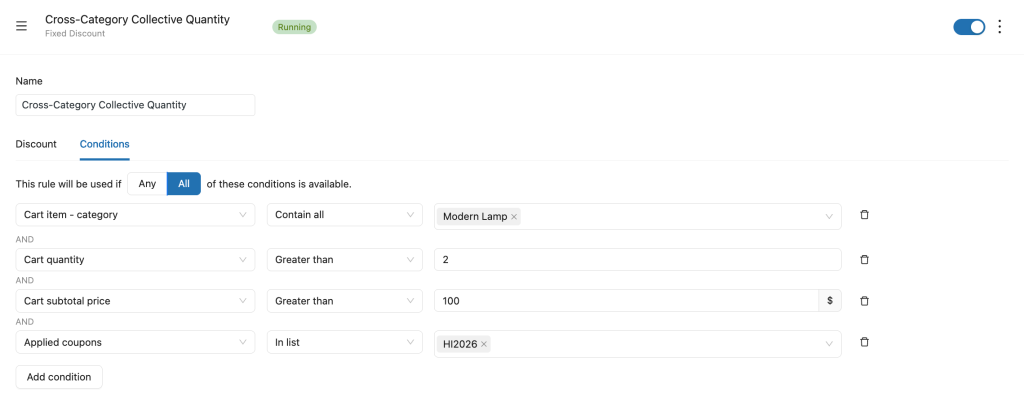
Customers can mix and match – as long as they hit the value threshold.
Attribute-Based Quantity
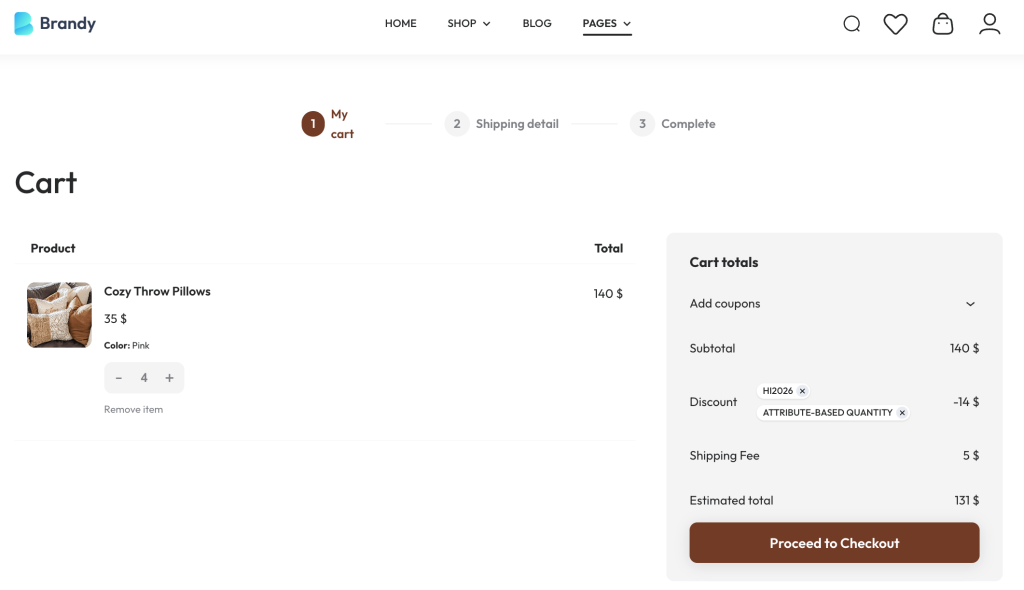
Let’s say we want to offer 10% OFF for the New Year when a customer buys 3 or more pink-colored items.
How to set it up with YayPricing
- Create a Cart Discount rule
- Set a discount for 10%
- Schedule the campaign for the New Year
- Add conditions: Product variation is pink, Minimum quantity is 3
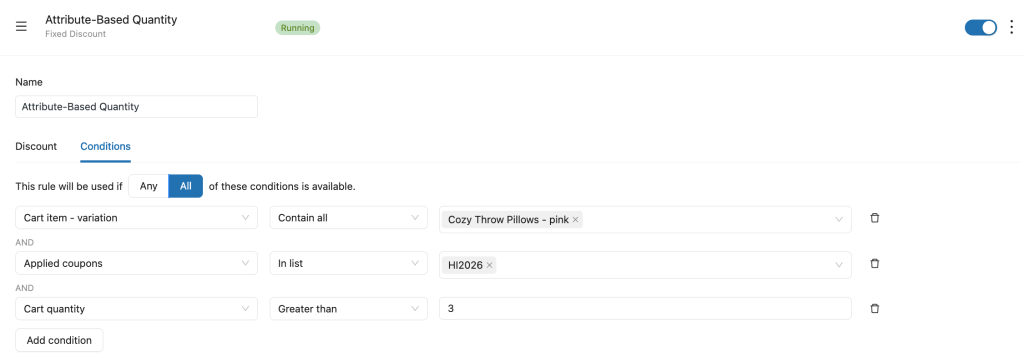
Thus, only pink items count toward the quantity requirement.
Range-Based Quantity
Now, we’ll set up the rule like:
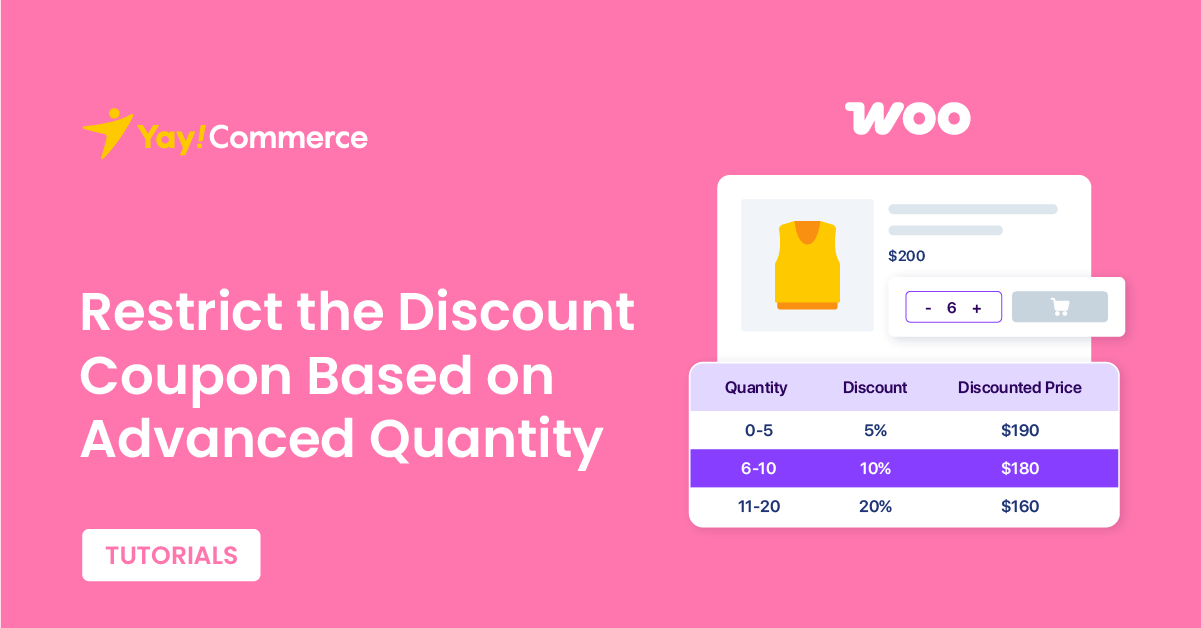
- Buy 0 – 5 items → 5% OFF
- Buy 6 – 10 items → 10% OFF
- Buy 11 – 20 items → 20% OFF
This is the classic “buy more, save more” strategy, and one of the most effective.
How to set it up with YayPricing
- Create a tiered pricing rule, each with:
- Quantity range condition
- Corresponding discount percentage
- Set the coupon code for the condition
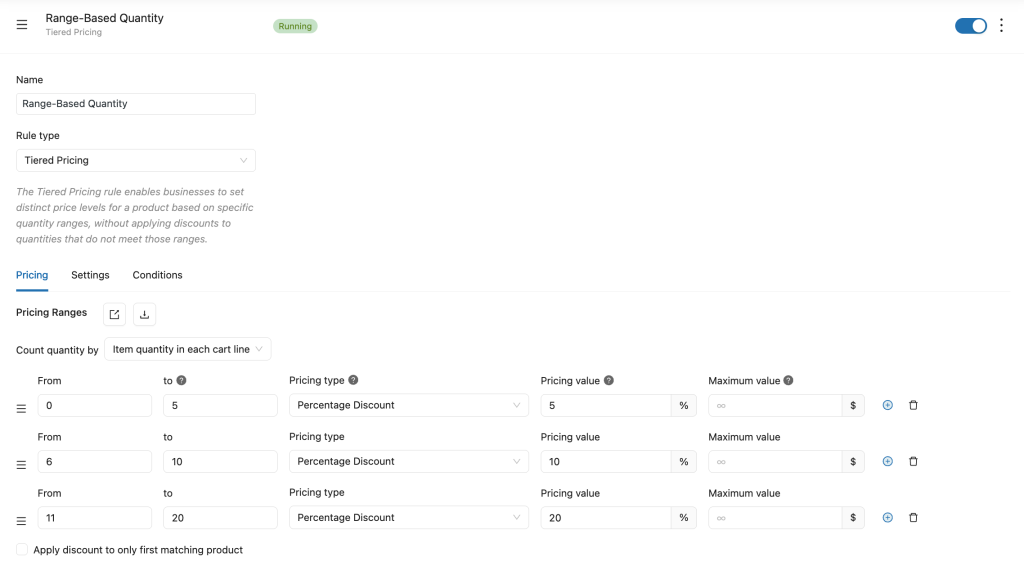
Customers instantly see how much more they can save by increasing quantity.
Frequently Asked Questions (FAQs)
Before wrapping things up, let’s quickly answer some common questions store owners often ask when setting up quantity-based discount coupons with YayPricing.
1. Can I restrict a coupon based on total cart quantity in WooCommerce?
By default, WooCommerce doesn’t support advanced quantity-based coupon restrictions. However, with YayPricing, you can easily apply discounts only when a specific cart quantity or product quantity condition is met – without any custom code.
2. Can I apply quantity-based discounts to specific products or categories?
Yes! YayPricing allows you to restrict discounts by individual products, product variations, or entire categories. This gives you full control over which items qualify for the promotion.
3. Can I combine quantity conditions with other rules?
Absolutely. You can stack multiple conditions, such as:
- Minimum cart quantity
- Minimum cart total
- Specific products or categories
- Customer roles
This makes your campaigns much more flexible and targeted.
Quantity-based discount campaigns are one of the easiest ways to increase average order value – and with YayPricing, setting them up is simple, flexible, and beginner-friendly.
Stop relying on basic coupons. Start running promotions that actually drive results.
If you’re interested in running more advanced WooCommerce promotions, these guides will help you go even further:
- How to Add Discounts in WooCommerce the RIGHT WAY (Step by Step)
- How to Create WooCommerce Deals of the Day (with countdown timer)
- How to Create Conditional Fees in WooCommerce
Want to explore more ways to grow your WooCommerce store with smart pricing and automation? Check out these helpful resources from YayCommerce: YouTube, Facebook. These resources are perfect for both beginners and experienced store owners looking to optimize their sales strategies.
Final Thoughts
If you’ve ever wished your WooCommerce coupons could be a little smarter, a little more flexible, and a lot more effective, you’re definitely not alone.
The good news is that creating quantity-based, restricted discount campaigns doesn’t have to be complicated or technical. With YayPricing, you can turn simple promotion ideas like “buy more, save more” into clear, well-structured campaigns that both customers understand and your business benefits from.
Most importantly, your customers see transparent pricing and feel confident adding more items to their cart – because they clearly understand the value they’re getting.
If you run promotions regularly and want them to feel more professional, more strategic, and easier to manage, YayPricing is a great companion for your WooCommerce store. Start small, test one campaign, and you’ll quickly see how powerful quantity-based discounts can be.
Here’s to smoother campaigns, happier customers, and better results from every promotion you run
