
In the competitive world of online retail, highlighting your best products can significantly boost sales and improve customer engagement. Featured products are like the “VIP section” of your WooCommerce store. They grab attention, highlight best-sellers, promote special items, and help guide customers toward products you really want them to see.
While WooCommerce lets you mark products as Featured directly in the dashboard, there are times when you may want to do it programmatically – especially if you’re working with bulk products, automation, custom workflows, or integrations.
In this guide, we’ll walk through simple, safe, and practical ways to programmatically mark products as featured in WooCommerce, empowering you to customize your store efficiently and effectively. Whether you’re a developer or a WooCommerce store owner looking to enhance your workflow, this tutorial has got you covered.
Why You Should Programmatically Mark Products as Featured?
Let’s be honest, manually choosing featured products in WooCommerce can get tiring pretty quickly. It’s fine when your store is small, but as your product list grows, keeping everything updated becomes a real challenge. That’s where programmatically marking products as featured can make your life much easier.
Here’s why many WooCommerce store owners love this approach:
- It saves you a ton of time: Instead of opening each product and ticking the “Featured” box one by one, you can let rules do the work for you.
- With a programmatic setup, your store can automatically: Feature products that are selling well, remove featured status from out-of-stock items, and rotate featured products every week or during special seasons.
- Perfect for promotions and seasonal campaigns: Programmatically featured products are a big help.
- Featured products usually appear in the most noticeable spots on your website: homepage sections, sliders, or special product blocks.
- Works seamlessly with themes & plugins: Most WooCommerce themes and plugins already recognize featured products.
It’s a smart move for any WooCommerce store that wants to grow without adding more manual work.
How to Programmatically Mark Products as Featured in WooCommerce?
One of the most efficient ways to mark products as featured in WooCommerce is by leveraging the built-in WooCommerce functions programmatically. This approach allows you to automate the process, which is especially useful when dealing with a large number of products or when integrating with custom workflows.
Let’s see, by default, you can mark WooCommerce products as featured by logging into the WP-Admin and clicking each “star” icon in the Products table.
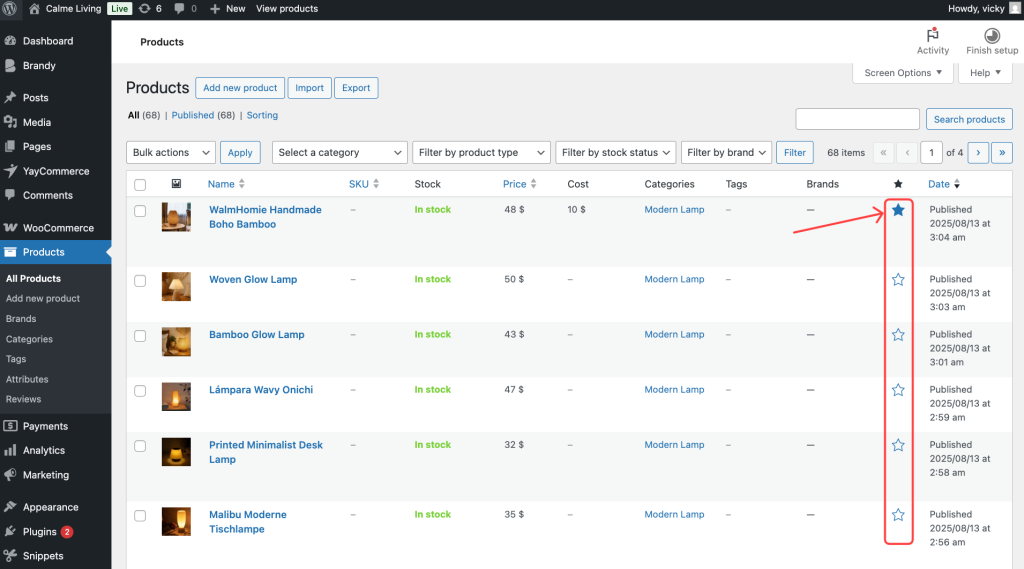
But now, WooCommerce offers a handy filter hook that makes it easy to change the featured status whenever you need. This way, you can set up your rules automatically and save yourself time in the admin area.
The very first thing we have to do is install and activate the Code Snippets plugin. This plugin will help WordPress users add snippets to their site easily.
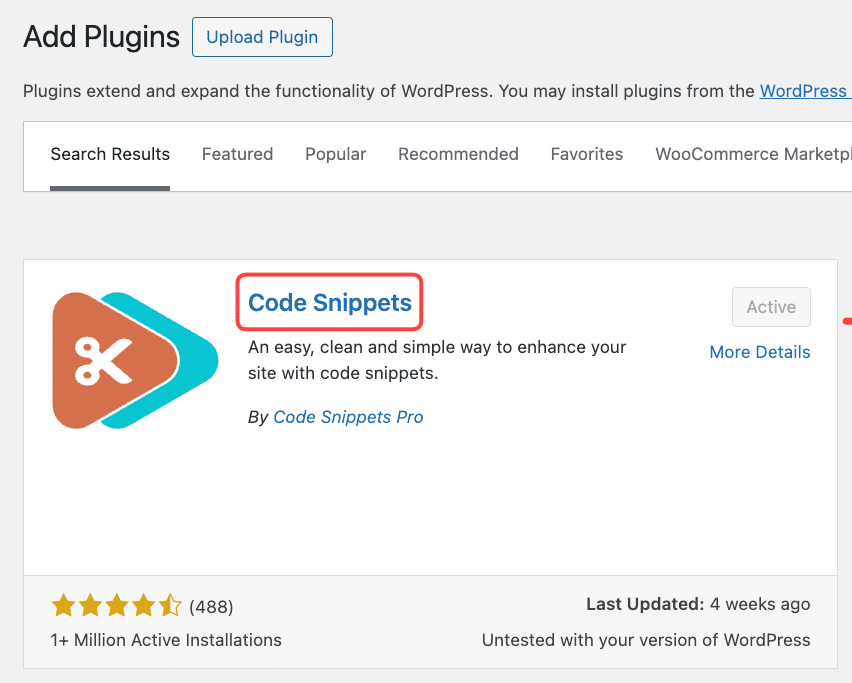
Let’s check, we have two methods to achieve this with a simple PHP snippet.
PHP Snippet #1: Conditionally Mark WooCommerce Product IDs as Featured
Using this snippet helps WooCommerce filter to automatically mark certain products as featured without changing their data in the database. Here’s a snippet:
add_filter( 'woocommerce_product_get_featured', 'yaycommerce_mark_products_as_featured', 9999, 2 );

function yaycommerce_mark_products_as_featured( $featured, $product ) {
    if ( in_array( $product->get_id(), [ 123, 456, 789 ] ) ) {
        return true;
    }
    return $featured;
}
Now, you can create a new snippet and activate it with the Code Snippets plugin.
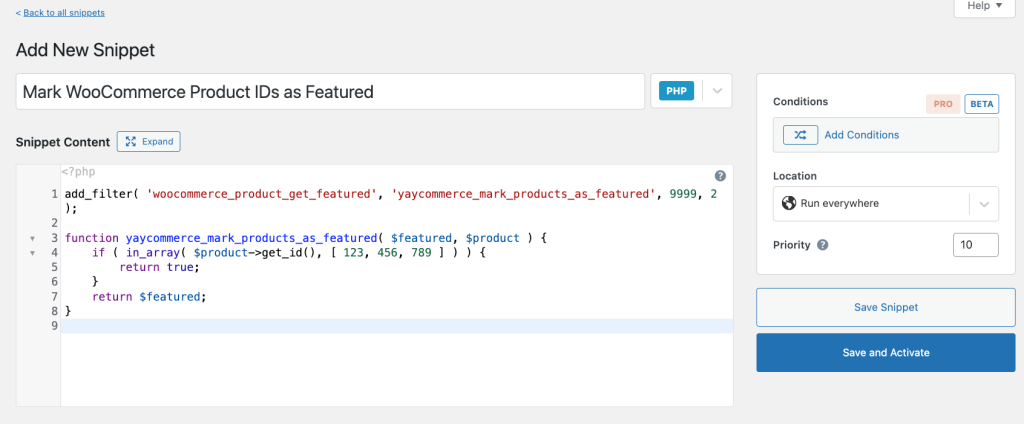
This snippet fetches the product IDs and updates their metadata to mark them as featured. Let’s check how it works on the products dashboard of the WooCommerce store.
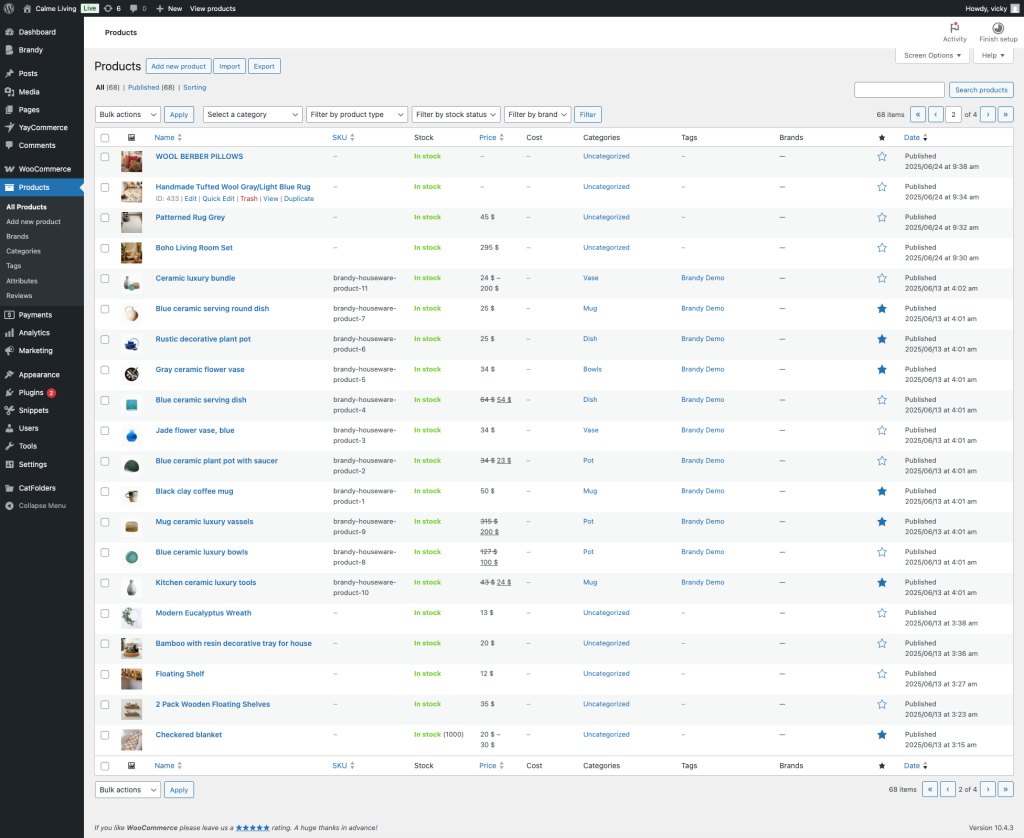
PHP Snippet #2: Conditionally Mark a Whole WooCommerce Product Category as Featured
Using this snippet will automatically mark all products in the “Pillows” category as featured, without modifying the database. Here’s a snippet:
add_filter( 'woocommerce_product_get_featured', 'yaycommerce_mark_products_as_featured', 9999, 2 );

function yaycommerce_mark_products_as_featured( $featured, $product ) {
    if ( has_term( 'pillows', 'product_cat', $product->get_id() ) ) {
        return true;
    }
    return $featured;
}
Let’s create a new snippet and see how it works.
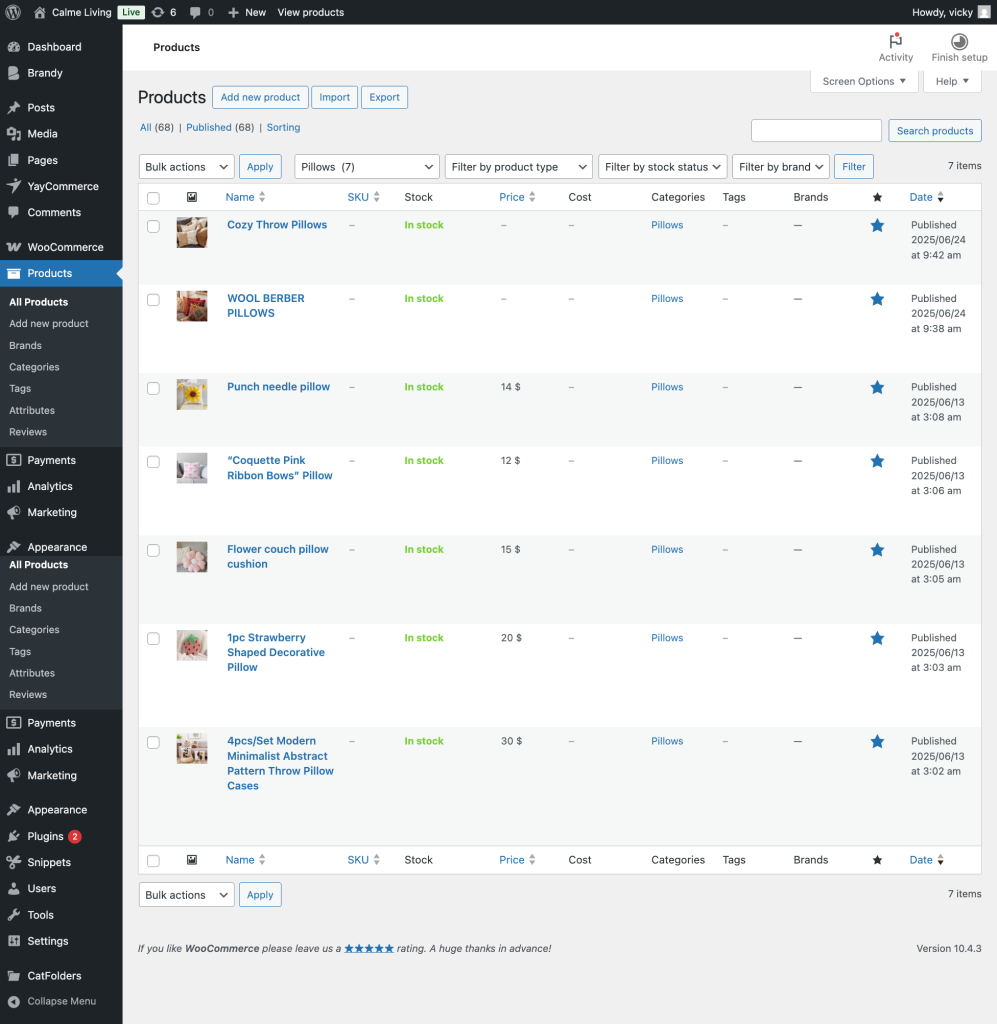
You can further customize this logic to automate marking products as features based on your unique business rules, such as automatically featuring bestsellers or new arrivals.
By leveraging such code snippets, you maintain full control over your WooCommerce store’s featured products without manual intervention, streamlining your marketing efforts and enhancing your site’s user experience.
Frequently Asked Questions
1. What does “Featured” mean in WooCommerce?
In WooCommerce, a featured product is a product marked to receive special visibility. Featured products can be displayed on the email templates, homepage, in widgets, blocks, or using shortcodes, helping store owners highlight important items such as best sellers, new arrivals, or promotional products.
2. What’s the best use case for programmatically featuring products?
This method is ideal for: Stores with extensive catalogs, automated promotions, seasonal campaigns, developer-built WooCommerce solutions, growth-focused stores that want less manual work, etc.
3. Will this code slow down my WooCommerce store?
No, when used properly. Adding or removing a taxonomy term is lightweight. However, avoid running bulk scripts on every page load. For automation, run scripts:
- Once via admin action
- Via cron jobs
- On specific events (like product updates)
4. Do I need coding experience to use this method?
Basic familiarity with WordPress and PHP is helpful, but you don’t need to be a developer. Many store owners safely use this approach via a plugin, such as the Code Snippets plugin, Small custom plugin, Developer assistance for setup, or another method.
For more online store tips, see our other WooCommerce guides:
- How to Automatically Hide WooCommerce Products Without a Featured Image
- How to Auto-Cancel WooCommerce Orders After Failed Payments
- How to Add Content Below WooCommerce Shop Page Products
- How to Add a Buy Now Button in WooCommerce: Guide & Tips
Want more practical tips, real-life use cases, and quick updates from the YayCommerce team? Make sure to follow our social channels: YouTube, Facebook, where we regularly share WooCommerce tutorials, feature highlights, promotional ideas, and best practices to help you grow your online store faster and smarter. It’s also the easiest way to stay updated on new releases, exclusive tips, and community insights – straight from the people building the plugins you use every day.
Final Thoughts
Programmatically marking products as featured in WooCommerce gives you full control, flexibility, and automation power. Whether you’re running promotions, building custom workflows, or managing large stores, this approach saves time and keeps your store dynamic.
Here’s when this approach truly shines:
- You manage large or growing product catalogs
- You want automation instead of repetitive admin work
- You run frequent campaigns, sales, or launches
- You’re building custom WooCommerce functionality
Start small, build with clear rules, and always align featured products with your business goals. When used thoughtfully, featured products can quietly but consistently boost engagement and sales, without adding extra work to your daily routine.
