
Imagine a customer lands on one of your WooCommerce product pages.
They like the product photos.
The description looks good.
The price is reasonable.
But then they scroll down and see:
Your product page has only one or two reviews, or worse, no reviews at all.
That tiny number can create a surprisingly big problem.
Even if your product is excellent, shoppers have no way to see what other customers actually think about it. They may hesitate, compare your product to a competitor with dozens of reviews, and eventually leave without buying.
This is why customer reviews for WooCommerce are more than just a feature on your product page. They are a form of social proof that can help shoppers evaluate products, answer questions, build trust, and make purchasing decisions.
The good news is that you don’t have to wait for customers to leave reviews on their own. With the right strategy, you can streamline the review process, send timely review requests, encourage customers to share more detailed feedback, and even reward them for taking the time to leave a review.
In this article, we’ll show you how to get more and better product reviews on your WooCommerce store and explain how a WooCommerce review plugin like YayReviews can help you automate the process.
Why Are Customer Reviews Important for WooCommerce Stores?
When customers shop in a physical store, they have many opportunities to evaluate a product before buying it. They can see the product in person, touch it, ask a salesperson questions, and sometimes even try it.
Online shopping is different.
A customer might have only a few product photos, a description written by the store owner, some specifications, and a price to help them make their decision. Even if your product description is detailed, shoppers may still wonder what the product is actually like to use.
This is where customer reviews become particularly valuable.
A product description might say that a backpack is “durable, lightweight, and spacious.” But a customer review might say, “I’ve used this backpack on three weekend trips, and it comfortably fits my laptop, camera, and two days of clothes.”
The second statement gives potential buyers something they can’t get from a traditional product description: a real customer’s experience.
Reviews can also answer questions you may not have thought to include on your product page. Customers might talk about sizing, quality, packaging, installation, shipping, ease of use, durability, or how they use the product in their everyday lives.
For this reason, a strong review section isn’t simply a collection of star ratings. It can become an important source of information for shoppers who are still deciding whether your product is right for them.
And the more useful your reviews are, the more value they can bring to your store.
How to Get More and Better Customer Reviews for WooCommerce
When trying to improve your WooCommerce reviews, it’s tempting to focus entirely on quantity. It explains how the product is used, how long it has been used, what the customer likes, and how it compares with their previous experience.
That’s the kind of review that can actually help someone make a purchasing decision.
That’s exactly where YayReviews comes in.
YayReviews is an advanced customer review solution for WooCommerce designed to help store owners collect, manage, display, and make better use of customer feedback.
Instead of treating reviews as a simple comment box at the bottom of your product pages, YayReviews helps you build a complete review workflow around your WooCommerce store.
1. Ask Customers for Reviews at the Right Time
One of the simplest ways to get more product reviews is to ask customers for them. It sounds simple, but timing is important. You don’t want to ask a customer to review a product before they have even received it. At the same time, waiting several months may mean that the customer has completely forgotten about the purchase.
The ideal timing depends on what you’re selling.
For example, a customer who buys a digital product may be able to review it within a few days. Someone who purchases clothing might need a few days to get used to it. A customer who buys skincare products may need several weeks to properly evaluate the results.
Think about how long it takes your customers to form a genuine opinion about the product, and use that point as the basis for your review request.
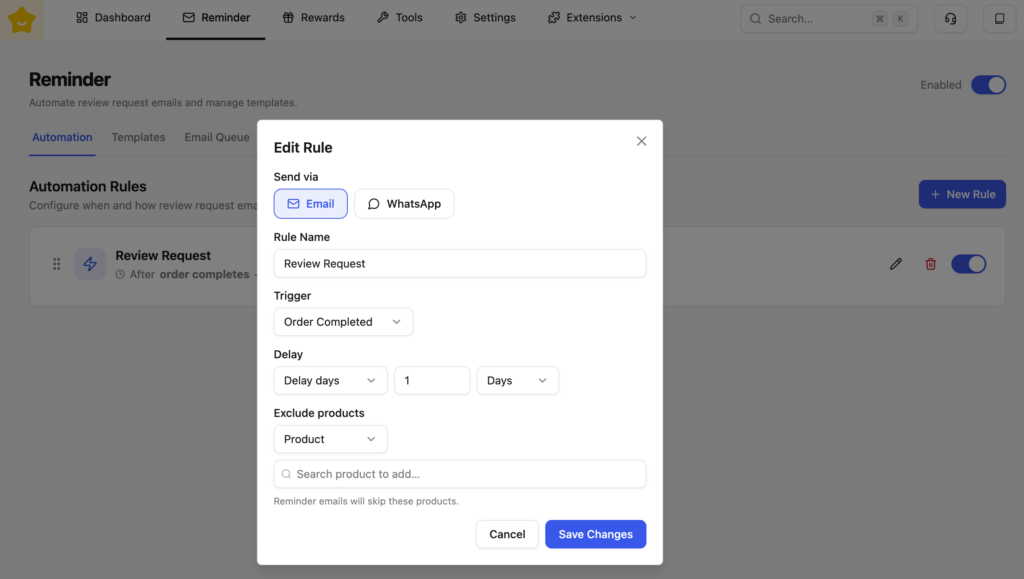
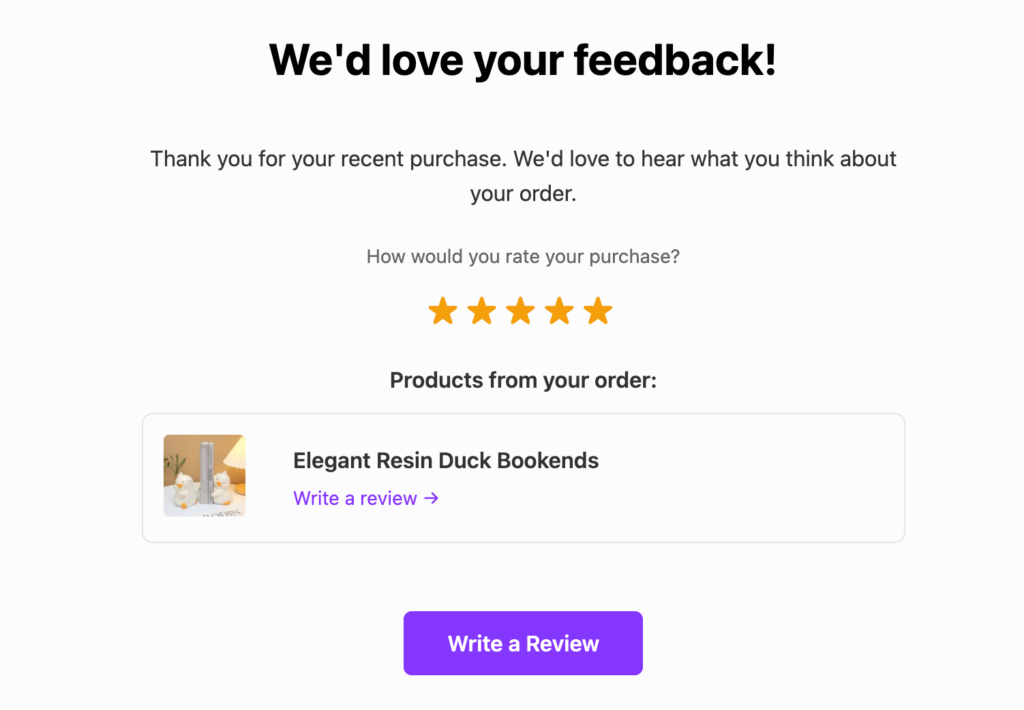
Instead of remembering when to contact every customer, YayReviews helps you automate review reminder emails.
You can customize the email template and target customers based on factors such as products, categories, or order value. This allows you to send review requests at a more appropriate point in the customer journey.
That means fewer manual follow-ups and more consistent review collection.
2. Don’t Forget About Your Past Customers
If you’ve been running your WooCommerce store for a while, there’s a good chance you already have a valuable source of potential reviews sitting in your customer database.
These are your past customers.
They’ve already purchased your products. Some of them may have been using those products for weeks, months, or even years. Yet many may never have left a review.
YayReviews lets you send review requests to past customers, helping you turn previous purchases into new customer feedback. You can also send bulk review requests when you want to collect more reviews for specific products.
For stores with a large customer database but relatively few reviews, this can be one of the quickest ways to increase the amount of social proof available on product pages. This is particularly useful when you’re launching a new review campaign and don’t want to start from zero.
3. Encourage Customers to Add Photos and Videos
Written reviews are valuable, but sometimes a picture really is worth a thousand words. This is particularly true for products where appearance, size, fit, or real-world usage matters.
Imagine a customer shopping for a sofa online. Your product photos can show the sofa from several professional angles, but a photo from an actual customer’s living room gives potential buyers a completely different perspective.
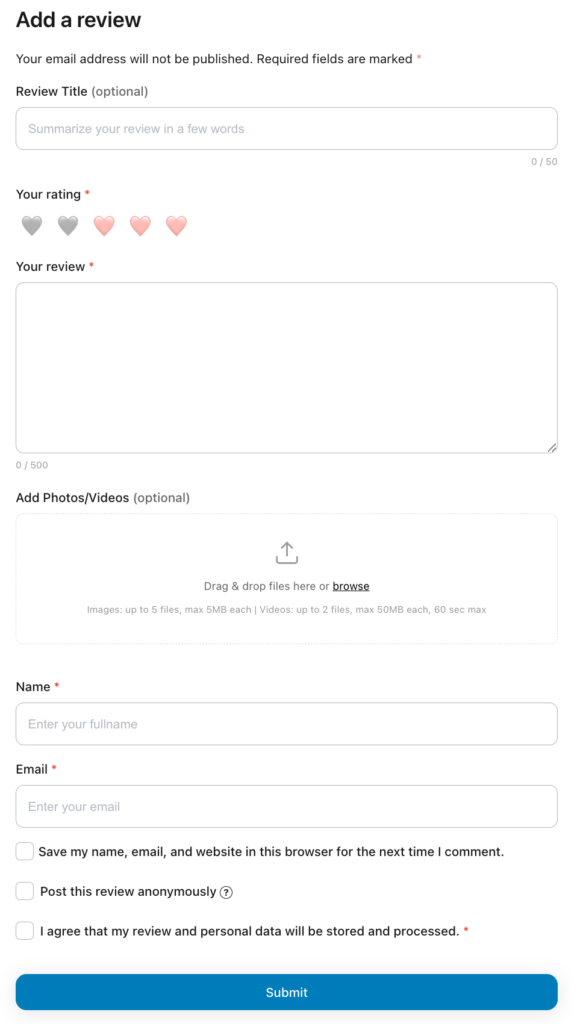
The same applies to clothing, cosmetics, furniture, accessories, electronics, home decor, and many other products.
With YayReviews, stores allow WooCommerce customers to submit photos and videos alongside their reviews, giving store owners another way to collect richer customer feedback.
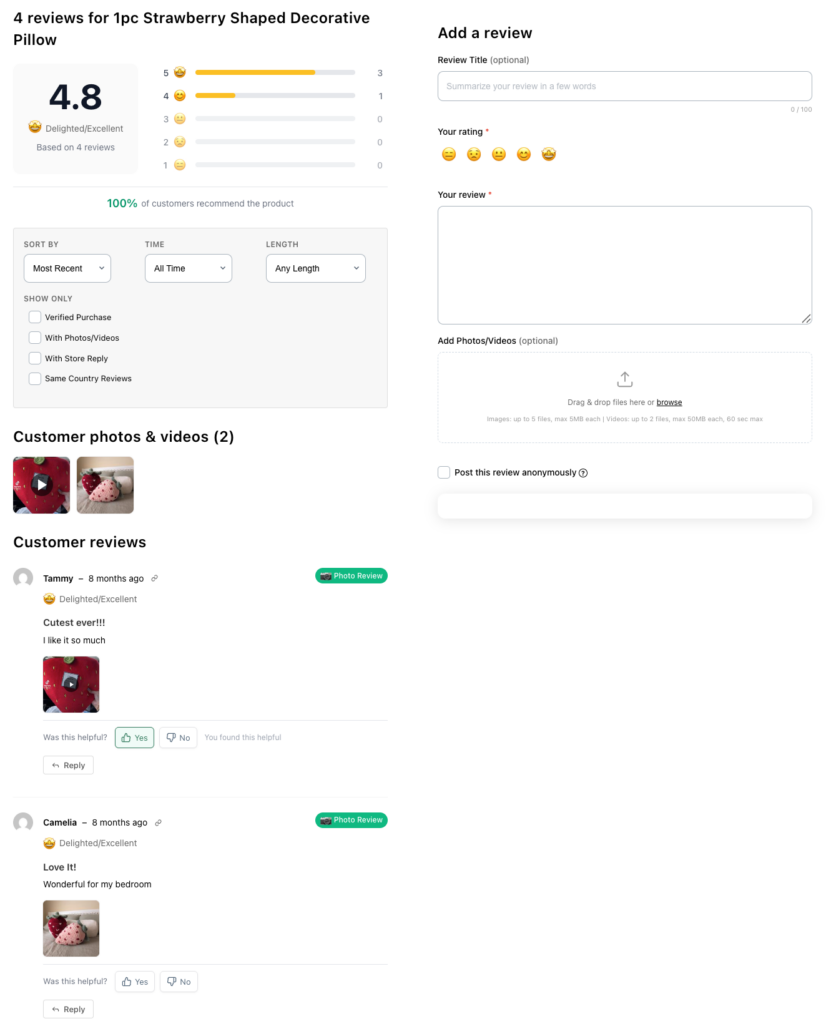
You can then showcase this user-generated content alongside your product reviews.
4. Give Customers a Reason to Leave a Review
Sometimes customers need a little extra motivation.
One approach is to offer a small reward, such as a coupon for a future purchase. The important thing is to structure the incentive carefully and make sure you’re encouraging genuine feedback rather than paying for positive reviews.
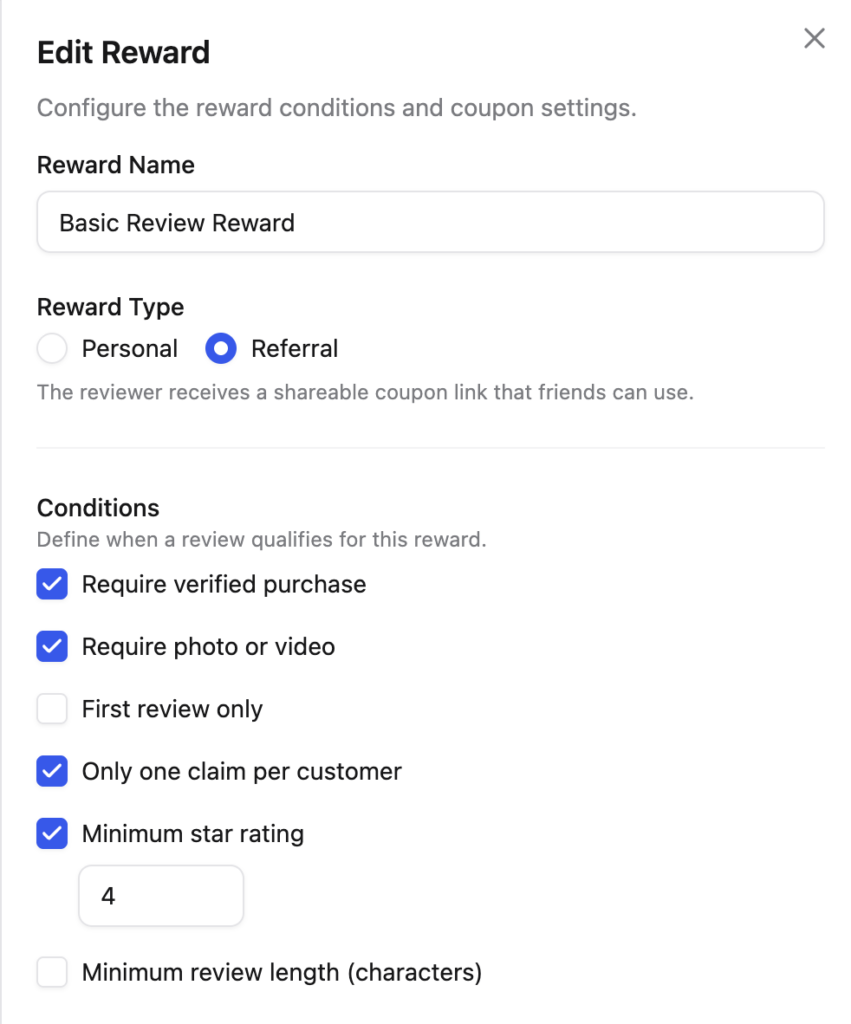
YayReviews allows store owners to create review reward rules and send WooCommerce coupons to customers who meet specific conditions. This gives you more control over how your review rewards work and lets you create review reward rules based on conditions such as verified purchases, review length, star ratings, or whether a customer includes media.
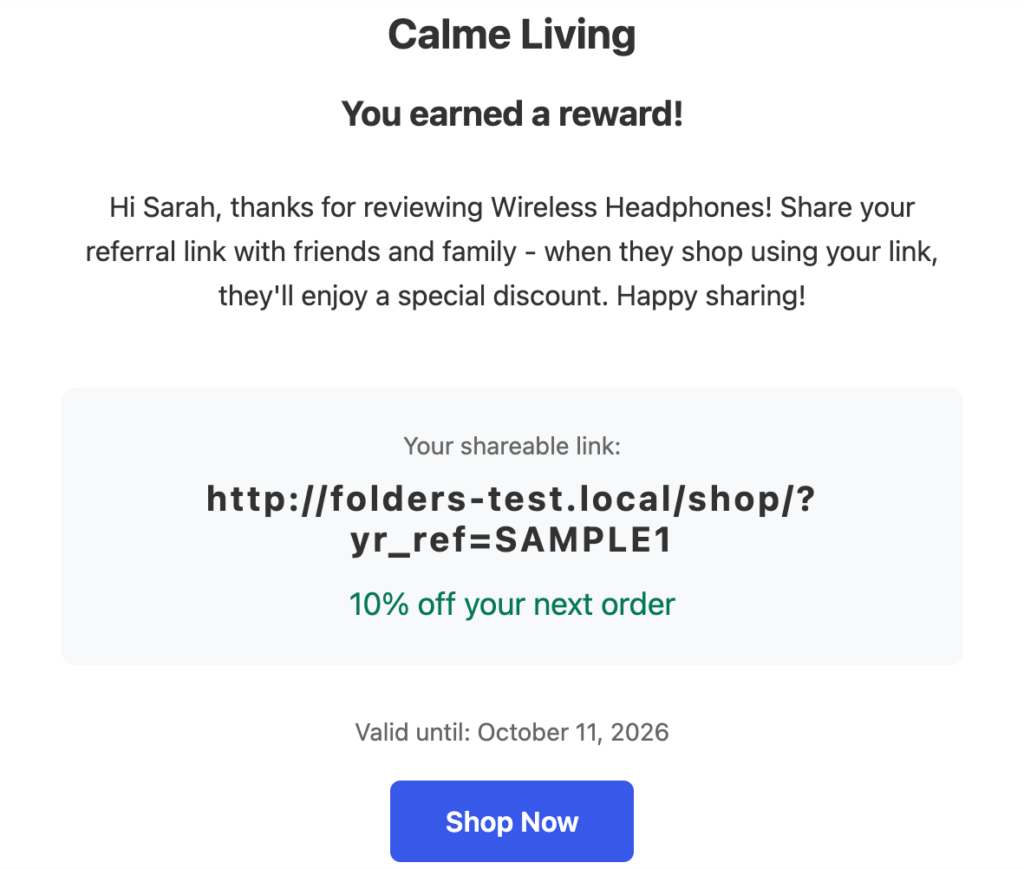
For example, you could offer a coupon when a verified customer leaves a review with a photo. This gives customers an incentive to participate while helping you collect more detailed user-generated content.
5. Help Shoppers Navigate Large Numbers of Reviews
Getting more reviews is only half the job. You also need to make those reviews easy for potential customers to use.
If a product has hundreds of reviews, shoppers shouldn’t have to scroll through every single one to find relevant information. As your store collects more feedback, your review section can become difficult to navigate.
YayReviews provides filtering and sorting options that allow shoppers to find the feedback most relevant to them. You can also showcase visual reviews and highlight important customer feedback.
For products with many reviews, YayReviews Pro’s AI-powered review summaries help shoppers quickly identify common themes in customer feedback without reading every review individually.
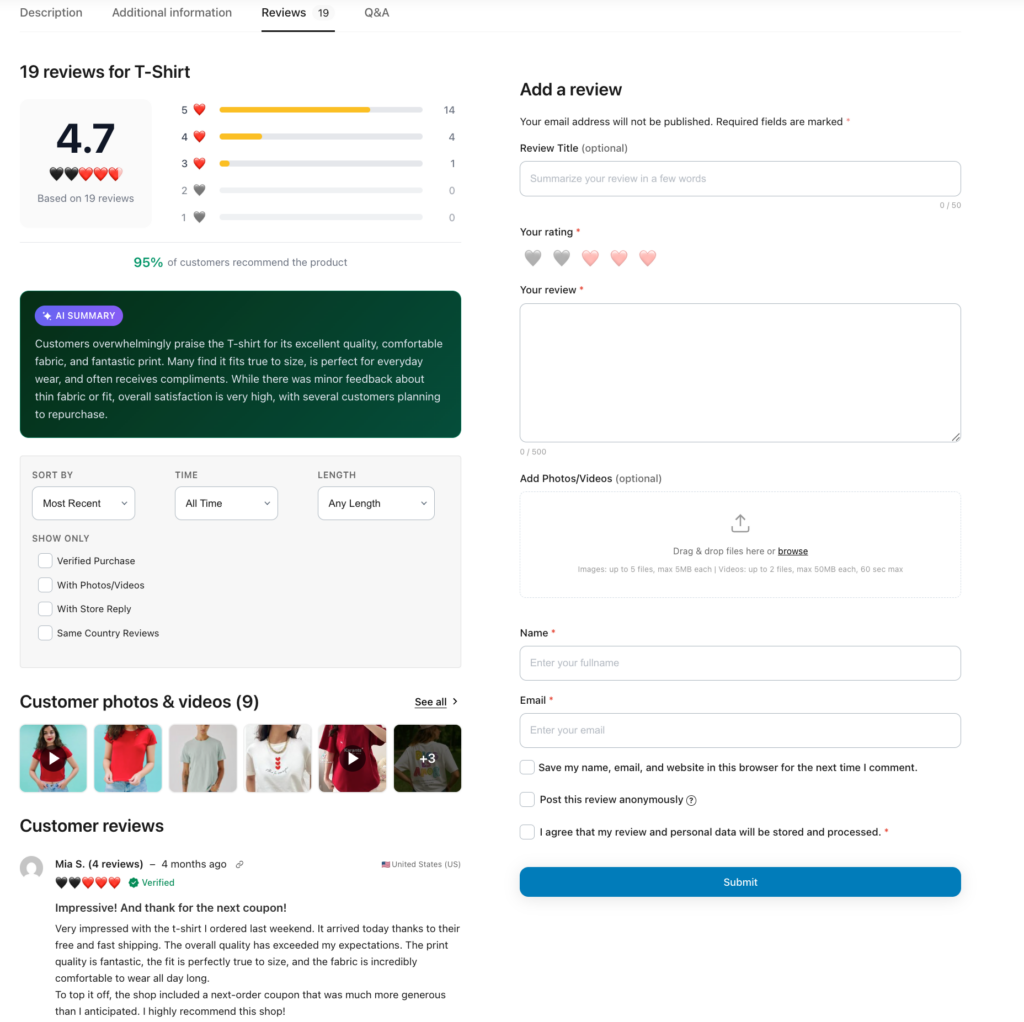
This is particularly useful for stores with popular products that have accumulated hundreds of customer reviews.
6. Show Verified Customer Reviews
When shoppers read reviews online, one question they may have is: “Did this person actually buy the product?”
A verified purchase label can help provide additional context.
WooCommerce supports identifying reviews from verified owners, and dedicated review plugins can provide additional options for managing and displaying this information.
YayReviews also supports verified purchase badges, helping customers distinguish reviews associated with verified purchases.
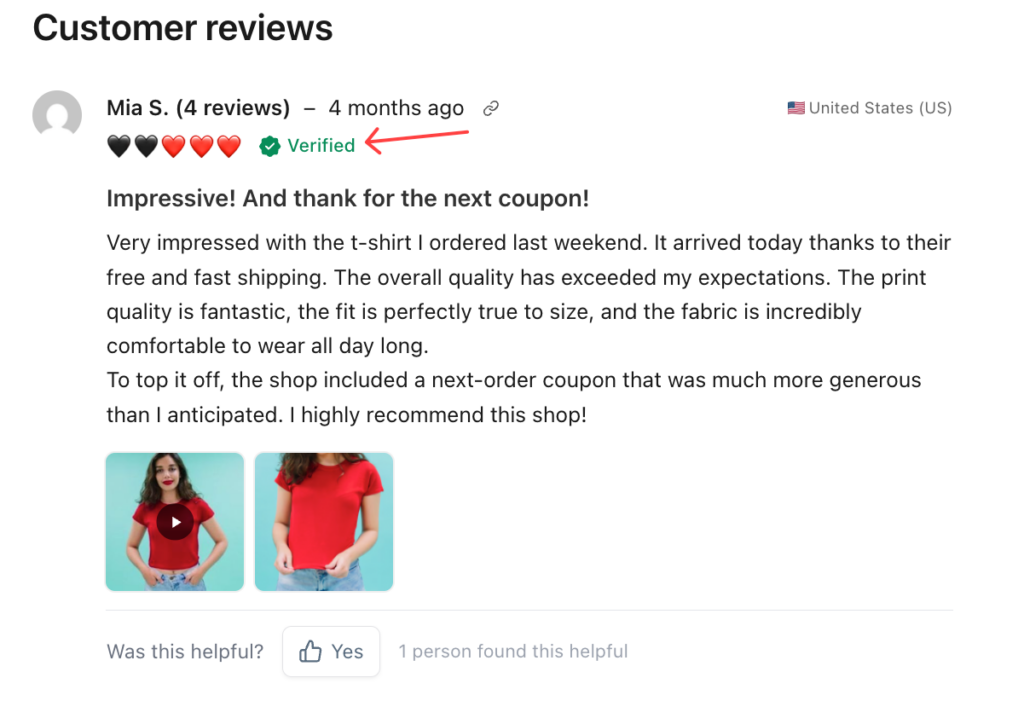
This doesn’t mean that every non-verified review is automatically unreliable. Instead, the badge gives shoppers another piece of information they can use when evaluating feedback.
Of course, verification isn’t a replacement for good moderation or customer service, but it can be another useful signal that makes your review section feel more trustworthy. It helps customers understand where the feedback comes from.
7. Manage and Showcase Customer Feedback in WordPress
Another advantage of using a dedicated WooCommerce review plugin is that everything remains connected to your WordPress website.
Instead of building separate systems for collecting reviews, sending reminders, managing customer feedback, and displaying social proof, YayReviews brings these functions together within your WooCommerce workflow.
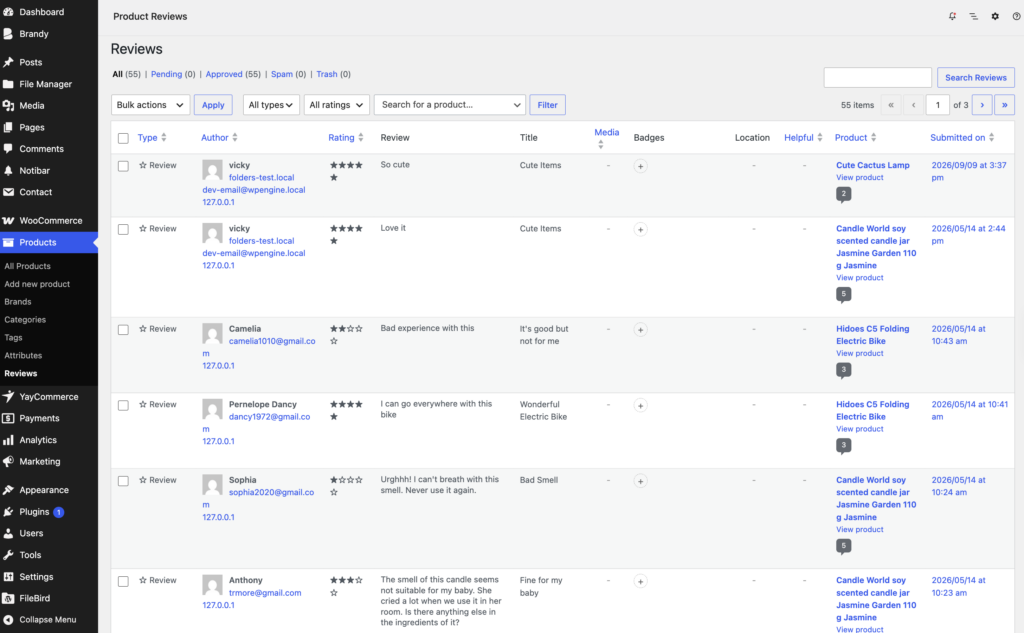
That makes it easier to create a consistent review experience from the moment a customer places an order to the moment another shopper reads their feedback.
8. Respond to Your Reviews
Finally, don’t treat reviews as a one-way communication channel.
When customers leave feedback, take the time to respond, especially when they report a problem.
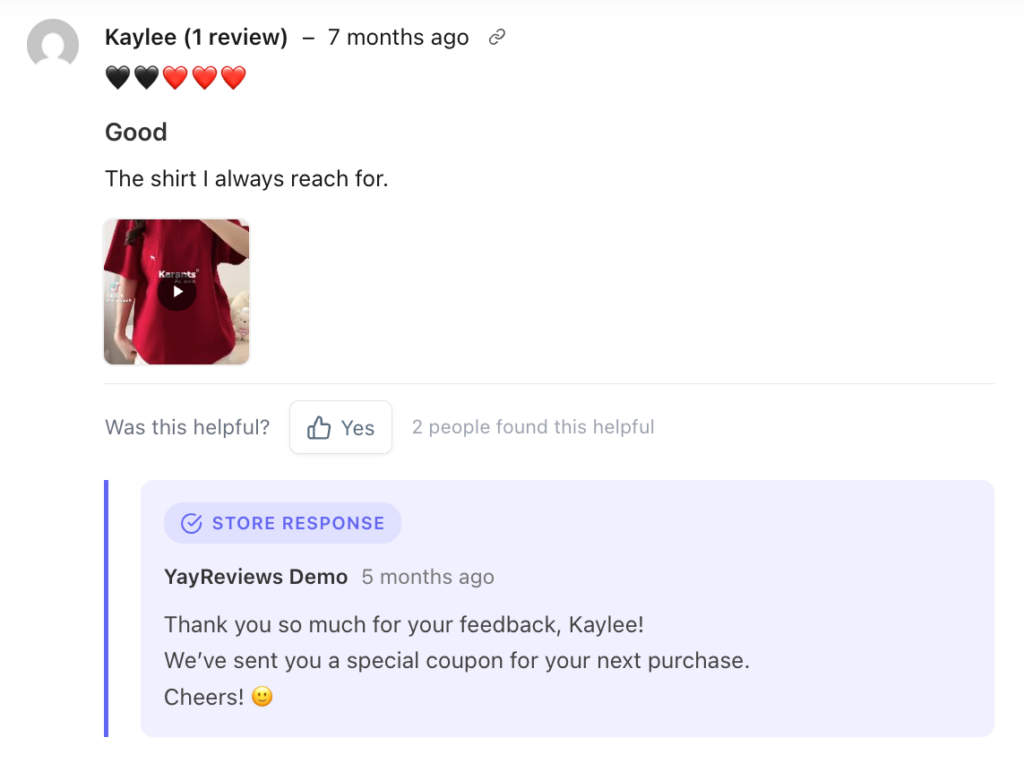
A thoughtful response to a negative review can demonstrate that your store actually listens to its customers. Positive reviews also provide opportunities to thank customers and strengthen the relationship.
Reviews aren’t just social proof. They’re also a source of direct feedback about your products, service, shipping, and overall customer experience.
Frequently Asked Questions
Now, let’s take a look at some frequently asked questions and answers on this topic.
How can I get more customer reviews on my WooCommerce store?
Ask after the customer has used the product, then follow up. Automate review request emails, reach past buyers, keep the form short, and give people a reason to write. YayReviews handles that workflow inside WooCommerce: timed emails, photo and video reviews, reward rules, and a review inbox on your WordPress site.
Does WooCommerce have a built-in review system?
Yes. WooCommerce includes a basic review box with star ratings, comments, moderation, and verified owner labels. That is enough for a small catalog. It does not send timed reminders, collect photos or videos, run coupon rewards, filter long review lists, or summarize hundreds of comments. YayReviews adds those pieces without moving reviews off your store.
When should I ask customers for a product review?
Ask after they can form a real opinion. Digital products can be reviewed in a few days. Clothing often needs a short wear-in period. Skincare can take weeks. Set the delay by product type, then send a reminder. YayReviews can automate that email and target by product, category, or order value so you are not chasing every order by hand.
Can I request reviews from past WooCommerce customers?
Yes. Older orders are often the fastest way to fill empty product pages. Those shoppers already used the item and never left feedback. YayReviews can send review requests to past customers and run bulk requests for specific products. That helps when you start a review campaign and do not want to wait for new orders only.
Can customers add photos and videos to WooCommerce reviews?
The default WooCommerce review form is text and stars. For sofas, clothing, cosmetics, and similar products, a customer photo or short clip is more useful than a one-line comment. YayReviews lets shoppers attach photos and videos with a review so you can show real use next to the written feedback.
Should I offer discounts or coupons for customer reviews?
You can. Tie the reward to participation, not to a five-star rating. Paying only for praise can make the review section look bought. YayReviews can send a coupon when a review meets rules you set, such as a verified purchase, a minimum length, or an attached photo. That nudges people to write without buying a rating.
How do shoppers find useful reviews when a product has hundreds of them?
A long unfiltered list is hard to use. Add sort and filter by rating, date, or helpfulness, and highlight photo reviews. YayReviews includes those tools. YayReviews Pro can also add an AI review summary so a shopper can see common themes without reading every comment. Pinning a few useful reviews keeps the best feedback near the top.
What is a verified purchase review in WooCommerce?
A verified purchase badge marks a review that is tied to an order. Shoppers use it as one more signal that the writer bought the product. WooCommerce can flag verified owners. YayReviews can show verified purchase badges in the review list so that signal is easy to see. The badge does not replace moderation. It only adds context.
What should I look for in a WooCommerce review plugin?
Look for timed review emails, photo and video uploads, reward rules, verified badges, filters, and a review inbox inside WordPress. Importing from tools such as Judge.me or Yotpo helps if you already have reviews elsewhere. YayReviews covers that workflow: collect, moderate, display, reward, and summarize without sending shoppers off your site.
How do I manage WooCommerce reviews from WordPress?
Keep collection, reminders, moderation, and display in one plugin. YayReviews runs inside WooCommerce, so review requests, media, coupons, and the front-end review block stay on your WordPress site. After you install it, set the email delay, turn on media if you want visual reviews, then moderate new submissions before they go live.
Final Thoughts
Getting more product reviews isn’t simply about adding a “Leave a Review” button to your WooCommerce product page.
It’s about creating a process that makes reviewing your products easy, timely, and worthwhile.
Give customers enough time to experience their purchase. Ask for feedback when they’re most likely to have something useful to say. Make the review process simple, and use automated reminders so you don’t have to chase customers manually.
Then go one step further.
Encourage customers to share photos and videos. Ask questions that lead to more detailed feedback. Reward honest participation when appropriate. Make it easy for shoppers to find the reviews that matter to them, and don’t be afraid to show constructive criticism alongside your positive feedback.
Most importantly, listen to what your customers are telling you.
A great review strategy doesn’t just give your product pages more stars. It can help you understand your customers, improve your products, create better marketing content, and build a stronger relationship with the people who buy from your store.
If you’re looking for a way to put all of this into practice, YayReviews can help you build a more complete customer review system directly within WooCommerce.
From automated review reminders and past-customer campaigns to photo and video reviews, review rewards, filtering, highlighted reviews, and AI-powered summaries, YayReviews gives you the tools to turn customer feedback into valuable social proof.
So what are you waiting for…
