
Imagine you’re shopping for a new dress online.
The product page looks great. The product description says the fabric is soft, the fit is flattering, and the color is exactly as shown.
Do you want to add WooCommerce photo reviews to your store but aren’t sure they’re worth the effort? Keep reading. In this guide, we’ll show you why photo and video reviews convert better than text, what the data says, and how to set them up step by step.
A star rating and two lines of text used to be enough. Not anymore. Today’s shoppers have seen too many five-star reviews that feel generic, vague, or even fake. They want proof. They want to see the jacket on a real person, the sofa in a real living room, and the blender actually crushing ice.
That’s exactly what WooCommerce photo reviews (and video reviews) deliver. They turn a review from a claim into evidence. And evidence sells.
For WooCommerce store owners, this creates an opportunity to turn ordinary customer feedback into visual content that can help shoppers feel more confident about buying. Photo and video reviews can take this one step further by showing real customers using real products.
In this article, we’ll show you why visual reviews outperform text, and how a plugin like YayReviews lets you collect, moderate, and display them without writing a single line of code.
What Are WooCommerce Photo Reviews?
WooCommerce photo reviews are product reviews that include customer-uploaded photos or videos in addition to the usual star rating and written comment. They’re a form of user-generated content (UGC) that appears directly on your product pages.
A typical photo review includes:
- A star rating (and sometimes custom ratings such as quality, value, or fit)
- A written review
- One or more photos of the product in real use
- Optionally, a short video
- A “verified buyer” label showing the reviewer actually purchased the item
Video reviews work the same way, just with moving footage instead of (or in addition to) photos.
A customer might record an unboxing video, demonstrate how an electronic product works, show how a piece of furniture is assembled, or explain how a beauty product looks after application.
WooCommerce’s standard review functionality already allows store owners to collect customer reviews and star ratings, while WooCommerce extensions can expand reviews to include photos and videos.
The important thing is that visual reviews shouldn’t replace written reviews. They should add another layer of evidence.
Here’s the catch: WordPress and WooCommerce ship with a basic review form that has no media upload. If you want photos or videos, you’ll need a WooCommerce review plugin that adds it.
Why Do Photo and Video Reviews Convert Better Than Text?
So why do visual reviews work better? It comes down to how people decide to buy online. Shoppers can’t touch, try, or hold your product, so they look for anything that reduces risk. Here’s how photo and video reviews do that.
They Prove the Review Is Real
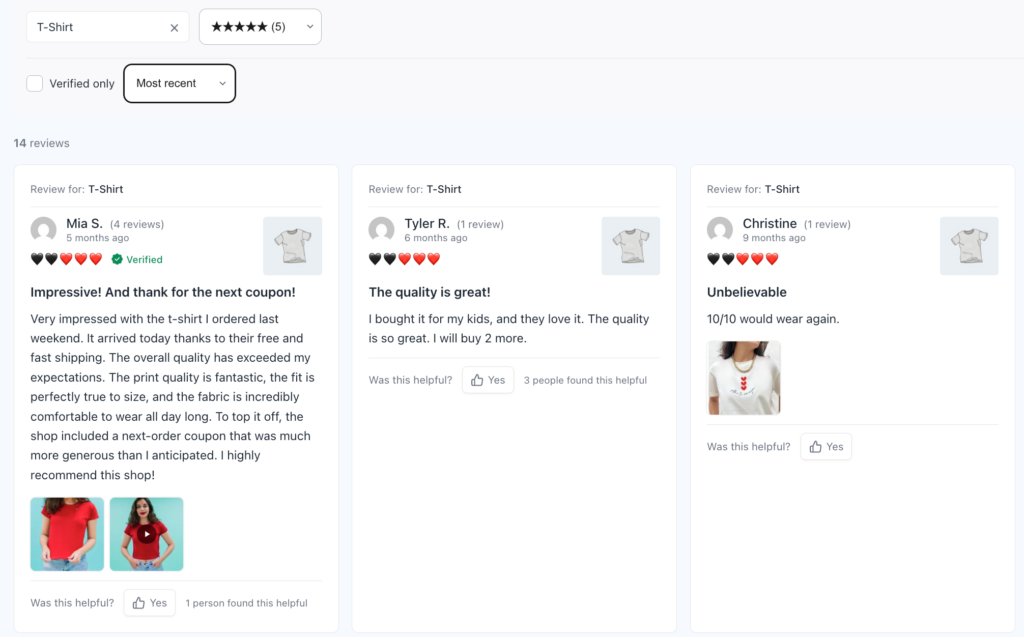
A text review can be written by anyone. A photo of the actual product, taken in a messy kitchen or a cluttered bedroom, is much harder to fake. That small imperfection is what makes it believable. When shoppers see real customers with real products, trust goes up, and hesitation goes down.
They’re seeing a possible version of their own life with the product. This can be especially helpful for lifestyle products where context affects purchasing decisions.
They Answer the Questions Text Can’t
Think about the questions shoppers ask before buying:
- How big is it, really?
- Is the color the same as in the studio photo?
- How does the fabric look after washing?
- Will it fit my space or my setup?
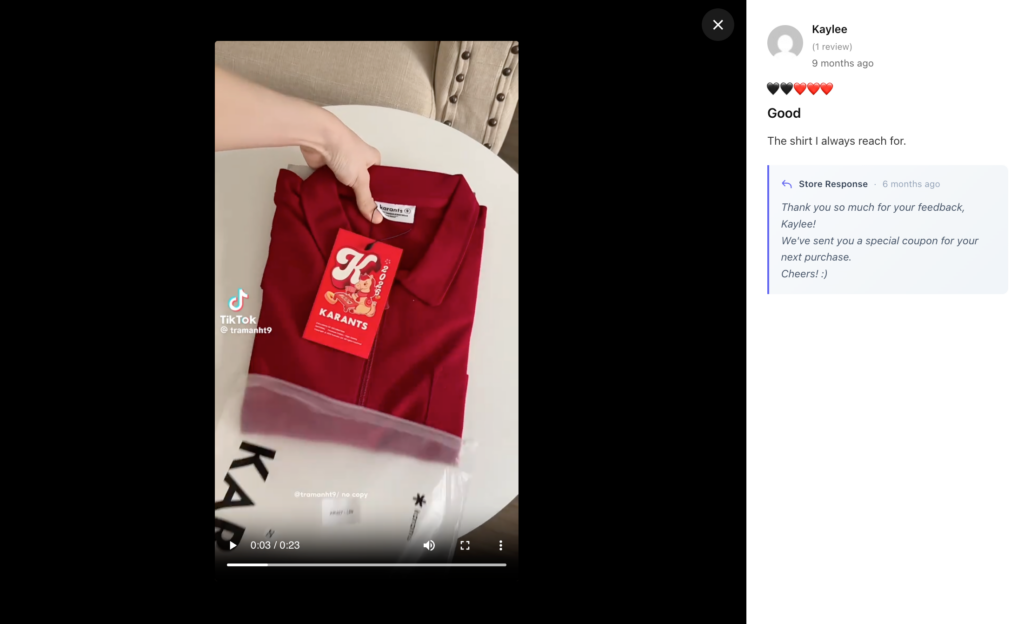
Descriptions and professional product photos can only go so far. A customer photo answers these questions instantly. For fashion, furniture, beauty, and home goods, this is a game-changer and helps reduce returns because buyers know what they’re getting.
They Show the Product in Real Life
Photos are great for showing appearance. Videos go one step further by showing action. That makes video reviews especially useful for products that need to be demonstrated.
Studio photos show your product at its best. Customer photos show it in context: on a real person, in a real home, next to everyday objects. That context helps shoppers picture the product in their own lives, which is a key step before clicking “Add to cart.”
The customer isn’t trying to create a commercial. They’re sharing their experience. That authenticity can make the content feel more relatable than another professionally scripted product video.
They Fit How People Shop Today
Most people browse and buy on their phones, and they’re used to scrolling through photos and short videos on social media. Visual reviews feel natural to them. Text-only reviews can feel dated by comparison.
Your product page answers the questions you thought customers would ask. Customer reviews often answer the questions customers actually ask.
That’s one reason collecting detailed customer feedback can be so valuable.
Meet YayReviews: The Easiest Way to Add WooCommerce Photo Reviews
YayReviews is a lightweight WooCommerce review plugin from the YayCommerce team. It replaces the default review system and is built around three simple steps: collect more reviews, show them better, and win more customers.
Here’s what it offers:
- Photo and video uploads: Let customers add images and videos to their reviews, with limits you control for file size, number of files, and video duration.
- Automated review reminders: Send timed emails after purchase. You can set the delay (for example, 7 days after the order is completed) and target by product, category, or order value.
- Rewards for reviewers: Offer discount codes to customers who qualify, with conditions such as star rating, media uploads, or total number of reviews. This makes it easy to give a bigger reward for photo and video reviews.
- Verified buyer badges and profile avatars: Show shoppers that reviews come from real customers.
- Pin or highlight reviews: Feature your best photo reviews at the top.
- Filter, sort, and search: Visitors can sort by date, helpfulness, or rating, and search reviews by keyword.
- AI-powered review summaries: Give shoppers a quick overview without reading every review.
- Flexible layouts: Display reviews in list, grid, masonry, or slider layouts that suit your theme.
- Custom rating types: Choose stars, hearts, thumbs, faces, and more. Premium users can create custom rating types.
- SEO rich snippets: Output review schema and integrate with Yoast SEO and Rank Math.
- Import tools: Move reviews over from Judge.me, Yotpo, CusRev, or a custom CSV file.
- Privacy tools: Optional consent checkbox, data anonymization, and export/deletion on request to help with GDPR.
- Translation-ready: Works with WPML, Polylang, and Loco Translate.
YayReviews is also designed to stay light. In other words, you get a polished review system without slowing down your store.
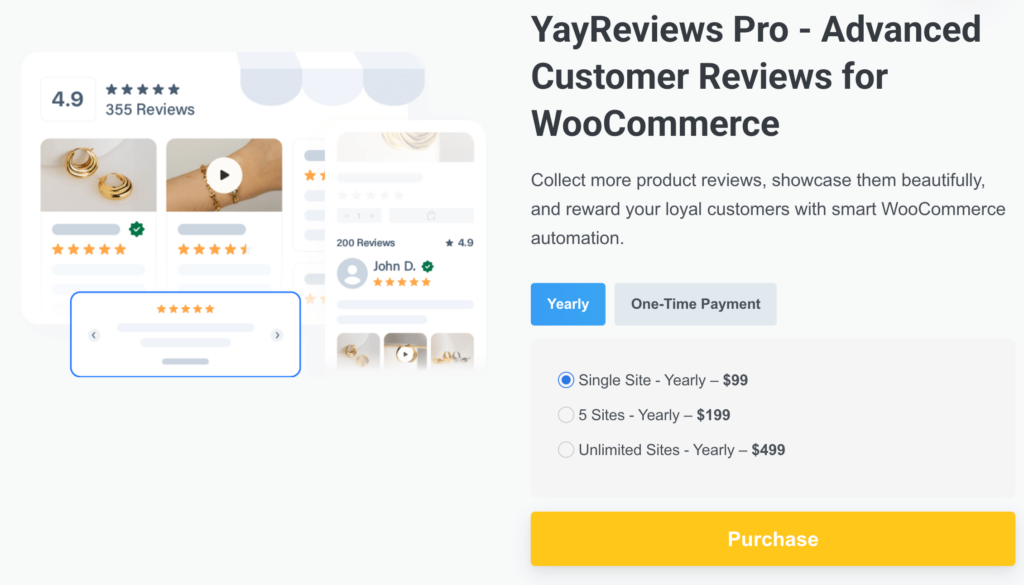
Free or Pro? YayReviews Lite is available for free on WordPress.org so that you can start with the core review features. The Pro version unlocks the advanced tools, including unlimited reminders, video reviews, rewards, and AI summaries. Pro licenses start at $99 per year for a single site (lifetime options are also available), and every purchase comes with a 30-day money-back guarantee.
How to Use YayReviews for WooCommerce Photo Reviews
Now, let’s move on to the tutorial. We’ll be using YayReviews for this setup.
Step 1: Install and Activate YayReviews
Install YayReviews Lite from the WordPress plugin directory, or upload the Pro version after purchase. Once you activate the plugin, it replaces the default WooCommerce review system. If you’re on Pro, don’t forget to activate your license key to get updates and priority support.
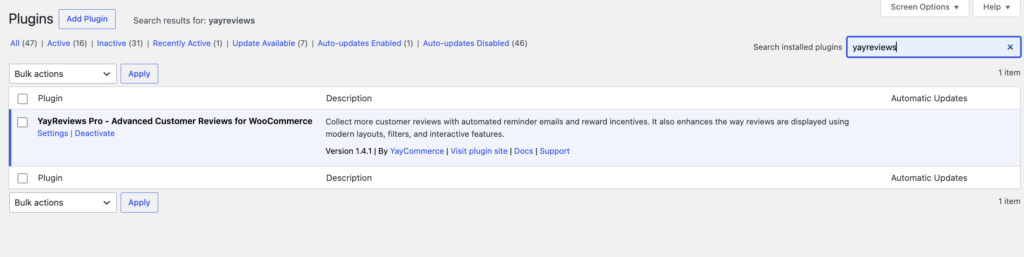
You’ll find the YayReviews settings in the left-hand menu of your WordPress dashboard.
Step 2: Let customers upload photos and videos
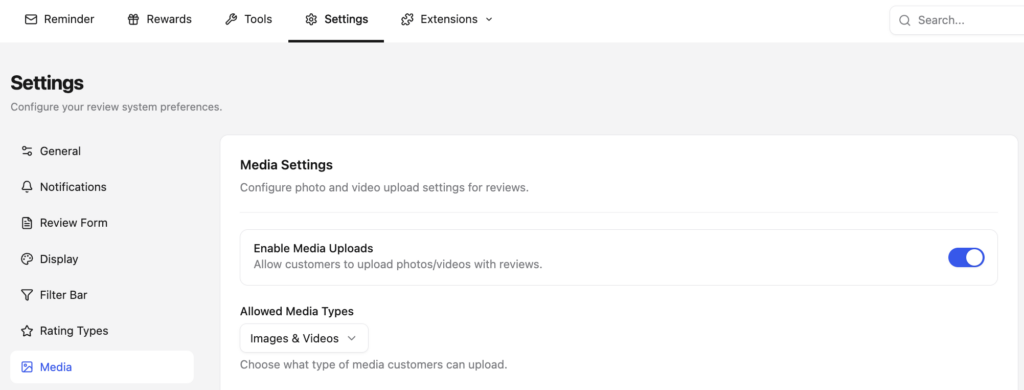
By default, media uploads are turned off. To enable them, go to Settings > Media Settings and switch on media uploads.
Next, select what customers can upload: images, videos, or both. If you sell fashion, beauty, or home décor, enabling both is a good idea. If you sell products that don’t need demonstrations, start with photos only.
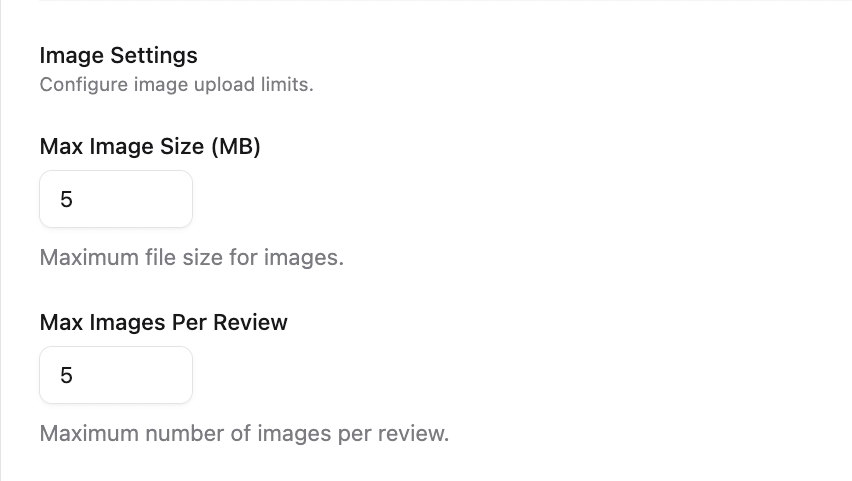
Scroll down to the image settings. Here you can set the maximum file size for each image and the maximum number of images per review. A balanced setup helps keep uploads easy for customers and your server healthy. For example, a few photos per review with a moderate size cap is a sensible starting point.
Under the video settings, you can control:
- Maximum video file size
- Maximum number of videos per review
- Maximum video duration

If you’re on shared hosting, keep these limits modest. Shared hosts often limit storage and bandwidth, and video storage and bandwidth can add up quickly.
Step 3: Encourage customers with rewards
This is where you really increase the number of visual reviews. Create a reward rule with conditions, such as a minimum star rating or a required media upload. For example:
- Text review: 10% off the next order
- Review with photo or video: 15% off the next order
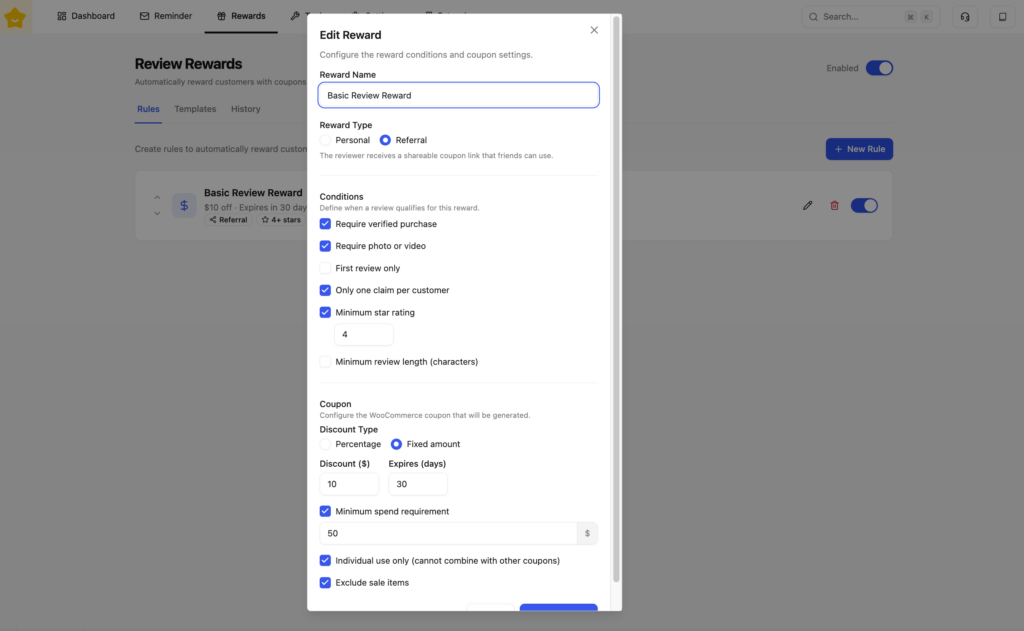
The reward is delivered automatically, so you don’t need to manage coupons by hand.
YayReviews Pro supports reward conditions and automated coupon delivery, helping store owners connect review collection with customer retention.
Step 4: Highlight verified customer feedback
Trust matters when displaying customer-generated content.
YayReviews supports verified buyer badges, helping shoppers identify reviews associated with confirmed purchases.
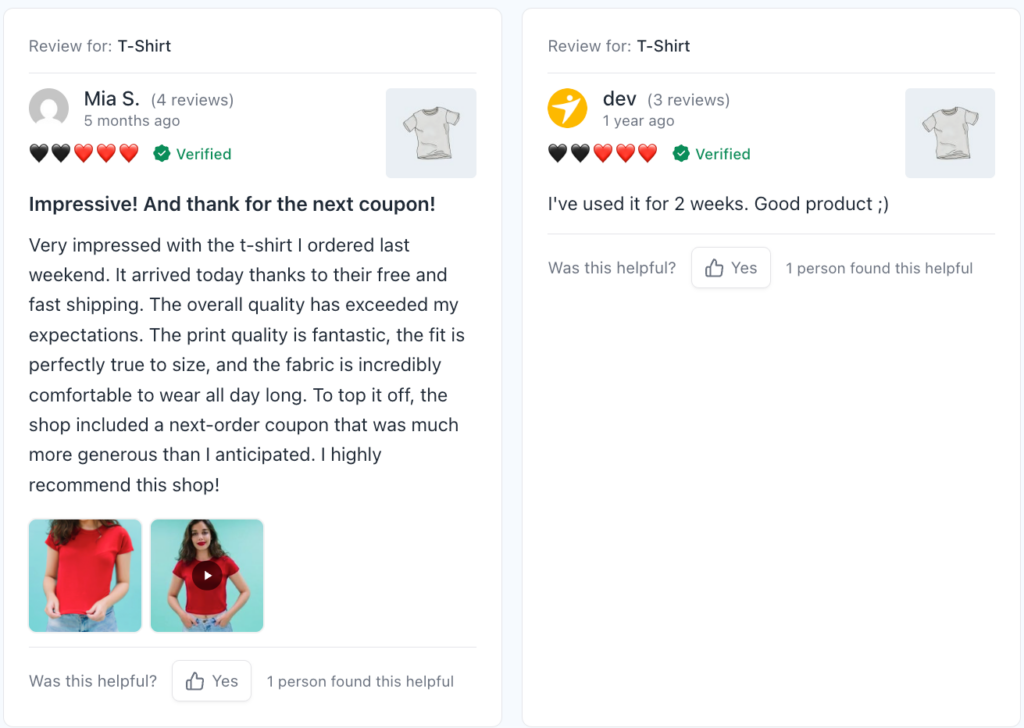
This is especially useful for stores where customers may be skeptical of anonymous or unverified feedback.
Step 5: Help shoppers find useful reviews
Once your store has hundreds or thousands of reviews, simply displaying everything isn’t enough.
YayReviews provides filtering and sorting options so shoppers can explore reviews by factors such as rating, date, or helpfulness.
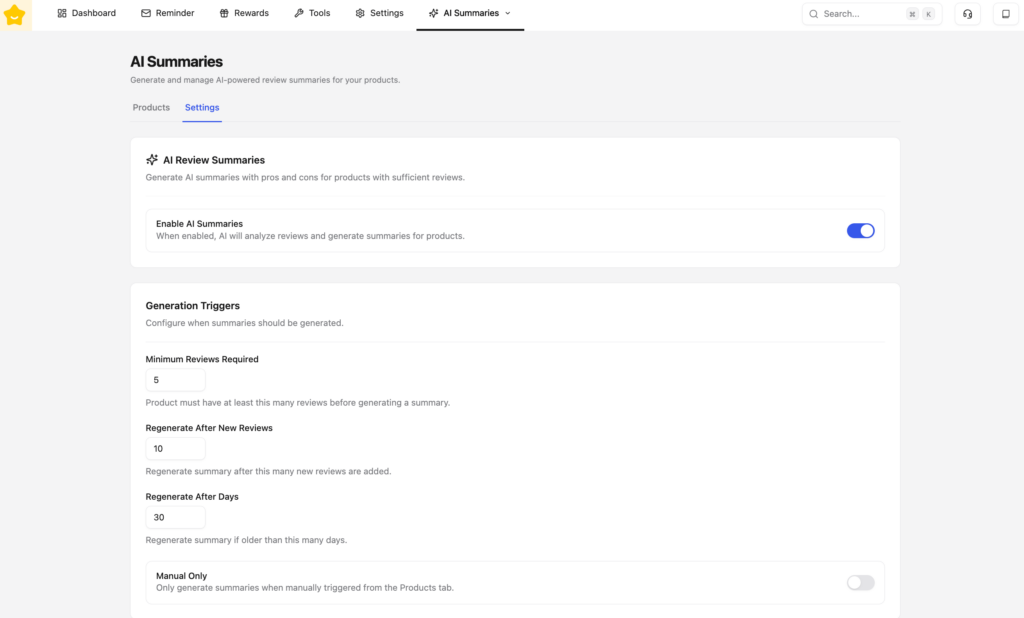
For stores with large review libraries, AI review summaries can also help shoppers quickly identify common themes.
Tips to Get More Photo and Video Reviews
Enabling uploads is only half the job. You also need customers actually to use them. Here are eight proven ways to increase visual reviews.
- Make photos optional but encouraged. Forcing uploads can reduce the total number of reviews. Add a friendly line like “Add a photo or video to help other shoppers” next to the upload button.
- Reward visuals a little more. A slightly higher discount for reviews with media gives customers a clear reason to upload.
- Ask at the right time. Send the first reminder after the customer has had time to use the product. Use the timing table above as a starting point.
- Mention photos in the email subject and body. “Show us how it looks in your home” works better than “Please review your order.”
- Keep the process mobile-friendly. Most customers will upload straight from their phone’s camera roll. Make sure the upload button is large, and the form is short.
- Show the best photos publicly. When customers see their photos could be featured, they’re more motivated to contribute. Pin or highlight standout reviews.
- Reach out to past customers. Don’t forget the people who bought months ago. A review campaign for past orders can quickly build your visual proof base.
- Respond to reviews. A quick, personal reply shows other shoppers that a real team is behind the store, and it encourages customers to come back and share more.
Want even more ideas? Read How to Get More (and Better) Product Reviews on Your WooCommerce Store.
Frequently Asked Questions
Now, let’s take a look at some of the frequently asked questions.
Do WooCommerce photo reviews convert better than text reviews?
They often help, because a photo is harder to fake than two lines of text. Shoppers can see the color, the size next to a real object, and the product in a normal room. That cuts the “what if it looks nothing like the studio shot” worry. Results still depend on the product, the traffic, and how you show the reviews. Measure add-to-cart and conversion before and after you turn photo reviews on, instead of assuming every upload will lift sales.
Does WooCommerce allow photo and video reviews by default?
No. The built-in review form collects a star rating and a written comment. It has no media upload. If you want customers to attach photos or videos, you need a review plugin that adds that field, stores the files, and shows them on the product page. YayReviews replaces the default review system and adds that upload option from the media settings.
Which products benefit most from photo and video reviews?
Fashion, beauty, furniture, home goods, handmade items, and food benefit the most. Shoppers want to see fit, color, texture, and scale. Electronics and tools benefit when a short video shows the product working, not just sitting on a table. Simple commodity items, such as a plain cable, gain less from a photo. A verified text review is often enough there.
Should I require a photo before a customer can submit a review?
No. A required photo cuts the total number of reviews. Make the upload optional, and add a short line such as “Add a photo or video to help other shoppers.” Then give a slightly better reward for reviews that include media. You keep the text reviews, and you still get the visual ones from people who are willing to upload.
When should I ask for a photo review?
Ask after the customer has used the product. A dress may need a few days. A sofa may need a week or two. Skincare may need longer. A reminder that arrives at the hour the order is marked complete is usually ignored because the customer has not opened the box yet. Put the photo request in the subject and the body. “Show us how it looks in your home” works better than “Please review your order.”
How do rewards help with photo and video reviews?
A small extra discount gives customers a reason to attach a file. A text review might earn 10% off the next order. A review with a photo or video might earn 15%. The rule should be clear, and the coupon should be sent automatically so you are not creating codes by hand. YayReviews Pro can set those conditions, including a media upload, and deliver the reward automatically.
Are video reviews worth collecting as well as photos?
Yes, for products that need a demo. An unboxing, a fabric drape, a furniture assembly, or a blender crushing ice answers questions a still photo cannot. Videos are heavier, so set a duration limit and a file size limit. Photos are enough for color and scale. Use video where motion is the proof.
Do photo reviews help SEO?
They can help the page, not as a magic ranking switch. Customer photos add unique images, and the written review adds fresh text. Valid review schema can make the product eligible for star ratings in search results. Those stars are not a direct ranking factor, but they can raise the click-through rate. The reviews still need to be real. Stuffed or fake reviews can hurt trust and violate the search engine guidelines.
Can I import photo reviews from another WooCommerce plugin?
Yes, if the plugin supports the source. Stores moving from Judge.me, Yotpo, or CusRev should not start from zero. YayReviews includes import from those tools and from a custom CSV, so existing reviews, including media where the file is available, can move onto the new layout. Check a sample import before you switch the live form.
How do I keep photo reviews trustworthy?
Show a verified buyer badge on reviews tied to a real order. Moderate new uploads before they go public, especially video. Let shoppers filter by rating, date, or helpfulness, and pin the clearest photos at the top. Reply to reviews so the page does not look abandoned. A consent checkbox and a way to export or delete reviewer data also matter if you sell to customers covered by GDPR.
Conclusion
Text reviews tell shoppers what other people think. Photo and video reviews show them. That’s a big difference when someone is deciding whether to trust your store with their money.
By adding WooCommerce photo reviews, you give customers the proof they’re looking for, help them choose the right product, and create fresh, authentic content that supports your SEO. The best part is that you don’t need a complicated setup. With a plugin like YayReviews, you can enable photo and video uploads, send automated reminders, reward customers, and display everything in a clean layout in a matter of minutes.
Start small. Enable uploads, set a smart reminder, and reward your first visual reviews. Then watch your product pages turn more browsers into buyers. It’s about turning customer experiences into useful visual social proof that helps the next shopper feel confident enough to click Add to Cart.
And when your customers can show, not just tell, how much they love your products, your product pages have one more powerful reason for shoppers to believe in what you’re selling.
Ready to turn customer photos into sales? Get YayReviews now and give your store the visual proof shoppers are looking for.
- Photo & Video Reviews in WooCommerce: Why They Convert Better Than Text
- 7 WooCommerce Discount Strategies That Actually Increase Average Order Value
- How to Get More (and Better) Product Reviews on Your WooCommerce Store
- How to Add a Request a Quote Button to Your WooCommerce Store
- What’s New in YayExtra 2.1.0
