
Do you want to offer free shipping on Christmas? In this post, we will show you how to do it properly using the YayPricing plugin.
Free shipping is one of the strongest offers you can run during Christmas. Customers are already comparing prices and looking for the best deal, and free shipping often decides which store they choose.
With YayPricing, you can create a free shipping rule that only runs during the holiday period, so you do not have to change your regular shipping settings. You can set the offer for a specific date range, limit it to certain products or cart totals, and keep the rest of the year unchanged. This keeps the promotion clear for customers and easy for you to manage when order volume rises.
First, let’s see why we should offer free shipping on Christmas.
Table of contents
Why Should We Offer Free Shipping on Christmas
Free shipping during Christmas can turn hesitant shoppers into buyers and help your store compete as customers compare options.
The holiday period brings higher traffic and bigger order values, so a clear free shipping offer often has more impact than a small discount. Setting it up only for the Christmas period keeps the cost manageable while still giving customers a strong reason to check out.
- Free shipping removes one of the biggest reasons customers abandon their carts. Many shoppers reach the checkout, see the shipping cost, and leave. Showing free shipping early can keep more of them moving forward.
- It makes your store more competitive during the busiest shopping weeks of the year. Customers often compare several stores before they buy, and free shipping is one of the first things they look for.
- Larger average order values are common in December. Offering free shipping on orders above a certain amount encourages customers to add one more item rather than pay for shipping on a smaller cart.
- It works well with other Christmas promotions. You can combine free shipping with a product discount or a gift offer without confusing the checkout process.
- Customers are more likely to choose your store for gifts when shipping is free. Many people buy for family and friends during this period, and free shipping makes the total cost easier to accept.
- You can limit the offer to a specific date range. This means you only cover shipping costs during the peak period and return to normal rates once the holiday rush ends.
How to Offer Free Shipping on Christmas with YayPricing
This works with both the free and premium versions. So if you are on the free version plugin, you can still offer free shipping. However, with the premium version of YayPricing, you gain more control and access to more campaign types. So if you are running a WooCommerce store with a considerable number of orders, we recommend the pro version plugin.
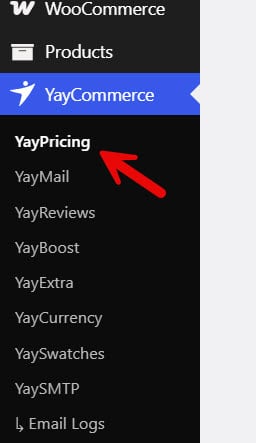
Now install and activate the YayPricing plugin. If you have already activated the plugin, skip this step. Now, under the YayCommerce settings, you can see the YayPricing settings.
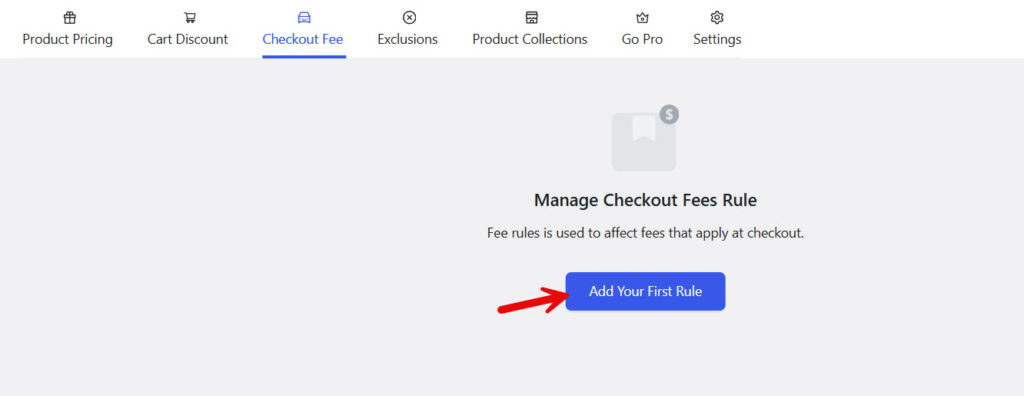
To offer free shipping, go to the checkout fee rule and add a new campaign.
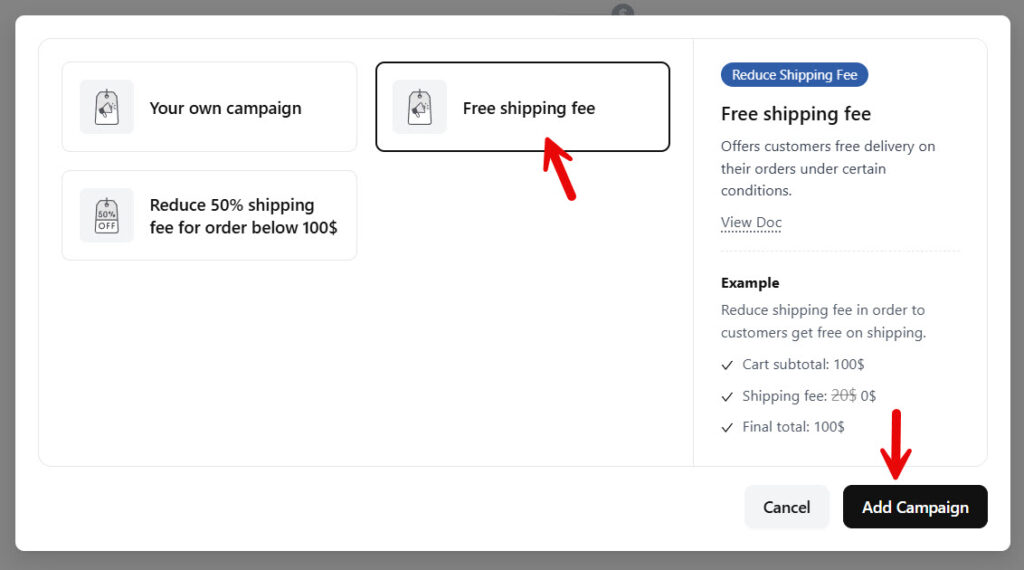
From the campaigns, choose free shipping fee and create the campaign.
The campaign comes with pre-made options. All you need to ensure is the “apply to shipping” option is selected.
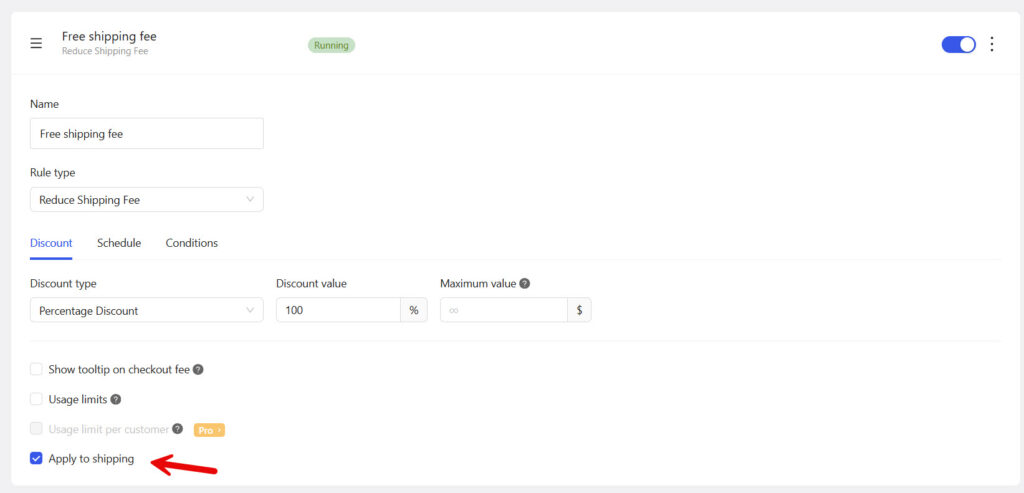
Also ensure the discount percentage is 100% so shipping is fully free. Since we are applying this only to Christmas, it is better to schedule the offer. To do that, open the schedule tab and choose the dates.
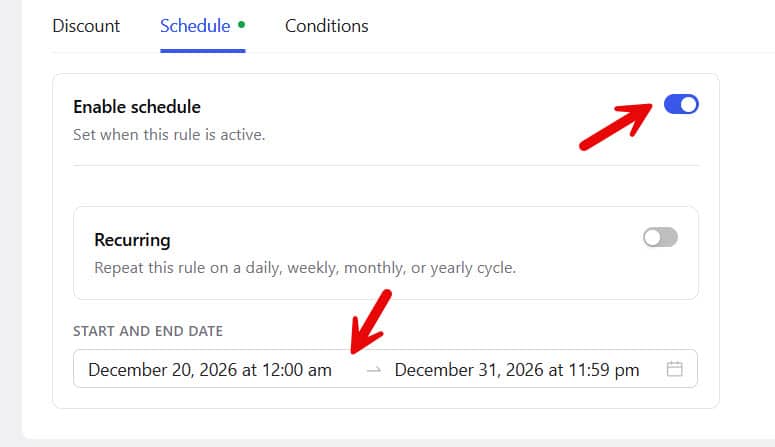
We’ll be running this campaign from December 20 to December 31. Once you have done that, YayPricing offers a conditional logic feature. With the help of conditional logic, you can apply this to specific products/ product categoris and so on. We’ll be offering free shipping on the entire product catalog, so we won’t use the conditional logic feature. But you are welcome to play with it.
Once you are done with the options, save the changes.
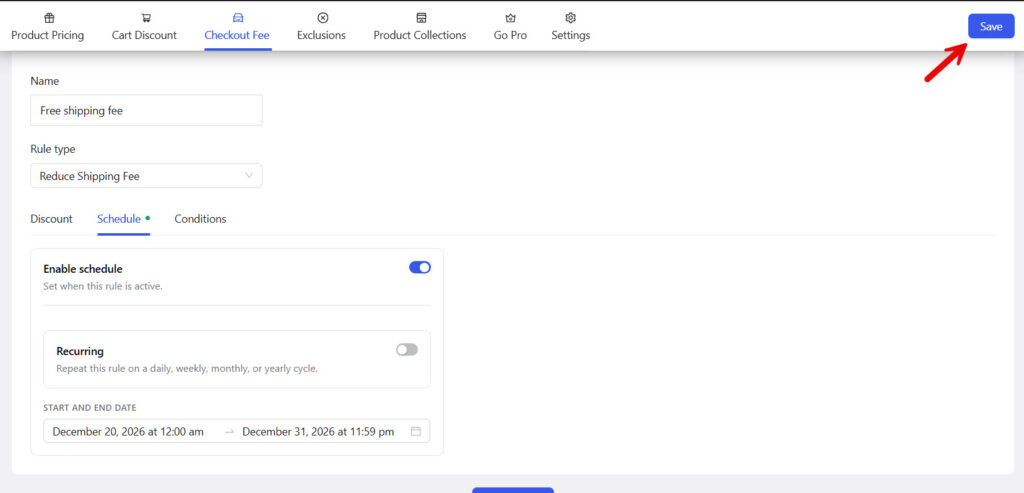
Now, when someone adds a product to their cart during the specified period, shipping is 100% free.
That’s it!
This is how you can offer free shipping on Christmas with YayPricing.
Common Mistakes You Need to Avoid While Dealing with Free Shipping
Setting free shipping during Christmas can increase orders, but a few common mistakes can raise your shipping costs or confuse customers. Checking your rules before the busy period starts helps you avoid most of these problems.
- Forgetting to set an end date is one of the most common mistakes. If the rule stays active after Christmas, you will keep offering free shipping longer than planned.
- Not testing the rule with different cart totals can cause problems. Always place test orders above and below your free shipping threshold to confirm it works as expected.
- Applying free shipping to every product without limits can become expensive. Restrict the rule to specific products or categories if some items cost more to ship.
- Ignoring shipping method selection can override express rates you still want to charge for. Limit the free shipping rule to only the methods you intend to cover.
- Running free shipping together with large discounts without checking the total can reduce your margin too much. Review a few sample orders to see the final profit after both offers are applied.
- Not clearing the cache after creating the rule can prevent free shipping from appearing for customers. Clear the cache and test the cart again before the promotion goes live.
Here are some related articles you might need to look into:
- How to Offer Free Shipping on Christmas with YayPricing
- How to Add Sale Badges and Custom Product Labels in WooCommerce
- How to Add a Handling Fee to Christmas Orders with YayPricing
- 7 Best WooCommerce License Manager Plugins in 2027
- Cross-Sells vs Upsells vs Order Bumps: Best Practices and More
Frequently Asked Questions
Now, let’s take a look at some frequently asked questions and answers on this topic.
Create a free shipping rule and add a date condition that covers your holiday period. The rule will only apply between the start and end dates you choose. You can also add product or cart total conditions if you want to limit it further.
Yes, date-based free shipping rules and most conditions work on the free version. You can already set the offer by date, product, category, or cart total without upgrading. Combined conditions and some rule types are only available in the Pro version.
Yes. You can add a product or category condition so that free shipping applies only to the items you choose. Other products in the cart will still use your normal shipping rates. This helps you control costs on items that are expensive to ship.
Yes. Add a cart total condition to the free shipping rule and set the minimum amount you want. Customers will only get free shipping when their cart reaches that total. This works on both the free and pro versions.
Set an end date on the rule or simply deactivate it once the holiday period is over. The free shipping offer will stop appearing as soon as the date condition is no longer met. You can keep the rule and turn it back on next year.
Yes, free shipping can run together with coupons and product discounts. Place a test order with a coupon to confirm the shipping cost shows as free and the total calculates correctly. This helps you catch any conflicts before customers place real orders.
Yes. You can limit the free shipping rule to specific shipping methods so it does not override all rates. This is useful if you want free shipping on standard delivery but still charge for express options. Check the rule settings to select the methods you want to include.
YayPricing applies the free shipping rate so customers see $0 shipping in the cart and checkout. The change is visible before they reach the payment page. This reduces surprise costs and helps more customers complete their orders.
Yes. You can add a user role or a logged-in condition to require free shipping only for registered customers. Most stores simply offer it to everyone during Christmas. Role-based rules are helpful if you have wholesale or member groups.
Check that the rule is active, the date condition is correct, and the cart matches any product or total conditions you set. Clear your cache and place a fresh test order. If it still does not work, review the rule priority to see if another rule is overriding it.
Conclusion
Offering free shipping on Christmas helps reduce cart abandonment and gives customers a clear reason to finish their order with you.
With YayPricing, you can set up date-based free shipping rules on both the free and pro versions. Most conditions are available in the free version, so you can already limit the offer by date, product, or cart total. The pro version unlocks combined conditions and additional rule types, giving you more control when you want to run free shipping alongside other Christmas promotions.
These extra options are useful if you need tighter rules during the busy period. Setting the offer early keeps everything simple for both you and your customers when order volume rises.
What other promotional methods would you use for Christmas?
Let us know in the comments.
