
Wondering what the difference is between cross-sell vs upsell vs order bump? In this post, we are going to explain what each has to offer, when to use them, and also how to set them up!
Upselling, cross-selling, and order bumps are three sales techniques that raise average order value without needing more traffic. Upselling encourages customers to purchase an upgraded or premium version of the product they already want.
Cross-selling suggests related or complementary products that go well with the main item. Order bumps offer a small, low-friction add-on right at checkout. Each approach works best at a different point in the buying journey, and using them together is one of the most effective ways to boost sales in an e-commerce store.
This guide covers the key differences, best practices, and practical tips to help you choose the right mix for your WooCommerce store.
First, let’s understand what each is and get an idea of what we’re getting into.
Table of contents
What is Cross-Sell
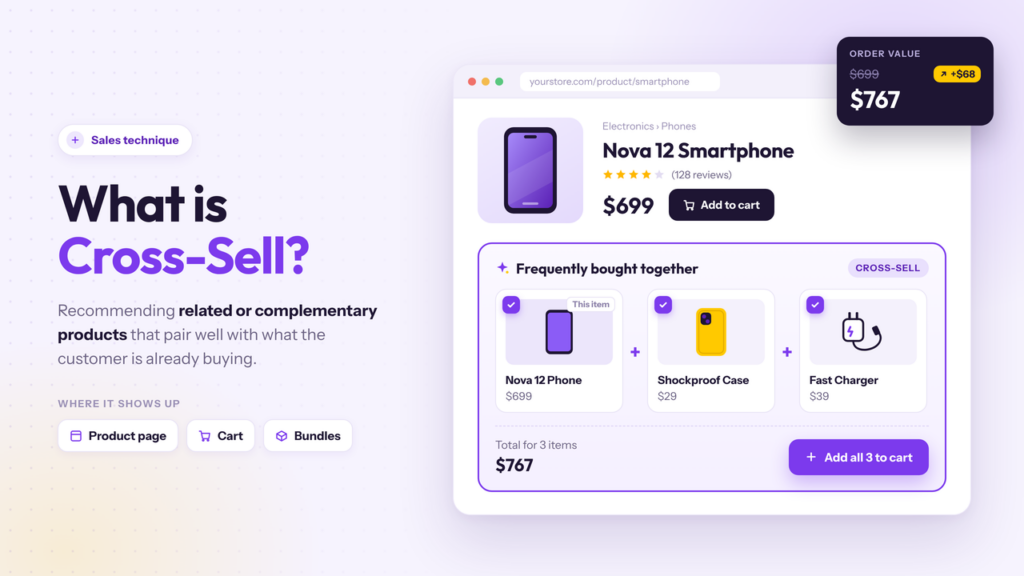
Cross-selling is a sales technique that recommends related or complementary products to a customer who is already interested in buying something. Unlike an upsell, which offers a premium or upgraded version of the same product, a cross-sell suggests additional items that pair well with the main purchase.
A common example is the “frequently bought together” section on a product page, where a store shows a phone case alongside a phone or a matching accessory with clothing.
This approach helps increase average order value and overall sales without asking the customer to spend more on a more expensive version of the original item.
It works well because the customer’s needs are already clear, so suggesting related products feels helpful rather than pushy. Stores often place cross-sells on the product page, in the cart, or as a small bundle.
When done right, cross-selling encourages customers to add items they may have forgotten, thereby increasing the value of a sale and improving the overall customer experience.
What is an Upsell
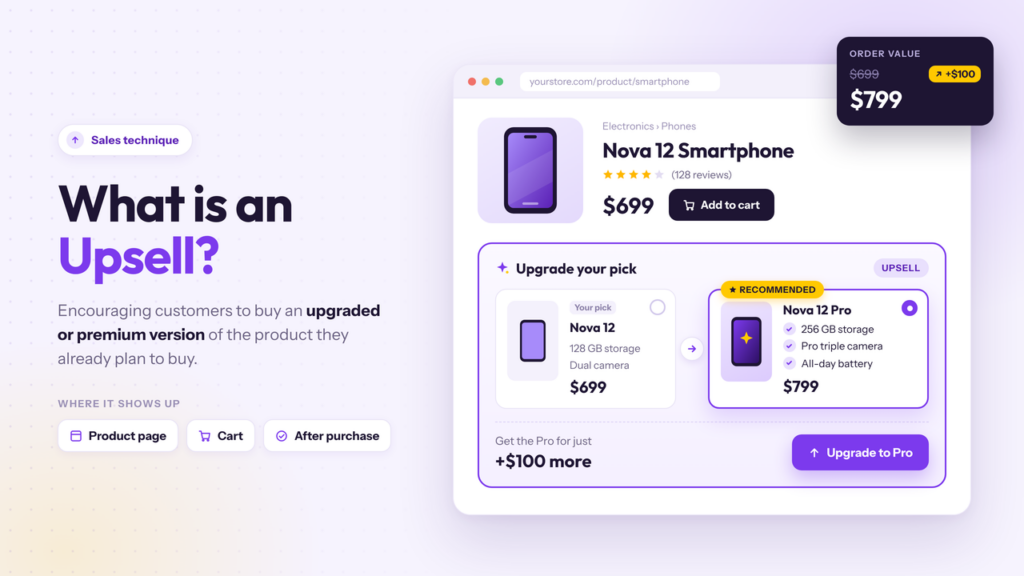
Upselling is a sales technique that encourages customers to purchase a more expensive or upgraded version of the product or service they already plan to buy. Instead of suggesting a different item, an upsell offers a premium version, a larger size, or an enhanced package of the same product.
A common example is showing a higher-tier plan, a bigger package, or a version with extra features on the product page or at checkout. The goal is to increase the value of a sale and raise average order value without needing more customers.
Because the customer is already interested in making a purchase, a well-timed upsell feels like a helpful upgrade rather than a hard pitch.
Stores often place upsells on the product page, in the cart, or right after the main purchase. When the offer is relevant and clearly better, customers are more likely to spend a little more for added benefits, which boosts revenue and overall sales.
What is an Order Bump
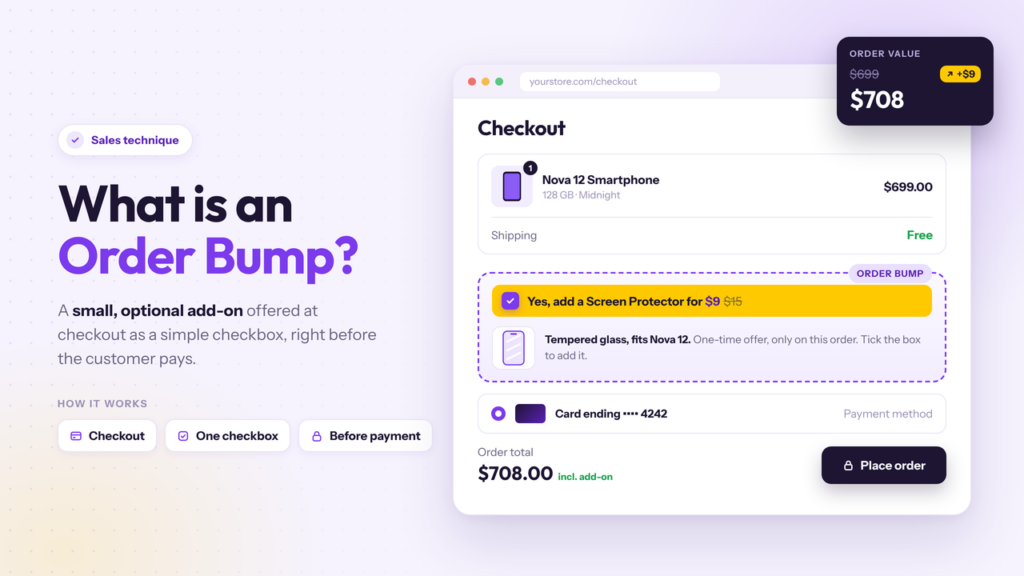
An order bump is a small, optional add-on shown on the checkout page, usually as a simple checkbox or one-click offer right before the customer pays. It is designed to be low-friction, so the customer can add it without leaving the checkout flow.
Common examples include a digital bonus, a related accessory, gift wrapping, or a small complementary product at a discounted price.
Unlike a traditional upsell or cross-sell that appears earlier in the journey, an order bump happens at the final moment when the customer is already committed to buying. This timing makes it one of the easiest ways to increase average order value.
Because the offer is visible only at checkout and requires little extra effort, conversion rates are often higher than with other recommendation methods. Stores use order bumps to capture last-minute purchases without interrupting the main buying process.
Cross-Sell vs Upsell vs Order Bump: Quick Comparison
Understanding the difference between upselling and cross-selling helps you choose the right approach at each stage of the customer journey. Upselling and cross-selling are two common sales techniques, while order bumps add a low-friction option at checkout.
The table below shows the key differences so you can decide which one fits best for your business.
| Aspect | Cross-Sell | Upsell | Order Bump |
|---|---|---|---|
| Main goal | Recommend related or complementary products | Offer an upgraded or premium version of the product | Add a small, optional item at checkout |
| Typical placement | Product page, cart, or “frequently bought together” | Product page or cart | Checkout page (before payment) |
| Friction level | Low to medium | Medium | Very low |
| Offer type | Additional products that pair with the main item | Higher-value version of the same product | Small add-on or bonus |
| Best for | Increasing average order value with related items | Persuading customers to purchase a better version | Capturing last-minute purchases with minimal effort |
| Example | Phone case shown with a phone | Premium plan or larger size | Checkbox for gift wrap or a digital bonus |
When to Use Cross-Sell, Upsell, or Order Bump
Choosing the right moment for each offer makes a big difference in conversion rates. Cross-sells, upsells, and order bumps work best at different stages of the customer journey.
Using them at the right time keeps suggestions helpful rather than disruptive and increases the likelihood that customers will add more to their order.
When to Use Cross-Sells
Cross-sells work best when a customer is already looking at a product and may need related items. Show them on the product page or in the cart so the suggestions feel natural.
This is the right time to recommend complementary products that improve the main purchase or solve a related need. Customers are more open to extra items before they reach checkout, especially when the products clearly go together.
- Use them on product pages with “frequently bought together” sections.
- Place them in the cart while the customer reviews their order.
- Suggest items that pair well with the main product, such as accessories or matching goods.
- Keep the number of suggestions low so the page stays easy to scan.
When to Use Upsells
Upsells work best when the customer has already decided on a product and is open to a better version. Offer them on the product page or in the cart before checkout.
The goal is to show a clear upgrade, such as a larger size, extra features, or a premium package, that gives more value for a modest price increase. This approach increases the value of the sale without asking the customer to buy a completely different item.
- Show them on the product page when the customer is comparing options.
- Use them in the cart if the customer has already added a base version.
- Highlight a clear benefit of the upgraded version.
- Keep the price difference reasonable, so the upgrade feels worthwhile.
When to Use Order Bumps
Order bumps work best at the final step, right before the customer pays. They appear on the checkout page as a simple checkbox or one-click offer.
This is the right moment for a small, low-cost add-on because the customer is already committed to buying. The offer should be relevant and easy to accept so it does not slow down the purchase.
- Place them only on the checkout page.
- Use them for small complementary items or digital bonuses.
- Keep the offer simple with a clear checkbox and short description.
- Limit the number of bumps so the checkout stays focused.
Get Started with YayBoost
Common Mistakes to Avoid While Dealing with Cross-Sell, Upsell, and Order Bump
Many stores lose sales because they treat cross-selling and upselling the same way or push too many options at once.
The difference between cross-selling and upselling matters for placement and timing. Using the wrong approach at the wrong stage can reduce customer purchases rather than increase your average order value. The points below cover common mistakes that hurt upselling and cross-selling strategies.
- Showing too many recommendations at once. Customers often ignore long lists. Limit “frequently bought together” sections and upselling offers to a few relevant items so the suggestions stay clear.
- Mixing cross-sell and upsell without clear labels. When the difference between cross-selling and upselling is not obvious, shoppers get confused. Keep upgraded versions separate from complementary products or services.
- Placing order bumps too early. Order bumps work best at checkout. Putting them on the product page or cart reduces their low-friction advantage and can feel pushy.
- Offering unrelated products. Suggestions that do not match the main item rarely convert. Focus on complementary products or services that genuinely help the customer.
- Using large price jumps for upsells. A large price increase relative to the original product often reduces acceptance. Small, clear upgrades perform better for increasing your average order value.
- Ignoring mobile layout. Buttons and checkboxes that look fine on desktop can cover key elements on a phone. Test every offer on mobile so customers can complete purchases without friction.
Here are some related articles that will be useful for you:
- Cross-Sells vs Upsells vs Order Bumps: Best Practices and More
- Photo & Video Reviews in WooCommerce: Why They Convert Better Than Text
- 7 WooCommerce Discount Strategies That Actually Increase Average Order Value
- How to Get More (and Better) Product Reviews on Your WooCommerce Store
- How to Add a Request a Quote Button to Your WooCommerce Store
Frequently Asked Questions
Now, let’s take a look at some frequently asked questions and answers on this topic.
Upselling encourages customers to buy an upgraded or premium version of the product they already plan to purchase. Cross-selling recommends related or complementary products that go well with the main item. The key differences lie in the offer type and the customer’s intent. Upselling raises the value of the same purchase, while cross-selling adds extra items.
Upselling vs cross-selling differs mainly in placement and goal. Upsells often appear on the product page as a better version of the current product. Cross-sells usually show as “frequently bought together” sections or related items in the cart. Both help boost sales, but they work best at different stages of the buying journey.
Keep offers relevant and limited. Use clear product images, short benefits, and a simple call to action. Place cross-sells on product pages and in the cart. Use upsells when the customer is already interested in a product. Test one change at a time and review results before adding more offers.
Use an order bump when you want a low-friction add-on at the final step. Order bumps appear on the checkout page as a simple checkbox or one-click offer. They work well for small complementary items or digital bonuses. Regular cross-sells are more effective earlier in the journey, when customers are still browsing.
Yes. Many stores show an upsell for a premium version of the main product and a separate cross-sell section for related items. Keep the two sections visually distinct so customers understand the difference. Too many options in one place can reduce conversions, so limit the number of suggestions.
A bundle groups complementary products or an upgraded set into one offer. Customers see the combined value and can add everything with one click. Bundles work as both a cross-sell and a light upsell strategy. They are especially useful on product pages when items are commonly purchased together.
Suggestive selling means recommending products based on what the customer is already viewing or buying. Cross-selling and upselling are two forms of suggestive selling. The goal is to help the customer find relevant options without pressure. Clear recommendations that match the customer’s needs usually perform better than generic lists.
Offer a clear upgrade with a visible benefit, such as a larger size, extra features, or a premium package. Place the upsell on the product page or in the cart when the customer has already shown interest. Avoid large price jumps. Small, relevant upgrades tend to convert better and help increase the average order value over time.
Focus on relevance. Suggest items that genuinely complement the main purchase or improve it. Keep the number of recommendations low and make it easy to skip them. Customers are more likely to accept suggestions when the offers feel helpful rather than forced. Clear pricing and product images also reduce confusion.
YayBoost is useful for order bumps at checkout and “frequently bought together” sections for cross-sells. YayExtra supports linked products and extra options on the product page, which helps with both cross-selling and light upselling. Start with one or two clear offers, measure results, and expand once you know which approaches work best for your store.
Conclusion
Cross-selling and upselling are two effective ways to increase sales and boost revenue from existing customers.
The difference between upselling and cross-selling is simple: upselling encourages customers to buy an upgraded or premium version of the product they already want, while cross-selling recommends related or complementary products.
Order bumps sit between the two as a low-friction add-on at the point of sale. When used together, these upsell and cross-sell strategies raise average order value without needing more traffic.
YayBoost is a strong fit for stores that want both order bumps at checkout and “frequently bought together” sections for cross-sells. YayExtra works well when you need to offer linked products or extra options on the product page to support suggestive selling.
Start with clear, relevant offers that match the customer’s needs, test them on high-intent pages, and keep refining. Successful upselling and cross-selling campaigns usually come from small, well-placed suggestions rather than large, generic ones.
Do you know any other ways to add upsells, cross-sells, or order bumps?
Let us know in the comments.
