
Do you want to create custom rating types for your online store? In this article, we will show you how to add custom ratings on your WooCommerce store without using any code.
Customer reviews play a major role in building trust and improving conversions, but traditional star ratings can feel generic and outdated for modern ecommerce stores.
Custom rating types let you create a more engaging, branded review experience with emojis, custom icons, or unique visual reactions. This can help your online store stand out while making reviews more interactive for shoppers.
In this guide, you will learn how to create custom rating types in WooCommerce using YayReviews, including how to replace default stars with emojis or custom images that better match your products and brand identity.
Before going further, let’s see what custom rating types are and why you should add them.
Table of contents
- What Are Custom Rating Types?
- Why Custom Rating Types Matter for eCommerce Stores?
- Best Use Cases for Custom Review Ratings
- What You Need Before Creating Custom Rating Types?
- How to Create Custom Rating Types in WooCommerce?
- Best Practices for Custom Rating Systems
- Common Mistakes to Avoid
- Why YayReviews Is a Strong Choice for Custom Ratings
- Custom Rating Ideas You Can Try
- Frequently Asked Questions
- Conclusion
What Are Custom Rating Types?
Custom rating types are alternative review rating systems that replace the traditional star-based review format with more interactive and visually engaging options.
Instead of using standard stars, online stores can allow customers to rate products using emojis, smileys, custom icons, branded graphics, or other visual elements that better match the store’s identity and product category.
These rating systems help make product reviews feel more modern and personalized. For example, a food store might use spicy pepper icons, a beauty store could use hearts or glow icons, and a gaming store may prefer controller-themed ratings. This creates a more memorable review experience while helping products stand out visually.
With plugins like YayReviews, WooCommerce store owners can easily customize rating types by replacing the default review stars with emojis or custom images uploaded from the store. This gives businesses more control over branding, user engagement, and the overall shopping experience.
Why Custom Rating Types Matter for eCommerce Stores?
Custom rating types do more than just change the appearance of product reviews. They help create a more engaging shopping experience that can improve interaction, trust, and conversions. Traditional star ratings are familiar, but they often look identical across thousands of online stores.
Custom ratings give your ecommerce store a more unique and memorable identity. Using emojis, branded icons, or custom images can make reviews feel more interactive and emotionally expressive.
This encourages customers to leave feedback more often, especially on mobile devices where visual interactions feel more natural. Custom rating systems can also help shoppers understand product satisfaction faster by using visuals that match the product category or brand style.
For ecommerce businesses focused on user experience and branding, custom review ratings are a simple way to make product pages more engaging while helping the store stand out from competitors.
Best Use Cases for Custom Review Ratings
Now, let’s see some industries/niches that can use custom review ratings.
1. Fashion and Clothing Stores
Fashion and clothing stores can use custom review ratings to create a more stylish and brand-focused shopping experience. Instead of traditional stars, stores can use icons like hearts, outfit emojis, hangers, diamonds, or even custom brand-themed graphics.
These visual ratings feel more natural for fashion products and help product reviews blend better with the overall store design. Custom fashion-focused ratings also make reviews more visually appealing on mobile devices and social-style storefronts.
For example, a luxury fashion brand could use diamond icons, while a streetwear store might prefer flame emojis or sneaker-inspired graphics. This approach helps reinforce brand identity while making customer feedback more engaging and memorable.
2. Food and Beverage Products
Food and beverage stores can make product reviews more fun and expressive by using custom rating icons that match the type of products they sell. Instead of standard stars, stores can use emojis and graphics like chili peppers, burgers, coffee cups, cookies, or chef hats to create a more engaging review experience.
These visuals immediately connect with shoppers and make product pages feel more interactive. Custom food-themed ratings also help communicate emotions and taste experiences more naturally.
For example, spicy food brands can use heat-level pepper icons, while coffee stores may use cup ratings to reflect customer satisfaction. This makes reviews easier to understand at a glance while helping the store build a stronger visual identity.
3. Beauty and Skincare Stores
Beauty and skincare stores can use elegant and visually appealing custom rating types to create a more premium shopping experience. Instead of traditional stars, stores can use icons such as hearts, sparkles, flowers, glow effects, or beauty-related emojis to better reflect the products being reviewed.
These visuals feel more aligned with the branding style commonly used in skincare and cosmetics stores. Custom beauty-focused ratings can also make customer feedback feel more personal and emotionally engaging.
For example, skincare brands can use glow icons to represent product effectiveness, while makeup stores may prefer lipstick or beauty-themed graphics. This helps product reviews look more attractive on the page while reinforcing the store’s visual identity and overall user experience.
4. Kids and Toy Stores
Kids and toy stores can use playful and colorful custom rating icons to make product reviews more engaging for both parents and children. Instead of standard stars, stores can use emojis and graphics like teddy bears, smiley faces, balloons, blocks, dinosaurs, or cartoon-inspired icons.
These visuals create a more fun shopping experience that matches the style of children’s products. Custom ratings also help toy stores build a stronger emotional connection with shoppers.
Bright and friendly icons make reviews feel more interactive and easier to understand at a glance. For example, educational toy stores could use lightbulb or puzzle-piece ratings, while plush toy brands may prefer cute character-style icons to reinforce their branding.
5. Gaming and Entertainment Products
Gaming and entertainment stores can create a much more immersive review experience by replacing traditional star ratings with themed icons that match gamer culture and digital entertainment products. Popular choices include controllers, fire emojis, lightning bolts, trophies, pixel hearts, or custom game-inspired graphics.
These visuals make product reviews feel more engaging and better aligned with the audience. Custom gaming-themed ratings can also strengthen community appeal and brand identity. For example, a retro gaming store could use pixel-style icons, while a streaming or entertainment brand may prefer reaction-based emojis.
This approach helps reviews stand out visually and makes the overall shopping experience feel more interactive and modern for gamers and entertainment fans.
6. Handmade and Creative Products
Handmade and creative product stores can use artistic custom rating types to create a more personal and authentic shopping experience. Instead of traditional stars, stores can use icons such as paintbrushes, hearts, yarn balls, scissors, handmade stamps, or custom-illustrated graphics that reflect the creativity behind the products.
These visuals help product reviews feel more unique and emotionally connected to the brand. Custom ratings work especially well for handmade businesses because they reinforce craftsmanship and originality.
For example, an art store could use palette icons, while a handmade jewelry shop may prefer gemstone or sparkle-themed ratings. This adds personality to product reviews and helps the store stand out from generic ecommerce experiences.
What You Need Before Creating Custom Rating Types?
Before creating custom rating types for your WooCommerce store, there are a few things you should have ready to ensure a smooth setup and a professional final review system.
- A WooCommerce store: Your online store should already be running on WooCommerce with product reviews enabled
- The YayReviews plugin is installed: YayReviews provides the custom rating functionality needed to replace traditional star ratings
- Product reviews enabled in WooCommerce: Make sure your store allows customers to leave ratings and reviews on product pages
- Custom icons, emojis, or images: Prepare any branded graphics or rating visuals you want to use in your review system
- A clear rating concept: Decide what type of rating style fits your niche best, such as emojis, themed icons, or experience-based reactions
- Mobile-friendly visuals: Ensure your custom icons or images look clean and recognizable on smaller screens
- Consistent branding: Use visuals that match your store’s colors, style, and overall design language
Having these elements prepared beforehand will make it easier to create a custom review system that looks polished, engaging, and aligned with your ecommerce brand.
How to Create Custom Rating Types in WooCommerce?
Now, let’s start with the tutorial.
YayReviews is a freemium plugin. The lite version can be downloaded from the WordPress plugin’s repository, and the premium version can be purchased from our store.
For this tutorial, we will be using the premium version of the YayReview plugin. The first thing you need to do is install and activate the plugin on your website. If you have purchased the premium version, ensure you have activated it with the right license key.
Now open the plugin’s settings.
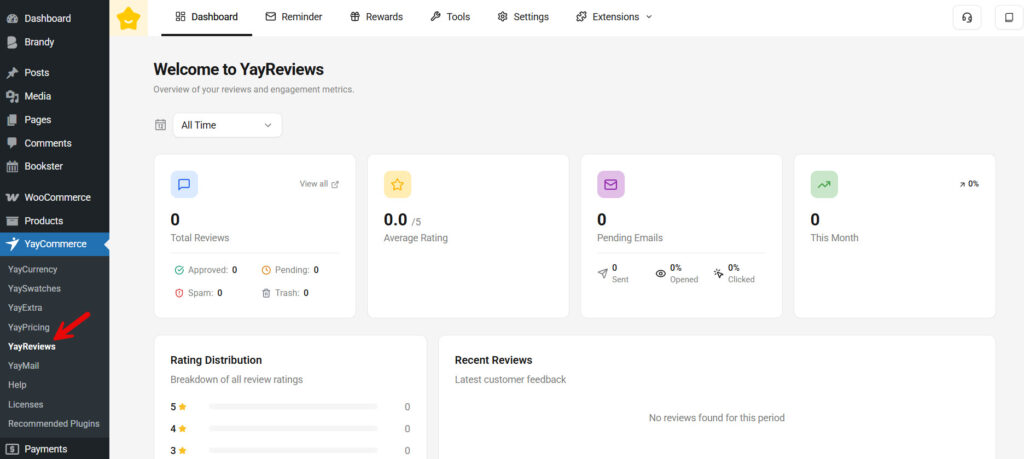
On the top bar, you can see options such as:
- Dashboard
- Reminder
- Rewards
- Tools
- Settings
- Extensions

From there, choose settings, then rating types.
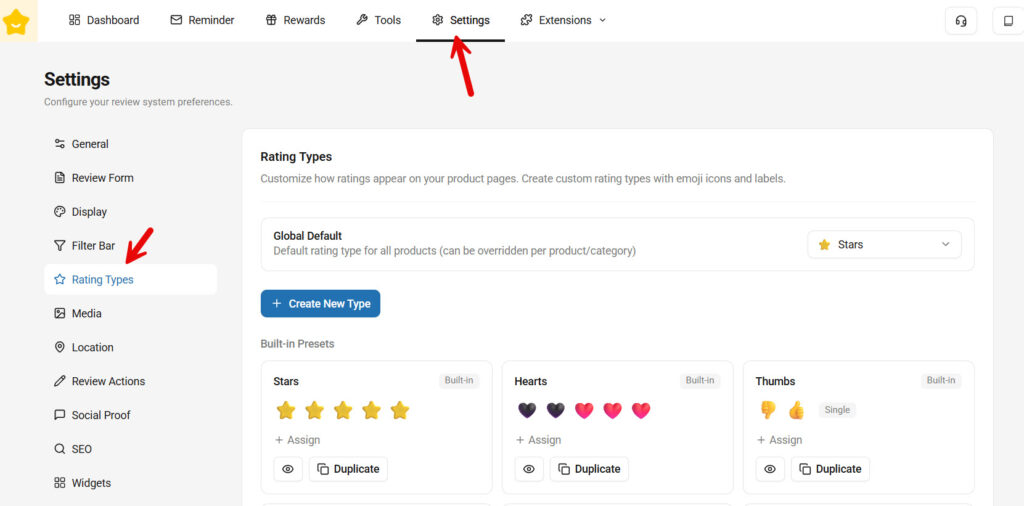
You can see some pre-built rating types built by our team there.
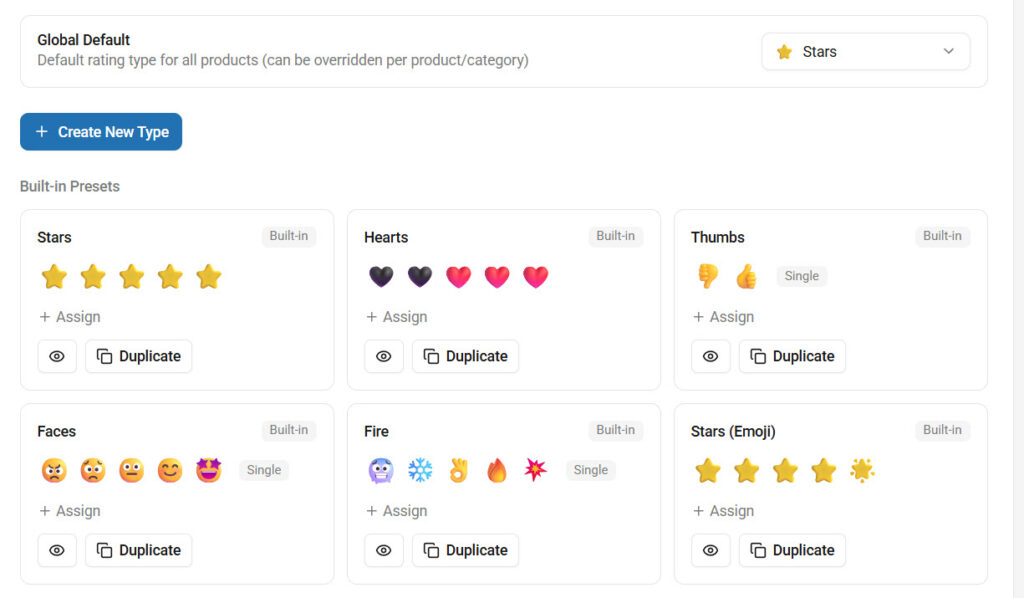
You can use one of them if you like, or you can build a completely new one from scratch. To do so, click the Create New Type button.
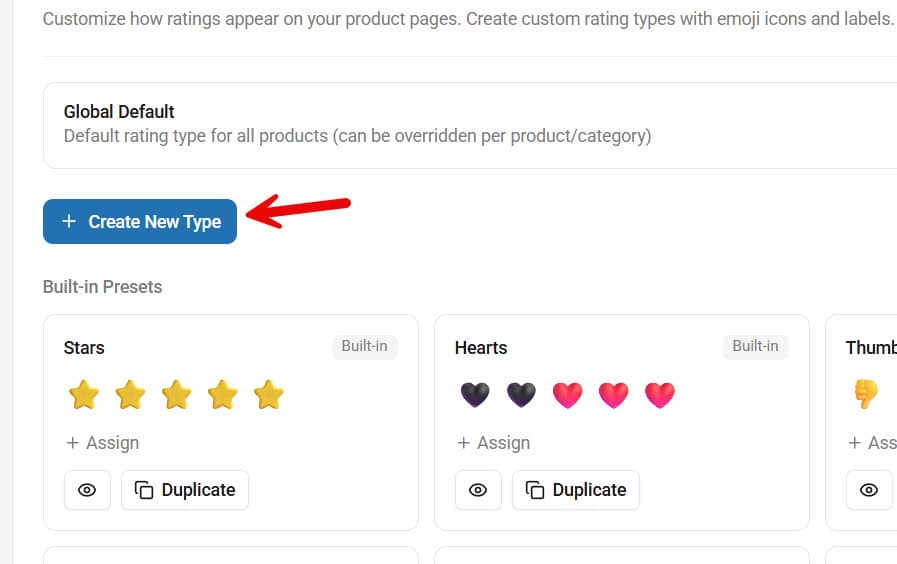
Now the review type creation wizard will be opened.
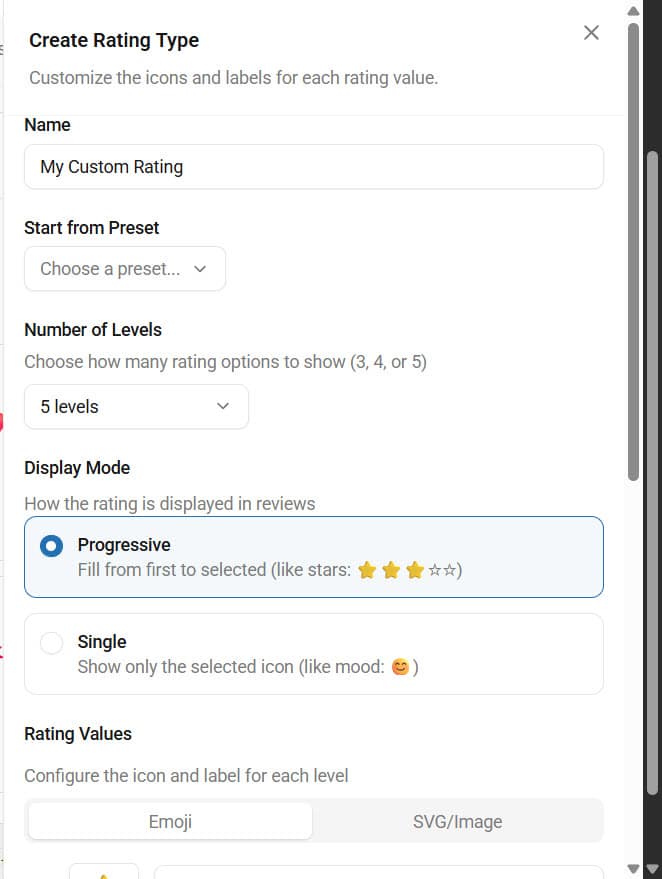
You can see options like:
- Name
- Start from preset
- Number of levels
- Display mode
- Progressive
- Single
- Rating values
- Preview
- Show/Hide label
The name is just for identification. You can use any name you like. And you can ignore the preset if your goal is to create a custom review type. The next option you have is the number of levels. You can pick an option based on your liking.
We will go for 5. Now, choose the display mode. Once that is done, it is time to do the main configuration. You can either choose an emoji for the review types or an SVG/image file.
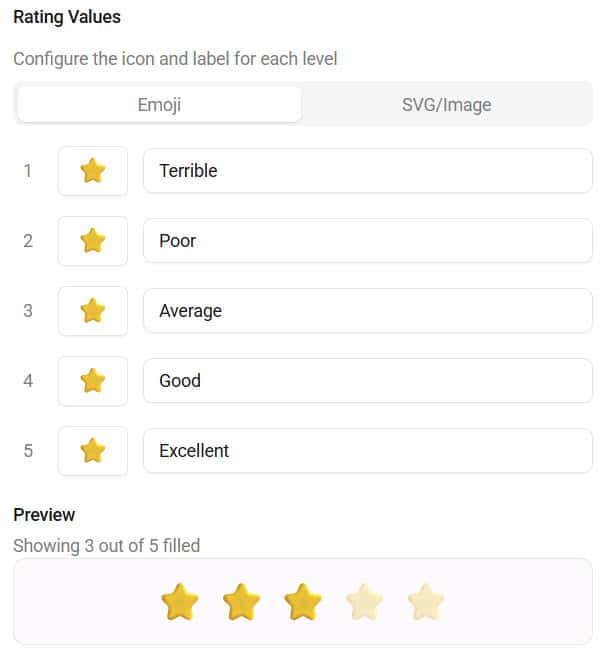
We are going to configure the emoji option, and the final result looks like this:
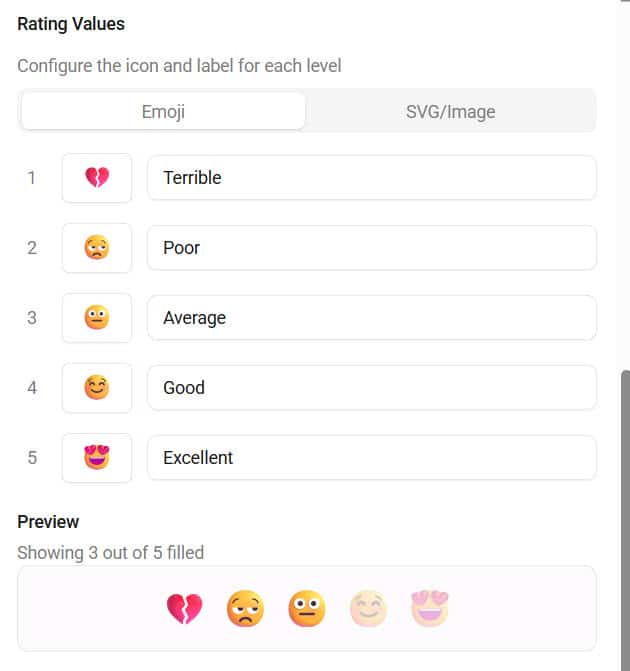
The plugin’s live preview option makes it easy to view the results. If you need to show SVG or images, switch the option and upload your images.
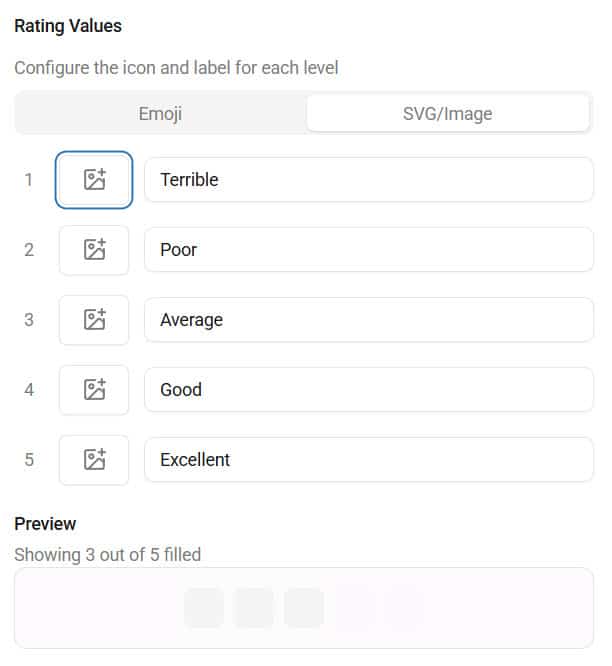
You should also try customizing the labels to suit your needs.
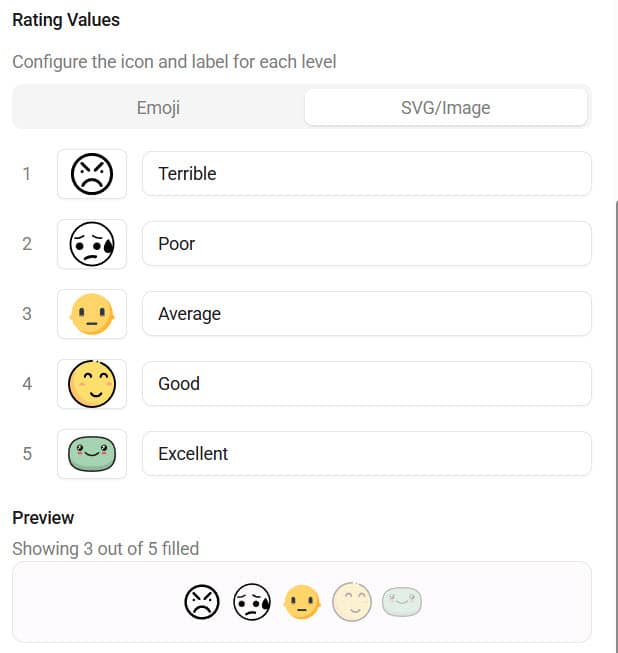
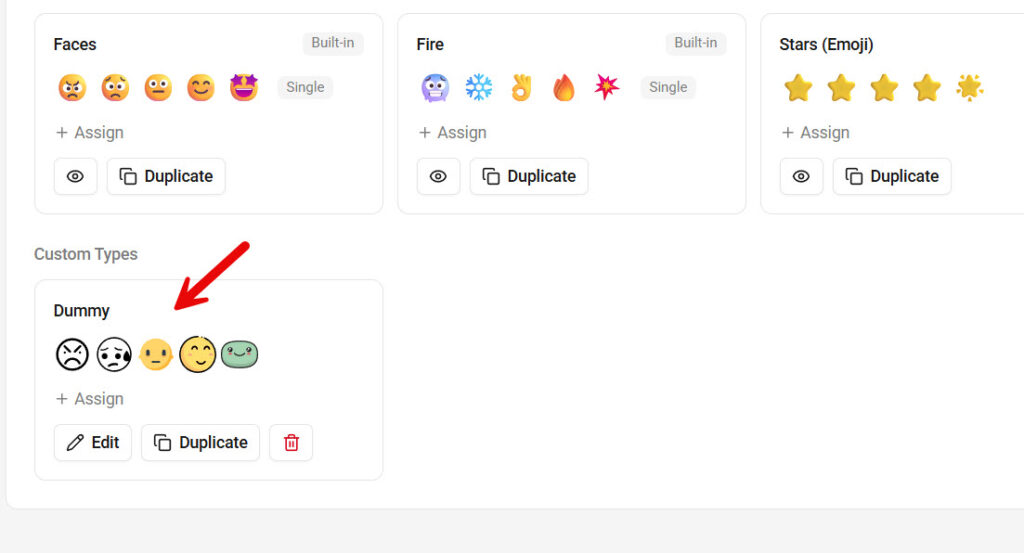
Once you are done with the customization, save it. If you scroll down on the rating types page, you can see the newly created custom review type there.
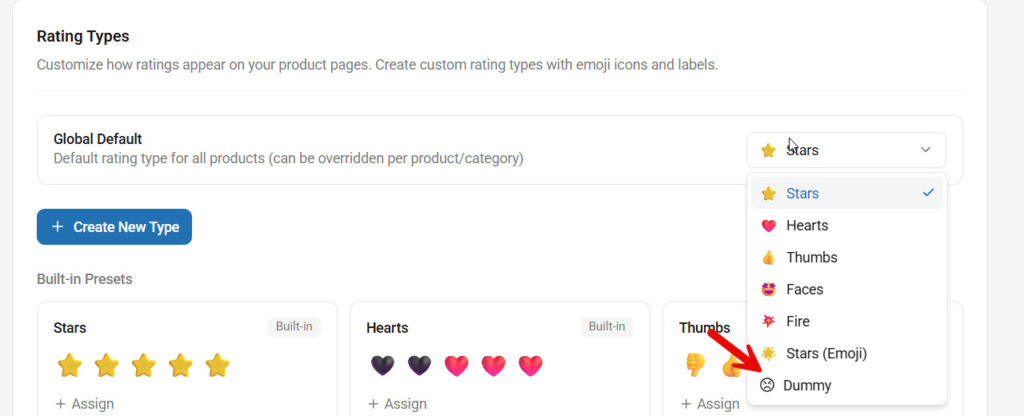
The next step is to change the global review style. If you open the dropdown, you can see the newly created custom review type. Select it and save the changes.
To check, open any product, go to the review section, and you can see the custom emojis or SVG icons.
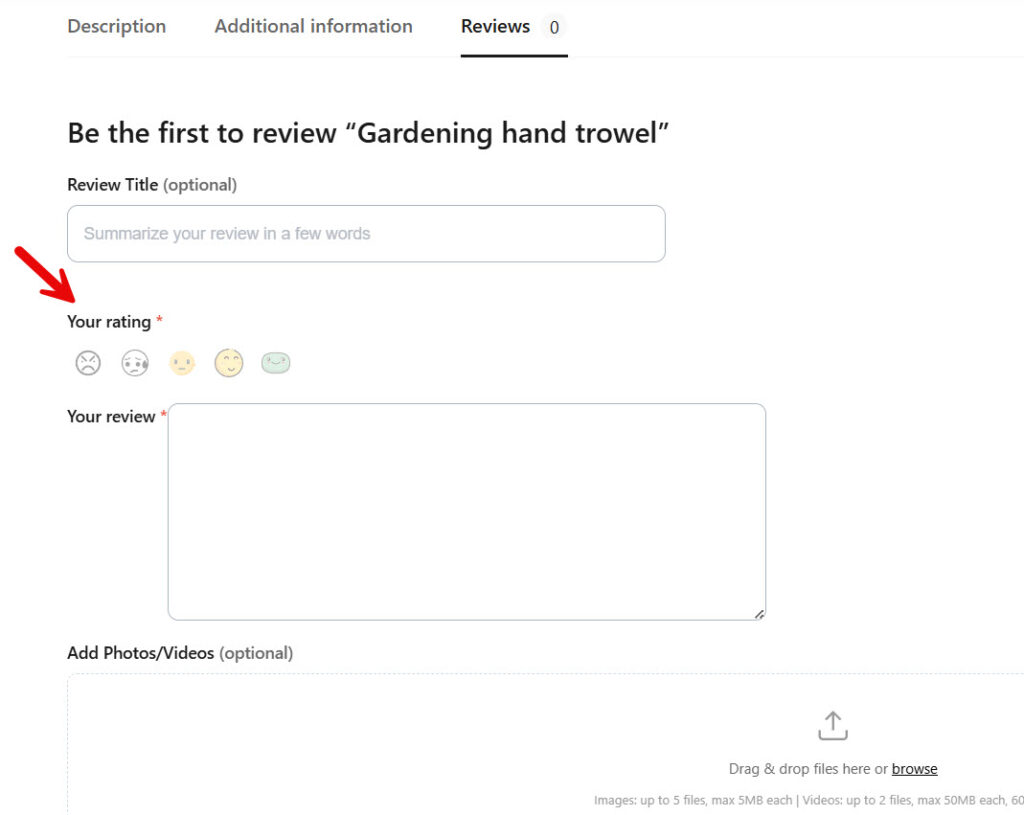
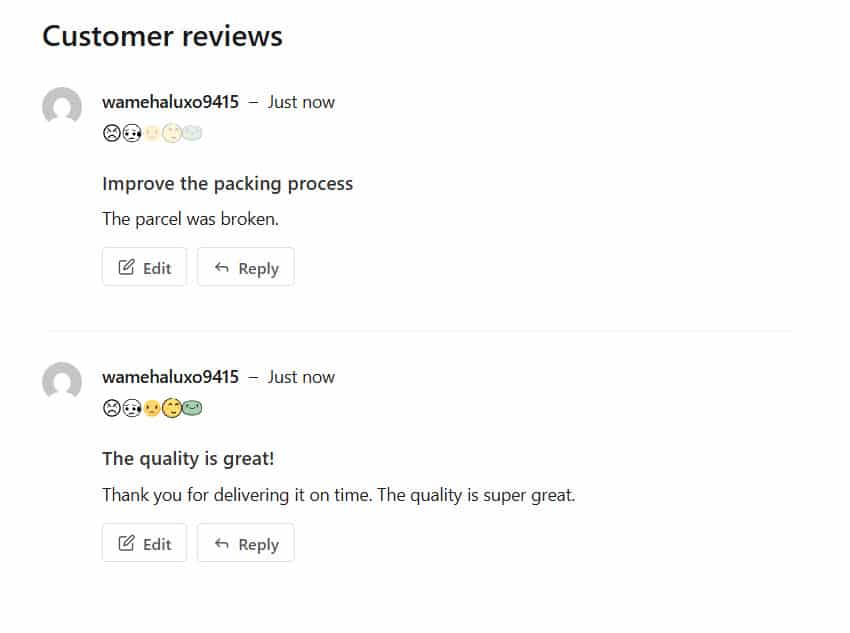
Whenever you change it, make sure you update the global styling. When someone leave a review, it will look like this:
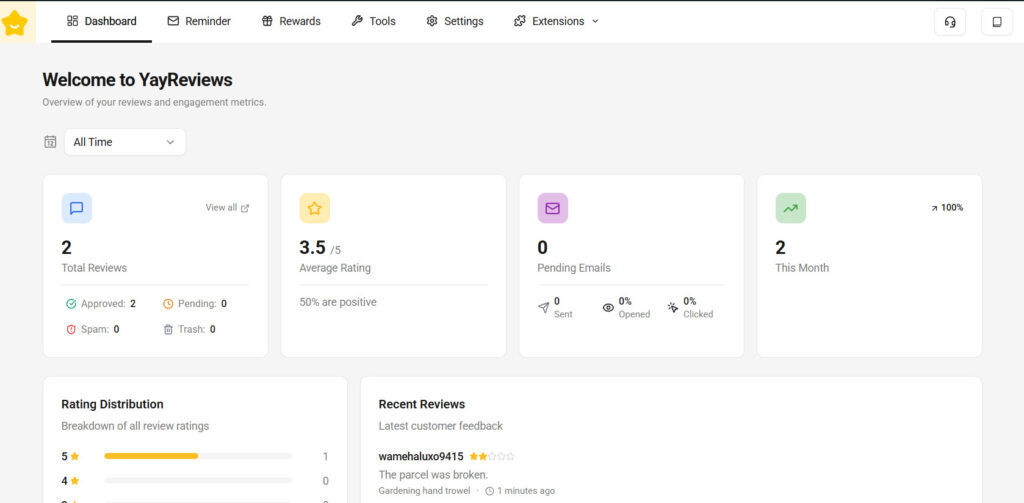
If you check the dashboard, you can also see an overall rating and further details.
That’s it!
This is how you can create custom rating types in WooCommerce.
Best Practices for Custom Rating Systems
Custom rating systems can make your product reviews more engaging, but they should still remain easy to understand and consistent across your online store. A well-designed rating system improves user experience without confusing shoppers.
- Keep the rating system simple: Customers should instantly understand what each icon or emoji represents
- Match ratings with your niche: Use visuals that fit your products and brand identity for a more immersive experience
- Prioritize readability: Avoid overly complex icons that make reviews harder to interpret
- Maintain visual consistency: Use the same rating style across all product pages to create a professional appearance
- Optimize for mobile devices: Ensure emojis and custom icons look clean and properly sized on smaller screens
- Use high-quality custom images: Blurry or low-resolution graphics can reduce trust and make the store look unprofessional
- Avoid excessive customization: Too many visual effects or inconsistent icons can distract shoppers instead of improving engagement
- Test the user experience: Preview your custom rating system on different devices and browsers before using it live
Following these best practices will help you create a custom review system that improves engagement while keeping your WooCommerce store clean, modern, and user-friendly.
Common Mistakes to Avoid
Custom rating types can improve engagement and branding, but poor implementation can make product reviews confusing or unprofessional. Avoiding these common mistakes will help you create a smoother and more effective review experience for your customers.
- Using confusing icons or emojis: Customers should immediately understand what the rating means without needing extra explanation
- Overcomplicating the review system: Too many rating styles or unnecessary animations can distract users and reduce usability
- Choosing low-quality custom images: Blurry or inconsistent graphics can negatively affect your store’s appearance and credibility
- Ignoring mobile optimization: Icons that look good on desktop may appear too small or broken on mobile devices
- Using ratings that do not match your niche: Random or unrelated visuals can make the review system feel disconnected from your brand
- Creating inconsistent designs: Mixing different icon styles across product pages can make the store look unorganized
- Replacing clarity with creativity: Unique ratings should still clearly communicate customer satisfaction levels
- Skipping frontend testing: Always test custom ratings on product pages before going live to ensure proper display and functionality
By avoiding these mistakes, you can create a custom rating system that feels engaging, professional, and easy for shoppers to use.
Why YayReviews Is a Strong Choice for Custom Ratings
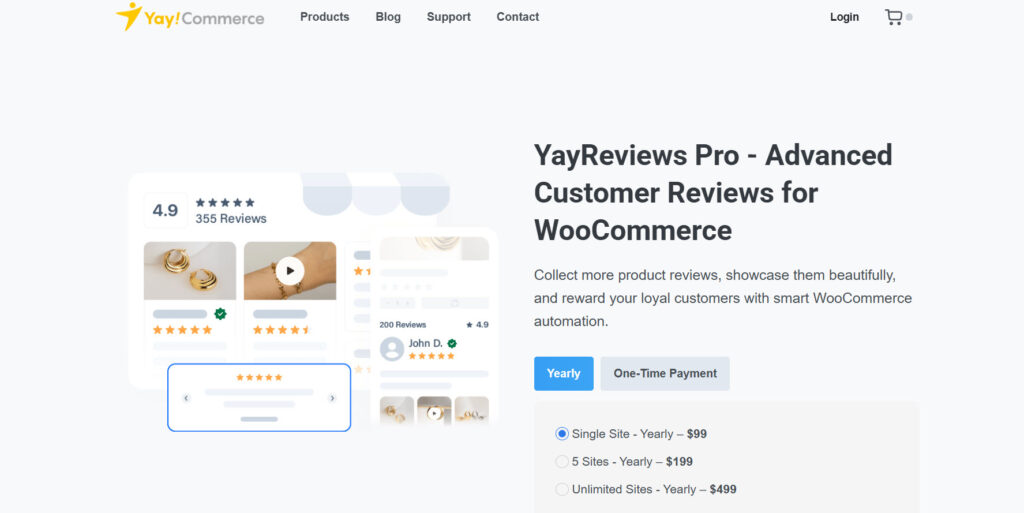
YayReviews is a powerful WooCommerce review plugin that makes it easy to create custom rating systems without complicated setup or coding.
Instead of being limited to traditional star ratings, store owners can customize the review experience using emojis, branded icons, or custom uploaded images that better match their products and store identity. One of the biggest advantages of YayReviews is its flexibility.
You can create visually unique review systems for different niches, helping your product pages feel more engaging and interactive. The plugin is also designed with usability in mind, making it simple to manage custom ratings directly from the WooCommerce dashboard.
Beyond custom rating types, YayReviews includes additional features such as photo and video reviews, review filtering, AI-generated summaries, and user-friendly moderation tools.
This makes it more than just a review plugin; it becomes a complete solution for building trust, improving engagement, and creating a modern review experience for your ecommerce store.
Custom Rating Ideas You Can Try
Here are five custom rating ideas you can try:
1. Emoji Reaction Ratings
Emoji reaction ratings are one of the easiest ways to make product reviews feel more modern and interactive. Instead of traditional stars, customers can react using emojis like heart eyes, fire, smiley faces, thumbs up, or excitement reactions that better express how they feel about a product.
This type of rating system works especially well for fashion, beauty, gaming, and social-driven ecommerce stores because it feels more engaging and visually appealing.
Emoji ratings are also highly mobile-friendly, making them easier to interact with on smartphones while helping reviews stand out on product pages.
2. Mood-Based Satisfaction Ratings
Mood-based satisfaction ratings allow customers to express their feelings using emotional reactions like happy, neutral, excited, surprised, or disappointed faces. This creates a more human and expressive review experience compared to traditional star ratings.
These rating systems work especially well for lifestyle, beauty, food, and entertainment products where emotional response plays a major role in purchasing decisions.
Mood-based ratings also make product reviews feel more interactive and visually engaging, especially for mobile shoppers who prefer quick, intuitive feedback.
3. Product Quality Meter
A product quality meter uses visual indicators like bars, levels, gauges, or themed icons to represent product quality and customer satisfaction. Instead of standard star ratings, customers can rate factors such as durability, comfort, taste, or overall quality using a more detailed visual system.
This type of rating works especially well for electronics, fitness products, food items, and premium goods where shoppers often compare product quality before purchasing.
A quality meter can make reviews feel more informative while helping customers quickly understand how well a product performs.
4. Experience-Level Ratings
Experience-level ratings focus on how customers felt while using a product, rather than relying on generic star ratings. For example, stores can use labels or icons to represent reactions such as “Loved It,” “Very Satisfied,” “Worth It,” or “Would Buy Again.”
These ratings feel more personal and can help shoppers better understand customer satisfaction. This type of review system works especially well for beauty products, digital products, subscriptions, and lifestyle brands where the customer experience matters as much as the product itself.
Experience-based ratings can also make reviews feel more authentic and emotionally engaging.
5. Brand-Themed Custom Icons
Brand-themed custom icons let you create a review system that matches your store’s identity and product style.
Instead of generic stars, you can use custom graphics like diamonds for jewelry stores, coffee cups for beverage brands, controllers for gaming stores, or handmade stamps for creative products.
This approach helps your product reviews feel more unique and professionally designed while reinforcing brand recognition across your ecommerce store. Custom icons also make the shopping experience more memorable by turning reviews into a visual extension of your branding.
Here are some more articles you might be interested in:
- Cross-Sells vs Upsells vs Order Bumps: Best Practices and More
- Photo & Video Reviews in WooCommerce: Why They Convert Better Than Text
- 7 WooCommerce Discount Strategies That Actually Increase Average Order Value
- How to Get More (and Better) Product Reviews on Your WooCommerce Store
- How to Add a Request a Quote Button to Your WooCommerce Store
Frequently Asked Questions
Next, we will take a look at some frequently asked questions about this topic.
Yes, you can replace the default WooCommerce star ratings with custom rating types using plugins like YayReviews. This allows you to use emojis, branded icons, or custom images to create a more engaging, visually unique review system for your online store.
Custom rating types are alternative review systems that replace traditional star ratings with visuals like emojis, icons, smileys, or branded graphics. They help ecommerce stores create a more interactive and personalized shopping experience.
Custom review ratings help product pages stand out visually while making reviews more engaging for customers. They can improve user interaction, increase review submissions, and strengthen brand identity by creating a more memorable review experience.
Yes, WooCommerce store owners can use emojis as product ratings with YayReviews. Emojis make reviews feel more modern and expressive, especially for mobile users and younger audiences.
Yes, YayReviews allows you to upload custom images and icons for your rating system. This gives you full control over how product reviews appear and helps align ratings with your store’s branding.
Fashion, beauty, gaming, food, handmade products, and toy stores benefit greatly from custom rating systems because they rely heavily on branding and visual presentation. Custom ratings help these stores create a more immersive shopping experience.
Custom review systems can improve conversions by making product pages more engaging and trustworthy. Visually appealing reviews often encourage shoppers to spend more time on the page and interact more with customer feedback.
Yes, custom ratings using emojis or optimized icons work very well on mobile devices. They are easier to recognize visually and often feel more natural for touchscreen interactions than traditional review systems.
Yes, YayReviews is designed to be beginner-friendly and does not require coding knowledge. Store owners can customize review ratings directly from the WooCommerce dashboard with a simple setup process.
Yes, custom rating types allow ecommerce stores to create a review system that matches their products, niche, and branding. Using themed icons or branded visuals helps create a more consistent and recognizable shopping experience.
Conclusion
Custom rating types are a simple but powerful way to make your product reviews more engaging, visually appealing, and aligned with your brand identity.
Instead of relying on generic star ratings, ecommerce stores can create more interactive experiences using emojis, custom icons, and branded graphics that better connect with their audience.
From fashion and beauty stores to gaming and handmade product businesses, custom review systems can help product pages stand out while encouraging more customer interaction. They also improve the overall shopping experience by making reviews easier to understand and more enjoyable to use.
With YayReviews, creating custom rating types in WooCommerce becomes easy and flexible. From emoji-based ratings to fully customizable image reviews, the plugin gives store owners the tools they need to build a more modern, memorable review experience.
We hope you found this article helpful and enjoyed reading it. If you need to learn more WooCommerce tips and tricks, check out the YayCommerce blog. Also, feel free to check out our social media handles, such as Facebook, X, Instagram, and YouTube, for more interesting content.
Which emoji or icon are you going to use?
Let us know in the comments.

