
Do you want to automatically send customer review reward emails in WooCommerce? If you need to automate this, keep reading.
Customer reviews are one of the most powerful forms of social proof for WooCommerce stores, but getting customers to leave reviews consistently can be difficult. Many shoppers simply forget to submit feedback after making a purchase.
This is where automated review reward emails can make a major difference. By automatically rewarding customers with coupons, discounts, or special offers after they leave a review, you can increase review submissions while encouraging repeat purchases.
In this guide, you will learn how to automatically send customer review reward emails in WooCommerce using YayReviews, including setup, automation, and best practices.
Table of contents
- What Are Customer Review Reward Emails?
- Why Rewarding Reviews Works for WooCommerce Stores
- Benefits of Automating Review Reward Emails
- How to Automatically Send Customer Review Reward Emails in WooCommerce
- Best Practices for Review Reward Emails
- Common Mistakes to Avoid
- Frequently Asked Questions
- Conclusion
What Are Customer Review Reward Emails?
Customer review reward emails are automated emails sent to shoppers after they submit a product review on your WooCommerce store.
These emails typically include a reward, such as a discount coupon, free shipping, a loyalty incentive, or an exclusive promotion, as a thank-you for leaving feedback. The goal of review reward emails is to encourage more customers to share their experiences while increasing engagement and repeat purchases.
Instead of manually contacting customers after each review, WooCommerce store owners can automate the process with a plugin like YayReviews. For example, a customer who submits a verified product review could automatically receive a percentage discount coupon for their next purchase.
Stores can also create different reward conditions for photo reviews, video reviews, or high-quality feedback. This makes review collection more scalable while improving customer retention and social proof for the store.
Why Rewarding Reviews Works for WooCommerce Stores
Rewarding customer reviews is an effective way to increase engagement and encourage more shoppers to leave feedback after making a purchase. Most customers are willing to share their experience, but many simply need a small incentive or reminder to take action.
Offering rewards through automated emails helps turn more completed orders into valuable product reviews. For WooCommerce stores, review rewards can improve multiple areas of the business simultaneously.
More reviews help build trust and social proof, making products look more credible to future buyers. Reward incentives like coupons or discounts can also encourage repeat purchases, helping increase customer retention and long-term revenue.
Review rewards are especially useful for ecommerce stores trying to grow user-generated content. Features like photo and video reviews become easier to collect when customers receive a meaningful incentive for contributing additional feedback.
This creates a stronger shopping experience while helping product pages feel more authentic and active.
Benefits of Automating Review Reward Emails
Automating review reward emails helps WooCommerce store owners collect more customer reviews without adding extra manual work to their daily operations. Instead of sending rewards individually after each review, the entire process can run automatically in the background.
- Saves time and effort: Automated workflows remove the need to manually send coupons or follow-up emails after every review
- Increases review submission rates: Customers are more likely to leave feedback when rewards are delivered consistently and quickly
- Improves customer engagement: Reward emails help keep customers connected to your store even after the purchase is completed
- Encourages repeat purchases: Coupons and discount rewards motivate shoppers to return and buy again
- Creates a scalable review system: Automation makes it easier to manage review collection as your WooCommerce store grows
- Supports user-generated content: Rewarding photo and video reviews helps generate richer product content and stronger social proof
- Maintains consistency: Every customer receives the same review experience and reward process without delays or missed follow-ups
- Improves overall store trust: More customer reviews make product pages look active, credible, and trustworthy for future shoppers
With a plugin like YayReviews, WooCommerce stores can automate review reward emails while keeping the process simple, organized, and customer-friendly.
How to Automatically Send Customer Review Reward Emails in WooCommerce
As you know, the plugin we will use is YayReviews. It is a freemium plugin. The lite version plugin includes all the basic features a review system needs, and you can get it from the WordPress plugins repository.
The premium version can be purchased from here.
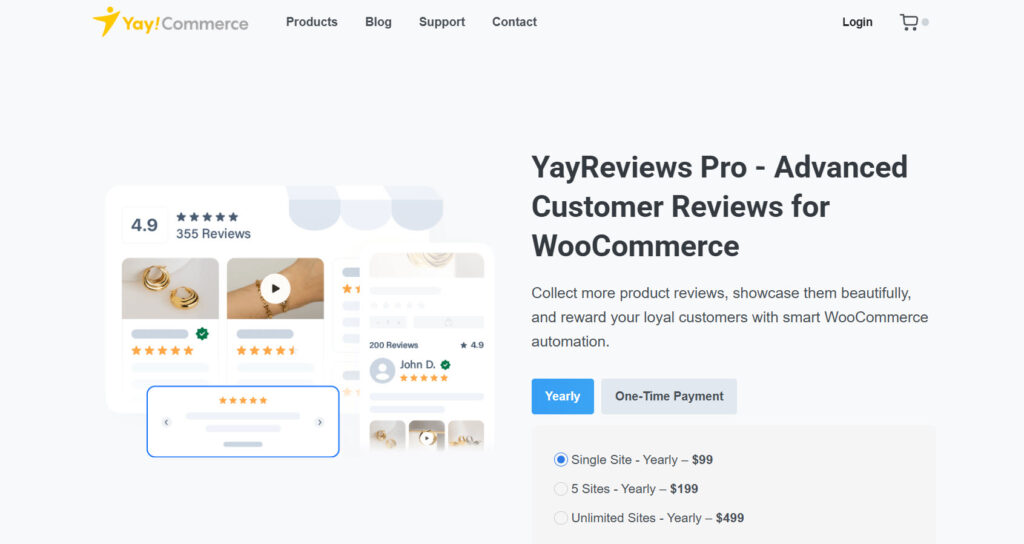
For this tutorial, we will be using the premium version of YayReviews. Once you have activated and verified your license key, you can begin configuring the plugin’s main settings.
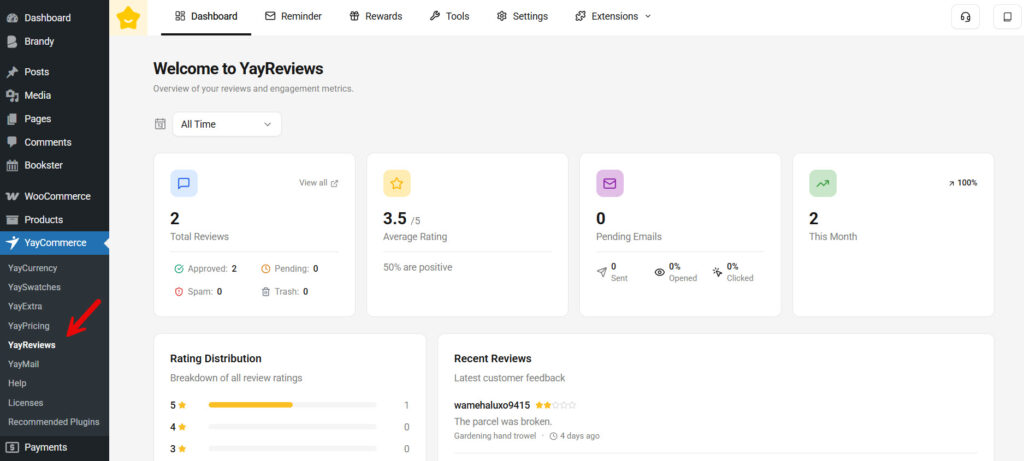
On the top bar, you can see options like:
- Dashboard
- Reminder
- Rewards
- Tools
- Settings
- Extensions
From the list, we will be choosing the rewards option.
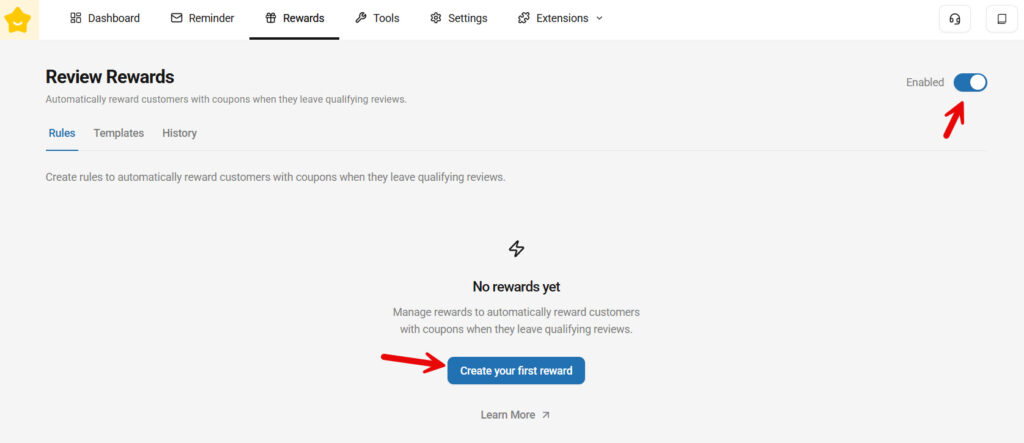
Make sure review rewards are enabled. Also, you won’t see any pre-made rules there. So you need to create your first one.
Once you hit the button, you will see all the configuration options to customize the reward.
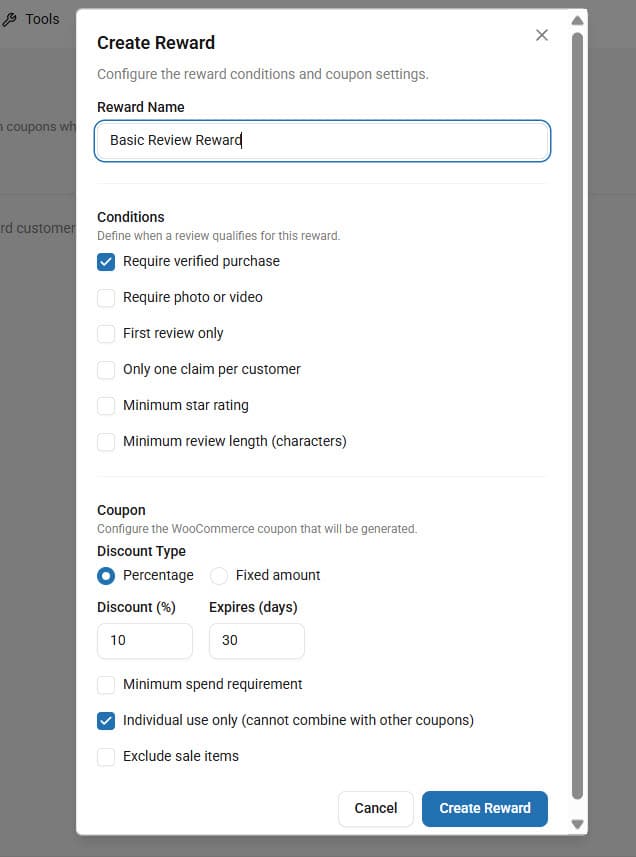
There are configuration options like:
- Reward name
- Conditions
- Require verified purchase
- Require photo or video
- First review only
- Only one claim per customer
- Minimum star rating
- Minimum review length
- Coupon
- Discount type
- Percentage
- Fixed
- Discount type
- Minimum spend requirement
- Individual use only
- Exclude sale items
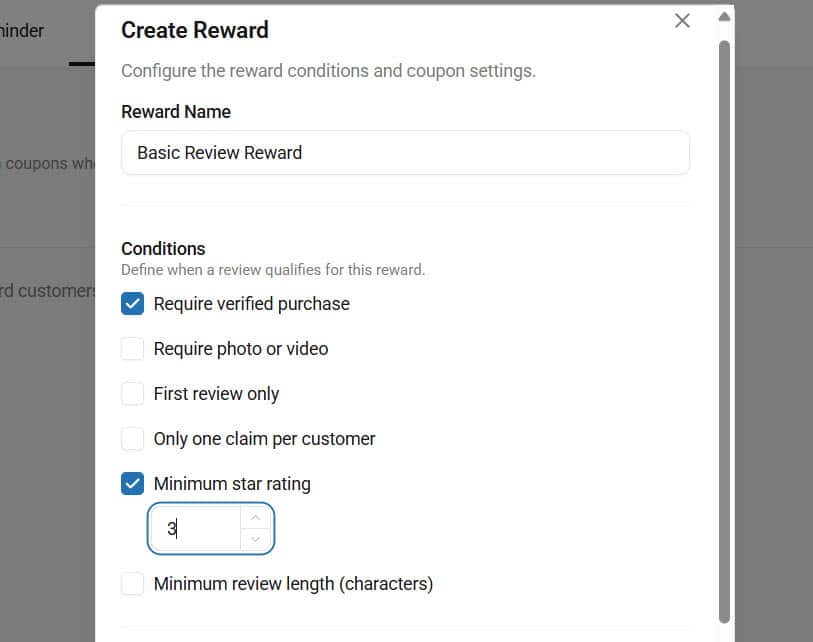
Here, we are going to add a review reward when someone leaves us a 3-star or above. So, to configure it, name the rule and select the conditions that apply. A good thing about the YayExtra plugin is you can add multiple conditions to the same rule.
For our use case, we will add two conditions to the rule:
- Require a verified purchase – so we know the customer is authentic
- Minimum star rating: 3 – our main rule
Now move to the coupon section.
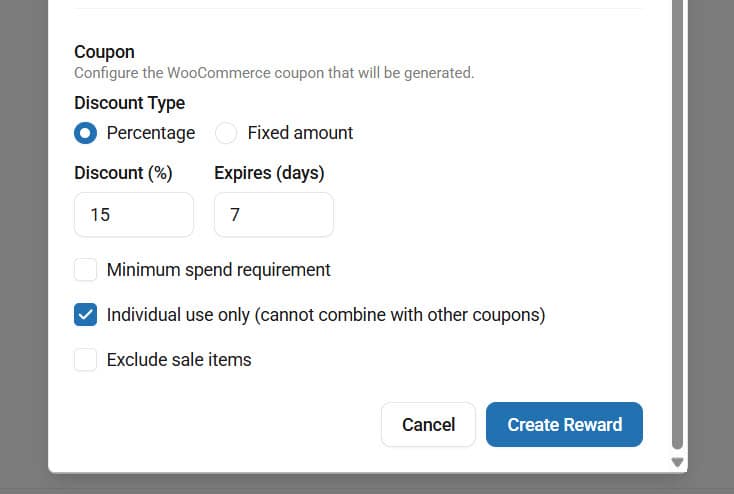
You can choose between a percentage discount and a fixed discount. You can also choose how much discount you want to give the user and what the expiration date will be.
Once you’re done with that, you will see more customization options, such as a minimum spend requirement, individual use only, exclude sale items, and so on.
In our case, we will give the reviewer a coupon code for a 15% discount. And the coupon will also expire in a week. So, they need to act quickly (more profit for you).
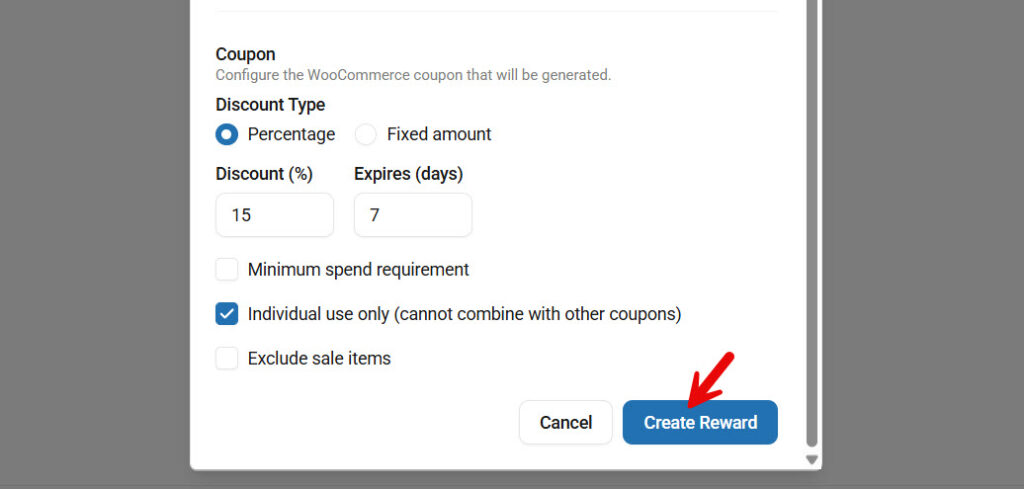
Once you are done, create the reward.
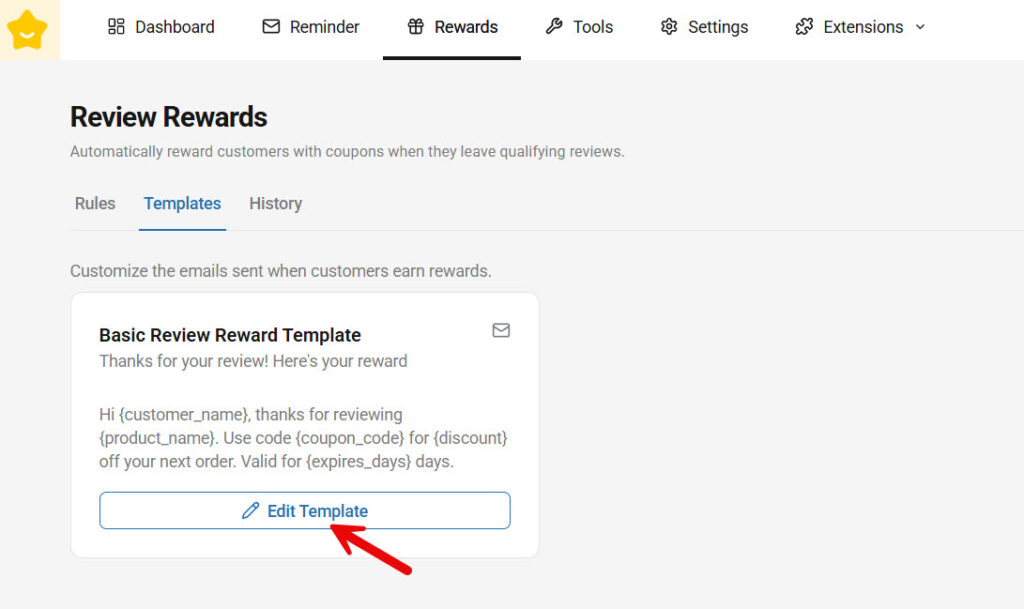
Now it is time to edit the email template. For each review reward rule you create, there will be individual email templates. You can see them in the templates section. The default one is good, but we could do a bit better with a custom one.
So, click the edit template button.
On the left-hand side, you can configure the
- Template Name
- Email Subject
- Email Heading
- Email Body
The right-hand side will show you the live preview of the email template. A few variables are also available, which you can insert in the email content.
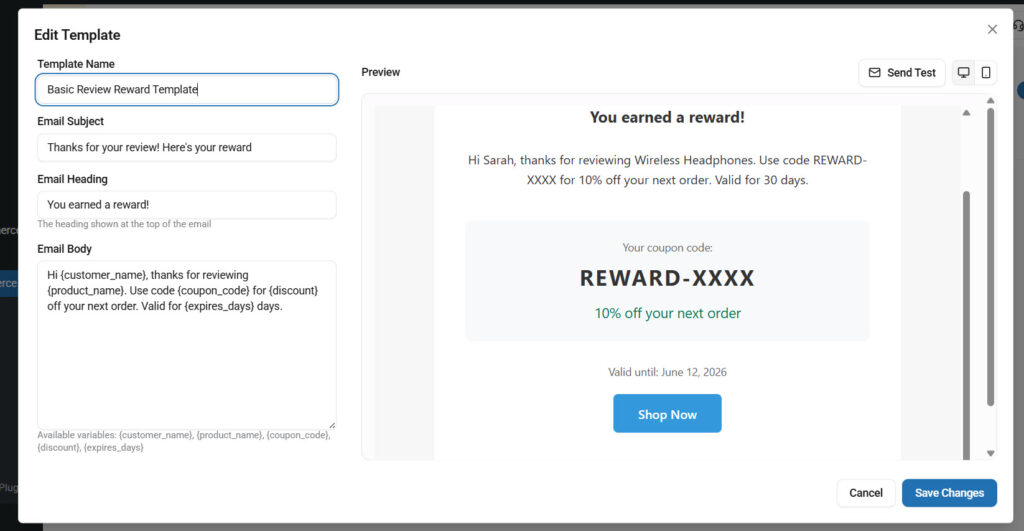
And now, as you thought, it is pretty basic. People wouldn’t care much about this template. That’s where YayMail comes in.
YayMail is one of the best plugins for customizing your email templates. Using the plugin, you can take the email template customization to the next level. The plugin is 100% compatible with YayReviews, so you won’t run into any issues.
Each template you create in the templates section can be seen in the YayMail editor and tweaked.

Inside the editor, you can see the blocks on the left-hand side.
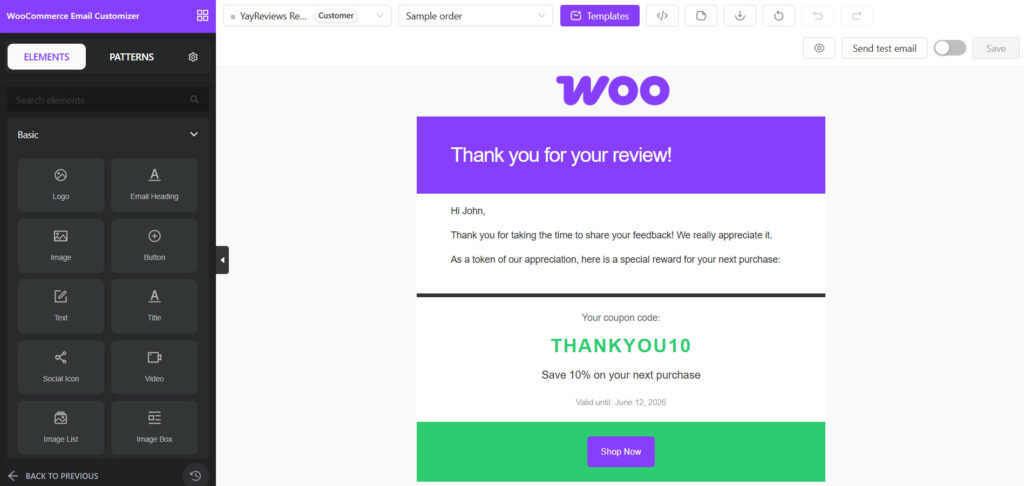
On the right-hand side, you can see the live preview of the template. We are not going to continue with how to design the template – that’s for another day. But once you have customized the template, you need to save and activate it.
From now on, when someone leaves a 3-star or above review (purchase mandatory), this email template will be triggered. There are several conditions you can use, as shown in the screenshot. So, try to create rewards based on your preferences.
That’s it!
This is how to automatically send customer-review reward emails in WooCommerce. You can add as many rules as you need.
And if you are facing issues with email deliverability, it is due to the SMTP configuration. We recommend using YaySMTP and configuring the mailer properly.
Best Practices for Review Reward Emails
Review reward emails can significantly increase customer engagement and review submissions, but they work best when the experience feels genuine, simple, and valuable to customers.
- Offer meaningful but sustainable rewards: Discounts should feel valuable without hurting your profit margins
- Encourage honest reviews: Reward customers for leaving feedback, not for leaving only positive reviews
- Send rewards quickly: Fast delivery makes the experience feel automated, reliable, and rewarding
- Keep the email simple and clear: Customers should immediately understand the reward and how to redeem it
- Use personalized messaging: Adding the customer’s name or purchased product can improve engagement
- Optimize for mobile devices: Most customers open emails on smartphones, so keep layouts clean and mobile-friendly
- Reward high-quality reviews differently: Consider offering better incentives for photo or video reviews that add more value to product pages
- Avoid overwhelming customers with conditions: Complicated coupon rules or redemption restrictions can reduce participation
- Maintain consistent branding: Use your store’s colors, logo, and tone to create a professional email experience using the YayMail plugin
- Test your email workflow regularly: Make sure rewards are triggered properly and delivered without delays
Following these best practices helps create a review reward system that feels trustworthy, professional, and effective for both your WooCommerce store and your customers.
Common Mistakes to Avoid
Automated review reward emails can improve customer engagement and review collection, but poor setup or confusing reward systems can reduce their effectiveness. Avoiding these common mistakes will help you create a smoother and more trustworthy experience for your customers.
- Rewarding only positive reviews: Customers should be rewarded for honest feedback, not just high ratings
- Sending rewards too late: Delayed reward emails can reduce excitement and make the automation feel unreliable
- Using overly complicated coupon rules: Difficult redemption conditions may discourage customers from using the reward
- Offering rewards with very little value: Tiny discounts or weak incentives may not motivate customers to leave reviews
- Ignoring mobile email optimization: Emails that look broken or cluttered on smartphones can reduce engagement
- Not testing the automation workflow: Always verify that review submissions correctly trigger the reward email
- Creating a confusing review process: Too many steps can reduce review completion rates
- Overusing reward emails: Excessive promotional messaging can make customers ignore future emails
- Failing to moderate low-quality or spam reviews: Reward systems should still maintain review quality and credibility
- Using inconsistent branding in emails: Poor design or mismatched visuals can reduce trust in the reward system
By avoiding these mistakes, WooCommerce store owners can build a review reward system that feels professional, reliable, and genuinely valuable to customers.
Frequently Asked Questions
Now, let’s take a look at some frequently asked questions and answers about this topic.
Yes, WooCommerce can automatically send review reward emails when combined with a plugin like YayReviews. The plugin allows store owners to automatically send discount coupons after customers submit approved product reviews, helping increase engagement and review submissions.
Most WooCommerce stores use percentage discounts or fixed discount coupons as review rewards. These incentives encourage customers to leave feedback and increase the likelihood of repeat purchases.
After a customer submits a review, the system checks the conditions you configured, such as review approval or verified purchase status. Once the conditions are met, the customer automatically receives a reward email with their discount code.
Yes, plugins like YayReviews allow WooCommerce store owners to create different reward conditions for photo reviews, video reviews, or other high-quality review types. This helps encourage richer user-generated content.
Yes, reviewing reward emails helps improve customer retention by giving shoppers a reason to return to your store. Discount rewards can encourage future purchases while keeping customers engaged with your brand.
Yes, incentivizing reviews is generally acceptable as long as customers are encouraged to leave honest feedback rather than only positive reviews. Transparency and authenticity are important for maintaining trust.
Yes, YayReviews includes built-in review reward automation that allows store owners to automatically send discount rewards after customers submit reviews. The plugin simplifies the entire workflow directly inside WooCommerce.
Yes, YayReviews is an all-in-one WooCommerce review plugin that includes features such as photo and video reviews, AI review summaries, custom rating types, moderation tools, and advanced review displays, in addition to review reward automation.
In most cases, yes. Sending rewards quickly creates a better customer experience and increases the perceived value of the incentive. Automated workflows help ensure customers receive rewards without unnecessary delays.
Yes, more customer reviews help build social proof and trust, which can improve conversion rates. Reward emails also encourage repeat purchases by bringing customers back with discount incentives.
Conclusion
Automatically sending customer review reward emails is one of the most effective ways to increase product reviews, improve customer engagement, and encourage repeat purchases in WooCommerce.
By rewarding customers with percentage-based or fixed discount coupons after they leave a review, store owners can create a more active and trustworthy shopping experience without adding manual work. With YayReviews, setting up review-reward automation is simple and scalable.
Beyond automated reward emails, the plugin also includes powerful WooCommerce review features, such as photo and video reviews, AI-generated review summaries, custom rating types, moderation tools, and advanced review management options.
This makes YayReviews more than just a review reward tool; it becomes a complete, all-in-one WooCommerce review solution designed to help ecommerce stores build stronger social proof and customer trust.

