
Do you want to give a discount to logged-in WooCommerce customers? If you are looking for a simple guide, keep reading.
Offering a discount to logged-in WooCommerce customers is a smart way to boost conversions and reward user engagement. By targeting users who have already created an account, you can encourage repeat purchases and build long-term customer loyalty.
WooCommerce allows you to create personalized pricing strategies, but setting up discounts for logged-in users often requires the right approach or plugin.
In this guide, you will learn how to offer a discount to logged-in WooCommerce customers step by step, helping you create a more effective and customer-focused pricing strategy for your store.
First, let’s see why we have to implement this function on your WooCommerce store.
Why Offer Discounts to Logged-In Customers in WooCommerce
Offering discounts to logged-in WooCommerce customers helps improve engagement and drive more sales.
- Reward loyal customers: Offer exclusive discounts to account-holding users who regularly shop at your store.
- Increase repeat purchases: Encourage customers to return and buy again with personalized pricing.
- Boost conversions: Logged-in users are more likely to complete purchases when offered special deals.
- Encourage account creation: Visitors are more likely to sign up when they see benefits like member-only discounts.
- Enable targeted pricing: You can create more effective marketing strategies by offering discounts based on user status.
How to Give Discounts to Logged-In WooCommerce Customers (Step by Step)
We are going to use the YayPricing plugin for it. YayPricing is a freemium WooCommerce plugin that lets you add dynamic pricing to your store. The free version comes with all the basic functions.
The premium version will unlock all the powerful features. For this article, we will use the premium version. The first thing you need to do is install and activate the plugin. If you are already using it, you can skip this part.
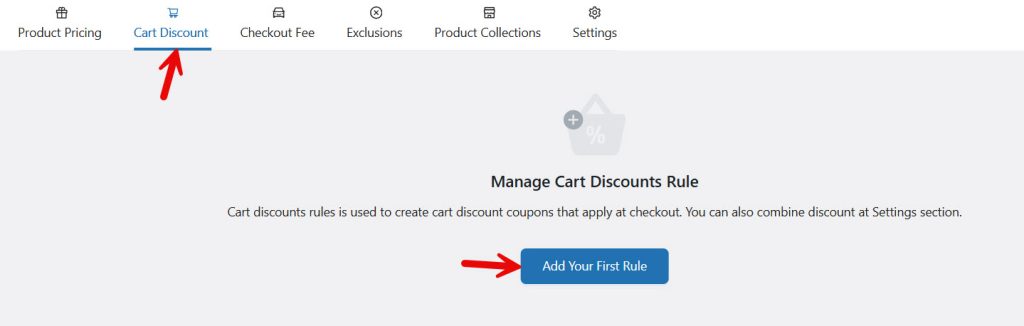
You will see six options in the plugin settings page.

- Product Pricing
- Cart Discount
- Checkout Fee
- Exclusions
- Product Collections
- Settings.
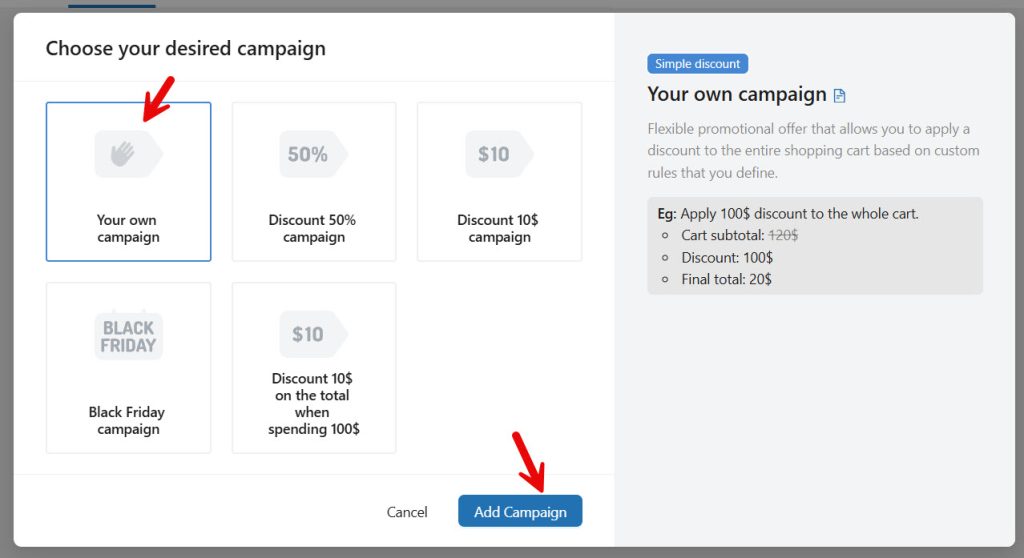
From here, select the Cart Discount rule and create a new campaign.
You will see some pre-made campaigns there. You can choose one of them or set up your own campaign from scratch.
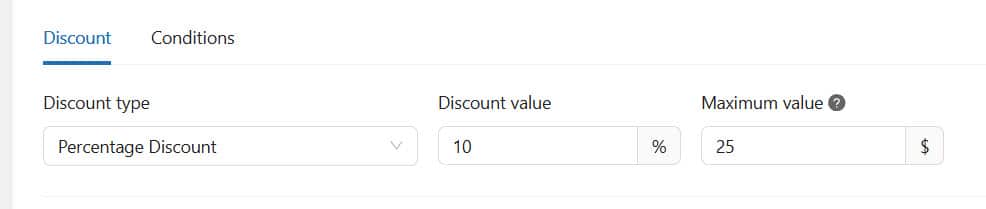
Give a name for the discount rule. The name is only used to identify each rule in the backend. It won’t be displayed in the front end. Once that is done, choose the discount type and amount.
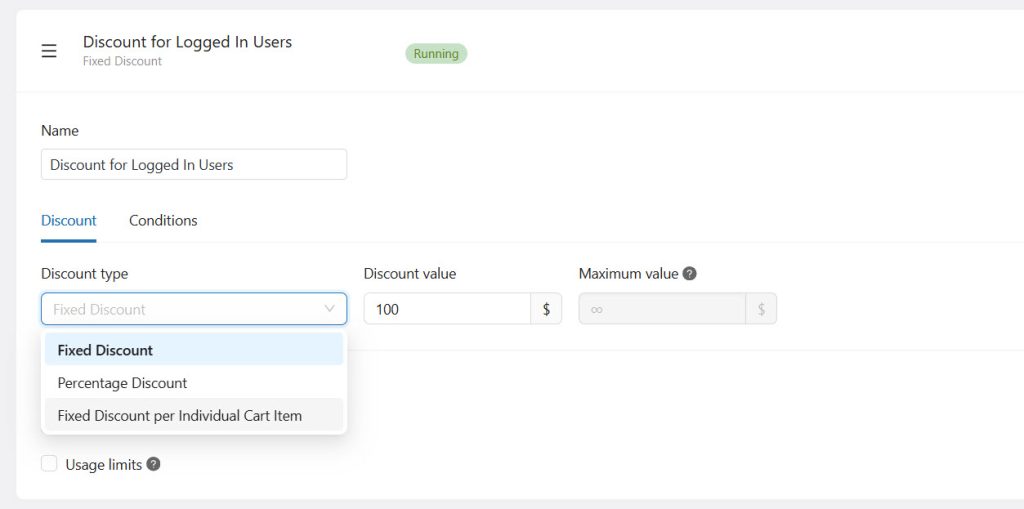
For this tutorial, we will use the percentage discount type, with a value of 10%. And the maximum discount people can get on an order would be $25.
Next, we will move to the conditions and add a new one.
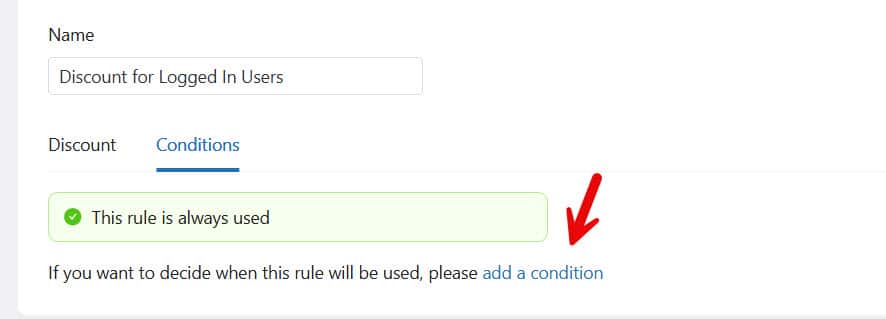
The condition you will be looking at is whether the user is a logged-in customer. And the value will be logged in.
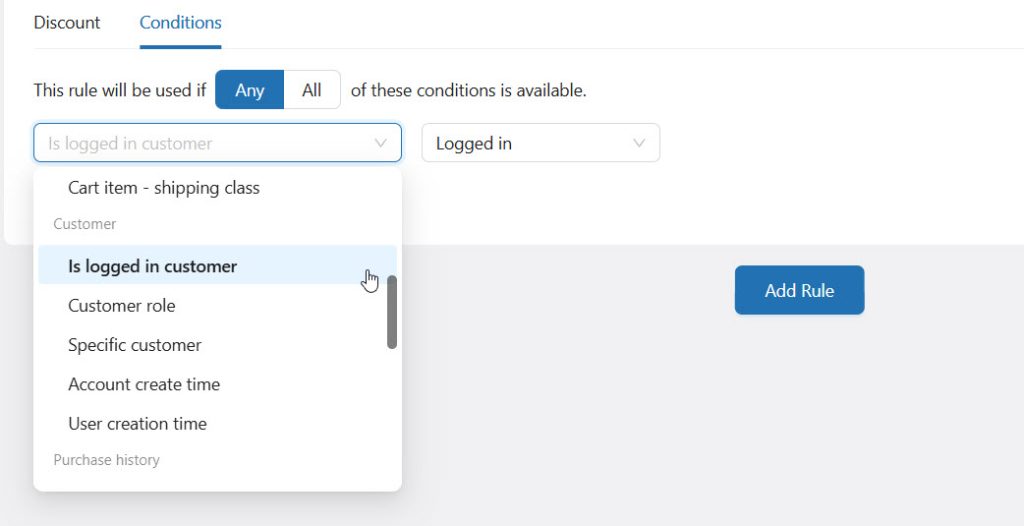
The best thing about YayPricing is that you can add more conditions to the same rule. So if you need to add more conditions, such as shipping region or payment method, feel free to do so.
When you add more than 1 condition, make sure you are using the all option here.
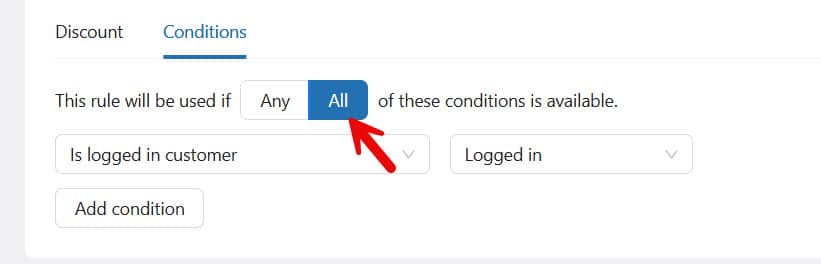
Once the configuration is done, you can save and activate the campaign.

From now on, everyone who purchases products on your website will receive a 10% discount when logged in. This is a good way to increase account creation rates, and you can later use the emails to market new products and drive more conversions.
It is a win-win situation.
That’s it!
This is how you can give discount to logged-in WooCommerce customers.
Best Practices for Offering Discounts to Logged-In Customers
Following best practices helps you maximize the impact of discounts while maintaining profitability in your WooCommerce store.
- Target the right users: Offer discounts to specific logged-in customers based on behavior, purchase history, or user roles.
- Keep discounts strategic: Avoid overusing discounts and focus on offers that drive real conversions.
- Use clear messaging: Highlight exclusive discounts for logged-in users to increase engagement and trust.
- Test different discount types: Experiment with percentage, fixed, or conditional discounts to see what works best.
- Set conditions and limits: Control usage with minimum-spend, product-selection, or time-based rules.
- Track and optimize performance: Monitor results and adjust your strategy to improve conversions and revenue.
Common Mistakes to Avoid
Avoiding common mistakes ensures your discounts for logged-in WooCommerce customers work effectively and don’t impact your revenue.
- Applying discounts to all users: Incorrect rule settings can make discounts visible to guest users instead of only logged-in customers.
- Not testing discount rules: Failing to test can lead to errors where discounts don’t apply correctly or stack unexpectedly.
- Overlapping multiple discounts: Running multiple pricing rules without control can reduce profits and confuse customers.
- Ignoring profit margins: Offering high discounts without calculation can negatively impact your store’s revenue.
- Lack of clear messaging: If users don’t know about the discount, they are less likely to take action.
- Not tracking performance: Without monitoring results, it’s hard to optimize your discount strategy for better conversions.
Here are some more articles you might like:
- How to Give a Discount to Logged-In WooCommerce Customers
- 7 Fastest WooCommerce Themes in 2026: Find Your Perfect Theme
- 7 Best AI Coding Tools and Plugins for WordPress
- How to Give WooCommerce Discounts for Specific Regions
- How to Give Discounts on WooCommerce Shipping Fees
Frequently Asked Questions
Now, let’s take a look at some frequently asked questions and answers.
You can give a discount to logged-in WooCommerce customers by using a pricing plugin that supports user-based conditions. This allows you to apply discounts only when a user is logged in, without affecting guest users.
WooCommerce does not offer built-in options to apply discounts specifically for logged-in users. You need a plugin to create advanced pricing rules based on user status.
You can offer percentage discounts, fixed-price discounts, or special pricing for specific products or categories. These discounts can be customized to align with your store’s strategy.
Offering discounts to logged-in users helps reward loyal customers, increase repeat purchases, and encourage visitors to create an account on your WooCommerce store.
Yes, you can combine logged-in user discounts with other rules, such as product- or cart-based discounts, depending on the plugin you use and your pricing strategy.
Yes, you can apply discounts for logged-in customers only on specific products or categories, allowing you to run targeted promotions.
A plugin like YayPricing is a great choice because it lets you create flexible pricing rules based on user login status, making it easy to manage and automate discounts without coding.
Conclusion
Offering a discount for logged-in WooCommerce customers is a powerful way to increase conversions, reward loyal users, and build long-term relationships.
In this guide, you learned how to target logged-in users with personalized pricing and why it is important for improving customer engagement. Instead of using complex setups, using a dedicated plugin makes the process much easier and more efficient.
With YayPricing, you can create flexible discount rules specifically for logged-in customers, control conditions, and apply them across products or categories with ease.
It simplifies the entire workflow and helps you implement advanced pricing strategies without coding, making it a reliable solution for growing your WooCommerce store.
We hope you found this article helpful and enjoyed reading it. If you need to learn more WooCommerce tips and tricks, check out the YayCommerce blog. Also, feel free to check out our social media handles, such as Facebook, X, Instagram, and YouTube, for more interesting content.
What other discount type would you implement in your store?
Let us know in the comments.