
Are you looking for the best ways to build social proof and engage customers? In this post, we are going to show you the top 9 options you can use to build social proof with the YayReviews plugin.
Customer reviews are one of the most powerful forms of social proof for any WooCommerce store. When potential buyers see real feedback, ratings, and photos from satisfied customers, they feel more confident about making a purchase.
A strong review system does more than just collect feedback. It builds trust, reduces hesitation, and directly increases conversions.
In this guide, we will walk you through 9 effective ways to build social proof and engage your customers using YayReviews. These practical strategies will help you collect more authentic reviews, display them effectively, and turn happy customers into loyal advocates for your brand.
Table of contents
- Why Social Proof Is Critical for Your WooCommerce Store
- The 9 Powerful Ways to Build Social Proof Using YayReviews
- 1. Send Smart Automated Review Reminders
- 2. Offer Gentle Incentives That Work
- 3. Collect Photo and Video Reviews
- 4. Respond to Every Review (Positive & Negative)
- 5. Showcase Reviews Across Your Site
- 6. Use Reviews in Marketing & Social Media
- 7. Add Verified Buyer Badges & Trust Signals
- 8. Display AI Summaries
- 9. Customize Rating Types to Match Your Business
- Get Started with YayReviews
- Frequently Asked Questions
- Conclusion
Why Social Proof Is Critical for Your WooCommerce Store
Social proof plays a major role in every online buying decision. When shoppers see real customer reviews, ratings, and photos, they feel more confident about purchasing from your store. Without it, many visitors simply leave and buy from a competitor.
Here are the main reasons why strong social proof matters:
- Builds Trust Quickly: Nearly 92% of customers hesitate to buy when no reviews are available. Real feedback from other buyers helps remove doubt and makes your products feel more reliable.
- Increases Conversions: Products with five or more reviews can sell up to 270 percent more than those without any. Displaying reviews on your site can also boost conversion rates by 15 to 67 percent.
- Improves SEO: Google favors pages with fresh user-generated content and rich snippets from reviews, helping your store rank higher in search results.
- Reduces Returns and Refunds: Honest reviews help customers choose the right product, leading to fewer disappointments and returns.
- Creates Long-Term Loyalty: When customers see others having great experiences, they are more likely to buy again and recommend your store to friends.
In short, social proof turns first-time visitors into paying customers and loyal fans. With the right tool like YayReviews, building this proof becomes much easier and more effective.
The 9 Powerful Ways to Build Social Proof Using YayReviews
The best ways you should follow are:
- Send automated review reminders
- Offer coupon codes for genuine reviews
- Collect photo and video reviews
- Respond to every review
- Showcase all the reviews
- Add badges
- Display review AI summaries
- Customize rating types
Let’s take a closer look at each option.
1. Send Smart Automated Review Reminders
One of the biggest reasons stores struggle to get reviews is that they rely on customers to leave feedback on their own. Most buyers forget or simply move on after purchase.
The most effective solution is to send automated review reminders at the right time. YayReviews makes this incredibly easy.
With YayReviews, you can set up smart email reminders that go out 3 to 7 days after delivery — when customers have actually used the product. You can also control the timing, add personalized messages, and even include a direct link to the review form.
How to do it with YayReviews:
- Go to YayReviews settings → Review Reminders
- Add a new rule
- Set the number of days after order completion
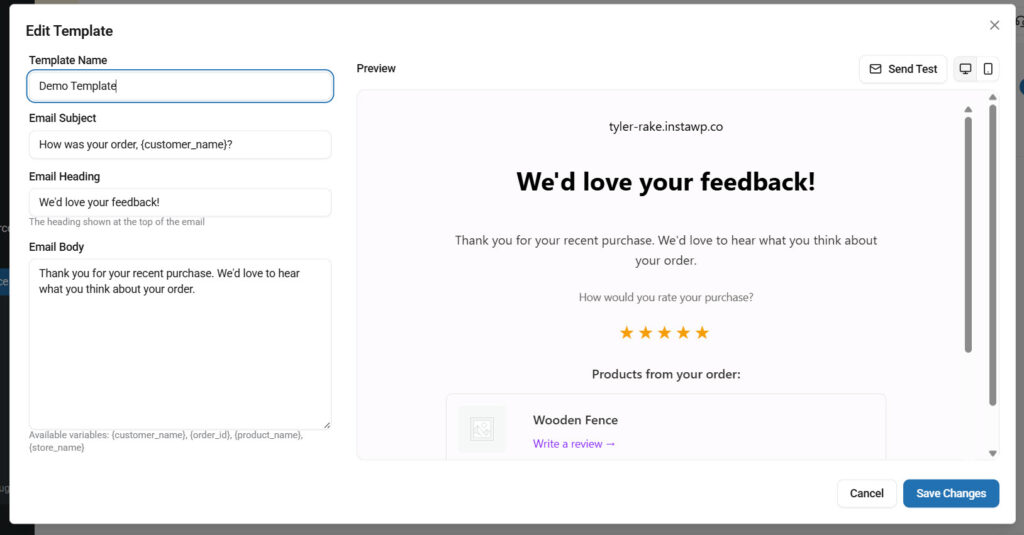
Pro Tip: Test different timings. Many stores see the best results between Day 4 and Day 6 after delivery. You should also use YayMail to design the email templates.
This single strategy can significantly increase your review collection rate while requiring almost no manual effort.
2. Offer Gentle Incentives That Work
Many customers are happy with their purchase but still need a little nudge to leave a review. Offering a small incentive is one of the most effective ways to boost review rates without being pushy.
YayReviews makes this process automatic and professional. You can reward customers with a coupon code after they submit a review, encouraging more people to share their honest feedback.
How to Set It Up with YayReviews:
- Go to Review Reminders in the plugin settings
- Create your reward
- Enable the “Coupon Reward” option
- Set the discount amount (e.g., 10% off next order)
- Customize the reward message
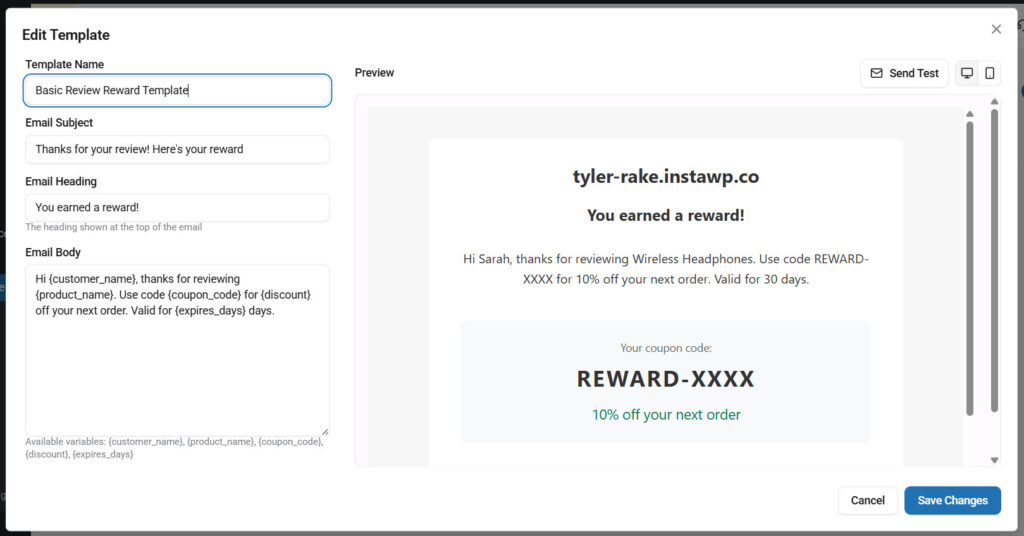
Pro Tip: Keep incentives reasonable. A 10-15% discount or free shipping on the next order works well for most stores. Always mention that reviews should be honest. This keeps your store compliant and maintains trust.
This strategy not only increases the number of reviews but also encourages repeat purchases, creating a positive cycle for your store.
3. Collect Photo and Video Reviews
YayReviews makes it easy to collect photo and video reviews that build powerful social proof. Customers can upload images and videos directly when submitting their feedback, giving future buyers a clearer, more realistic view of your products.
This feature is especially valuable for stores selling clothing, beauty products, furniture, or any items where visual proof matters. Real customer photos and videos build trust more effectively than text-only reviews and often lead to higher conversion rates.
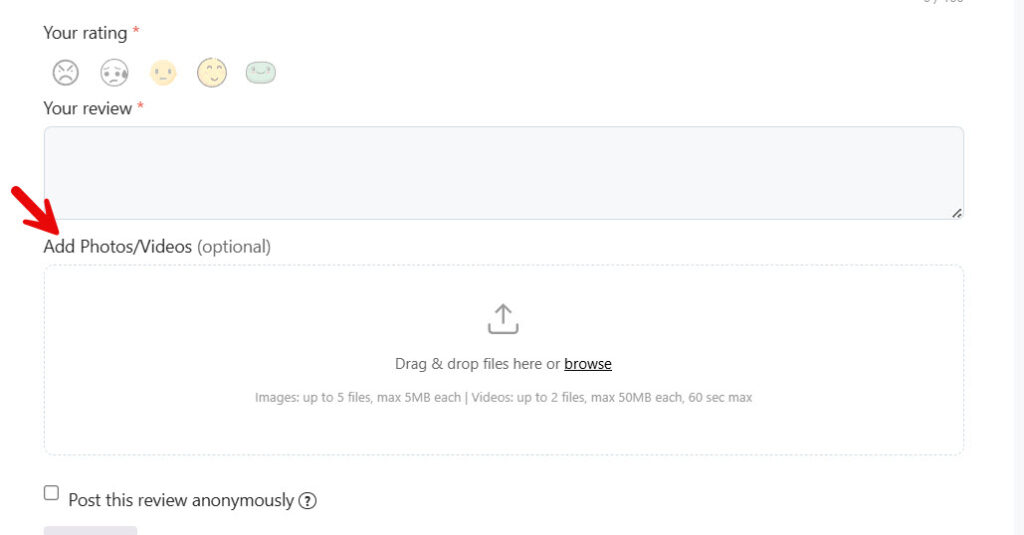
YayReviews gives you full control, with options to set file size limits, the number of uploads, and moderation tools, so you can maintain quality. The plugin also displays these media beautifully on your product pages, making reviews more engaging and convincing for visitors.
4. Respond to Every Review (Positive & Negative)
YayReviews makes it easy to respond to every customer review, whether positive or negative. Replying to reviews shows that you value customer feedback and care about their experience. For positive reviews, a simple thank you can make customers feel appreciated and more likely to buy again.
For negative reviews, a professional, helpful reply can turn unhappy customers into loyal ones and show other visitors that you stand behind your products.
The plugin keeps all reviews and replies organized in one place, so you never miss a new review. This consistent engagement builds stronger social proof because potential buyers see that you are active, transparent, and committed to customer satisfaction.
5. Showcase Reviews Across Your Site
YayReviews allows you to showcase customer reviews across your entire website, not just on individual product pages. You can display review widgets and review forms on your homepage, category pages, shop page, sidebar, footer, or even custom landing pages.
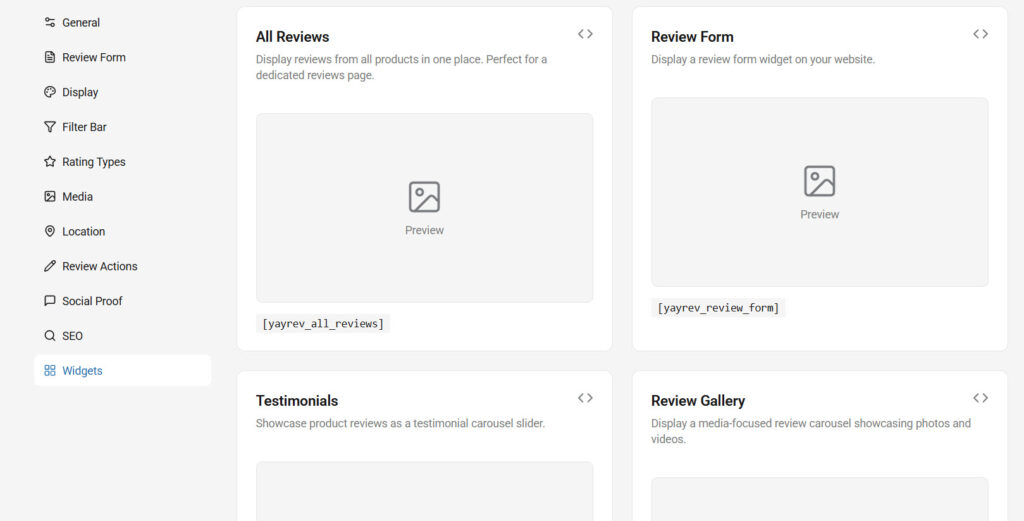
This broader visibility turns reviews into a powerful 24/7 marketing tool. When visitors see real customer feedback in multiple places, it creates consistent trust signals throughout their journey on your site. The plugin offers clean, responsive widgets that fit any theme.
By placing reviews strategically across different pages, you reinforce social proof at every stage, helping reduce hesitation and guide more visitors to make a purchase.
6. Use Reviews in Marketing & Social Media
YayReviews makes it simple to turn your customer reviews into powerful marketing content. You can easily export reviews with photos and videos, then repurpose them across your social media channels, email campaigns, and advertisements.
Real customer stories and visuals work much better than branded content because they feel authentic. With YayReviews, you can quickly find top-rated reviews, verified buyer feedback, and beautiful photo reviews to share on Instagram, Facebook, TikTok, or Pinterest.
This strategy helps you build social proof beyond your website. When potential customers see your product praised by real buyers on social media, it creates trust and drives more traffic back to your store.
The plugin also lets you generate widgets you can embed anywhere, making it easier to promote social proof across all your marketing efforts.
7. Add Verified Buyer Badges & Trust Signals
YayReviews helps you add verified buyer badges and strong trust signals that instantly make your reviews more credible. The plugin automatically marks reviews from actual purchasers with a clear “Verified Buyer” badge, which builds immediate trust with new visitors.
These trust signals show that the review comes from someone who really bought and used the product, not just a random person. You can also display overall rating summaries, total review counts, and percentage-based recommendations right above the review section.
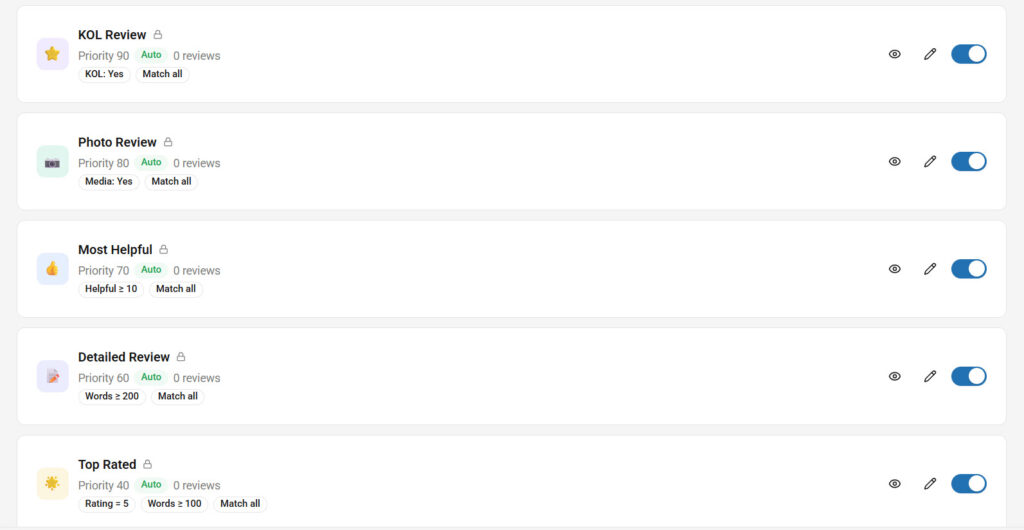
This combination of verified badges and trust signals significantly reduces buyer hesitation. Customers feel more confident when they see that most reviews are from real buyers, which leads to higher conversion rates and stronger social proof for your WooCommerce store.
8. Display AI Summaries
YayReviews helps you build stronger social proof by automatically generating and displaying AI-powered summaries of your customer reviews. Instead of forcing visitors to read through many individual reviews, the AI analyzes all feedback and creates a clear, concise overview.
For example, it might show something like “87 percent of customers loved the quality and sizing, with most praising durability and comfort.”
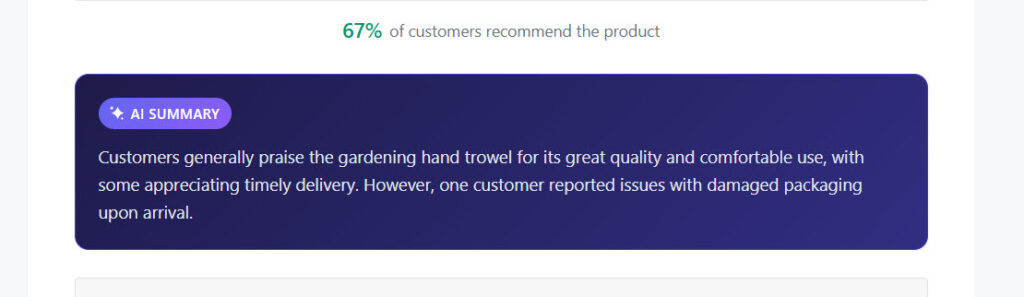
This feature highlights key strengths and common opinions, making it much easier for potential buyers to quickly understand the overall sentiment. You can place these AI summaries at the top of the review section, on product cards, or even on category pages.
The result is higher trust, better engagement, and improved conversion rates, especially for products with many reviews. YayReviews makes this advanced feature simple to use while keeping everything lightweight and professional.
9. Customize Rating Types to Match Your Business
YayReviews gives you full control to customize the rating style on the frontend to better match your brand and products. Instead of the usual yellow stars, you can change the rating icons to any emoji, custom images, or even SVG icons that fit your store’s theme.
For example, you can use heart emojis for fashion stores, thumbs-up for gadgets, or leaf icons for organic products. This small customization makes your review section look more unique and engaging. It also helps reviews feel more on-brand, encouraging customers to engage more and build stronger social proof.
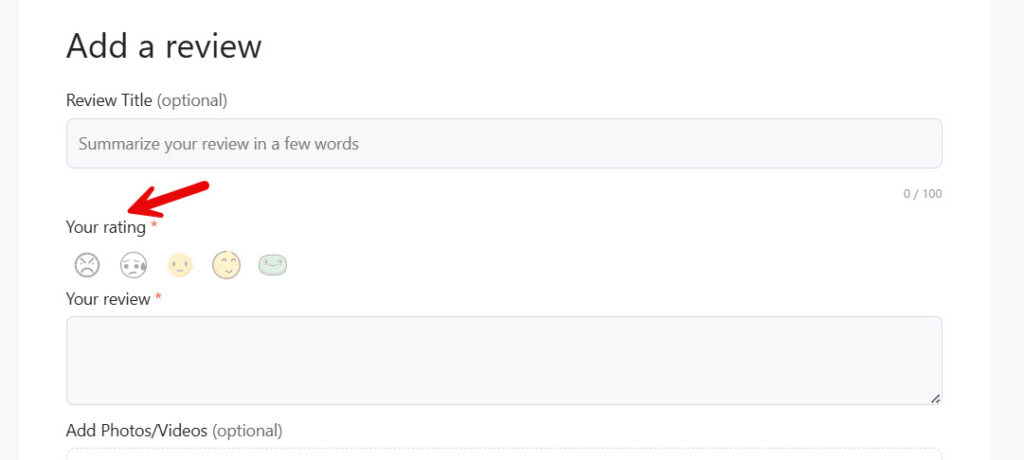
With this feature, your review area no longer looks generic. It becomes a natural extension of your store design while still delivering clear and trustworthy ratings to potential buyers.
Here are some more articles you might be interested in:
- Photo & Video Reviews in WooCommerce: Why They Convert Better Than Text
- 7 WooCommerce Discount Strategies That Actually Increase Average Order Value
- How to Get More (and Better) Product Reviews on Your WooCommerce Store
- How to Add a Request a Quote Button to Your WooCommerce Store
- What’s New in YayExtra 2.1.0
Get Started with YayReviews
Frequently Asked Questions
Now, let’s take a look at some frequently asked questions and answers about this topic.
Social proof is when potential customers see evidence that other people have bought and liked your products. It includes reviews, ratings, photos, and testimonials. It matters because it builds trust fast and helps reduce buyer hesitation, leading to higher conversion rates.
Customer reviews act as real recommendations from actual buyers. When people see positive feedback, star ratings, and photos from others, they feel more confident buying from your store. This trust directly translates into more sales.
The fastest way is to automate review requests. Sending polite reminders a few days after delivery, combined with a small incentive like a coupon, significantly increases review rates.
Yes. Products with customer photos and videos get much higher trust and better conversion rates than text-only reviews. Visual reviews feel more authentic and help shoppers better imagine the product.
Yes, you can. Offering a discount coupon after a review is acceptable as long as you clearly state that the review should be honest. Most customers appreciate the gesture.
YayReviews makes it very easy to collect, manage, and display reviews. With features like automated reminders, photo/video support, verified badges, and beautiful widgets, it helps you gather authentic reviews and show them effectively on your store.
You should display reviews on product pages, homepage, category pages, and even in the footer. Using review carousels and widgets makes them highly visible and more effective.
You should display reviews on product pages, homepage, category pages, and even in the footer. Using review carousels and widgets makes them highly visible and more effective.
Always respond professionally and quickly. Thank the customer for their feedback and offer a solution. Handling negative reviews well often builds more trust than only positive ones.
Yes. YayReviews is designed to be simple and lightweight. You can set up automated reminders, photo uploads, and nice review displays in just a few minutes, even if you are new to WooCommerce.
YayReviews has a free version that is enough for small stores. The Pro version is affordably priced and unlocks unlimited reminders, video reviews, advanced widgets, and priority support.
Conclusion
Building strong social proof is one of the smartest investments you can make in your WooCommerce store. Authentic customer reviews not only build trust but also help you stand out from competitors and increase your sales.
By applying the 9 strategies shared in this guide, from smart automated reminders to beautiful review displays and effective engagement tactics, you can consistently collect more genuine feedback and turn satisfied customers into powerful advocates for your brand.
YayReviews makes all of these strategies easier to execute with its simple setup, powerful automation, and clean design.
Whether you are just starting to collect reviews or want to take your social proof to the next level, YayReviews gives you the tools you need to succeed. Start implementing these tips today and watch how real customer voices help grow your store with trust and confidence.
We hope you found this article helpful and enjoyed reading it. If you need to learn more WooCommerce tips and tricks, check out the YayCommerce blog. Also, feel free to check out our social media handles, such as Facebook, X, Instagram, and YouTube, for more interesting content.
Ready to build better social proof?
Try YayReviews for free and see the difference yourself.
