
Are you looking for the HappyFiles review? In this post, we’ll cover a complete HappyFiles review and some alternatives with better features.
Managing media files in WordPress can quickly become messy as your site grows. The default Media Library offers limited organization options, making it hard to keep images, videos, and documents in order.
HappyFiles is a popular media management plugin that adds folders, categories, and better organization tools to your WordPress website.
In this HappyFiles review, we take a close look at its features, ease of use, free and premium versions, and overall performance to help you decide if it is the right media organizer for your site.
First, let’s see what HappyFiles can do to help you.
Table of contents
- HappyFiles: An Introduction
- HappyFiles Review: How Good Is This WordPress Media Library Plugin
- HappyFiles Pros and Cons
- How to Use HappyFiles to Manage and Organize Media Library
- HappyFiles Alternatives for Media Organizing
- HappyFiles vs FileBird vs CatFolders
- Quick Recommendation
- Frequently Asked Questions
- Conclusion
HappyFiles: An Introduction
HappyFiles is a media management plugin designed to help you organize files in the WordPress Media Library. It adds a clean folder system so you can categorize images, videos, documents, and other media files instead of scrolling through a long, unorganized list.
The plugin supports drag-and-drop organization, hierarchical folders, and works with multiple post types, including pages, posts, and WooCommerce products. It is lightweight, easy to use, and compatible with popular page builders like Elementor and Divi.
HappyFiles is a premium plugin (the free version was retired) and currently offers a lifetime license for a one-time payment.
HappyFiles Review: How Good Is This WordPress Media Library Plugin
In this HappyFiles review, we will take a look at:
- All the features this plugin has to offer
- The best use cases
- How good is the support and documentation
- How much does this plugin cost
And so on.
Features
HappyFiles comes with a focused set of tools designed to improve media organization in WordPress. Here are the main features:
- Unlimited Folders: Create as many folders as you need to organize images, videos, documents, and other media files without any restrictions.
- Hierarchical Subfolders: Build multi-level folder structures so you can group files by project, client, category, or any system that fits your workflow.
- Drag and Drop Interface: Easily move individual files or bulk select multiple items and drop them into the right folders with a smooth and intuitive interface.
- Organize Posts, Pages & Custom Post Types: Use folders beyond the Media Library to organize posts, pages, WooCommerce products, and other custom post types.
- SVG Upload and Sanitization: Enable SVG file uploads with automatic sanitization for better security, plus a built-in preview option.
- Import from Other Plugins: Quickly import existing folder structures from plugins like FileBird, Real Media Library, Enhanced Media Library, and others in just a few clicks.
- Gallery Support: Create dynamic image galleries directly from folders using shortcodes or the dedicated Gutenberg block.
- Multisite Compatible: Works seamlessly across WordPress Multisite networks, allowing you to manage folders on all subsites.
- RTL Language Support: Fully supports right-to-left languages such as Arabic and Hebrew for a better experience on multilingual sites.
- User Role Restrictions: Control which user roles can create, edit, or manage folders, making it useful for teams and multi-author websites.
Best Use Cases
HappyFiles works best in situations where you need simple and clean media organization without too many advanced tools. Here are the most practical use cases for this plugin:
- Small to medium websites that mainly need folders to organize images and documents
- Bloggers and content creators who upload images regularly and want a better folder structure
- WooCommerce stores that need basic organization for product images
- Agencies managing multiple client sites who prefer a one-time lifetime license
- Users who want a lightweight plugin with minimal impact on speed
- Sites that need to organize different post types such as pages, posts, and custom post types
If your main goal is to quickly categorize media files and keep the Media Library tidy, HappyFiles can do the job well. For more advanced folder management, stronger sorting options, or a free version, other media management plugins may be a better long-term fit.
Support
HappyFiles offers priority support to users with an active license. You can contact the developer directly through the official website for help with setup, updates, or any technical issues.
Support responses are generally helpful and reasonably fast for a small premium plugin. The 60-day money-back guarantee also gives users extra confidence when purchasing.
While the support is decent for most basic needs, it is not as extensive as larger plugins with dedicated support teams. For simple media organization tasks, the available support should be sufficient.
HappyFiles Pricing
HappyFiles is a premium-only plugin. The free version was retired in 2021, so you can only use the paid version.
Current Pricing:
- Lifetime License: $59 (one-time payment)
- Unlimited websites
- Lifetime updates
- Priority support
- 60-day money-back guarantee
This pricing makes HappyFiles one of the more affordable options in the media management category, especially if you prefer a one-time payment instead of a yearly subscription.
After purchase, you receive a license key that you can activate in the plugin settings to enable updates and support. Overall, the $59 lifetime deal is reasonable for users who want a simple and permanent solution without recurring fees.
HappyFiles Pros and Cons
| Pros | Cons |
|---|---|
| Clean and easy-to-use folder system for managing your media | No free version available (retired in 2021) |
| Supports unlimited folders with multiple hierarchical levels | Limited advanced features compared to some competitors |
| Works with posts, pages, WooCommerce products, and custom post types | |
| Fast performance and lightweight | |
| Drag-and-drop organization and copy-paste folders | |
| Good compatibility with Elementor, Divi, and right-to-left languages | |
| Lifetime updates and priority support with the license |
How to Use HappyFiles to Manage and Organize Media Library
Since HappyFiles is a complete premium plugin, you have to get the premium version by paying for it. Once you have downloaded the plugin files, install and activate it on your WordPress website.
Now check the plugin settings.
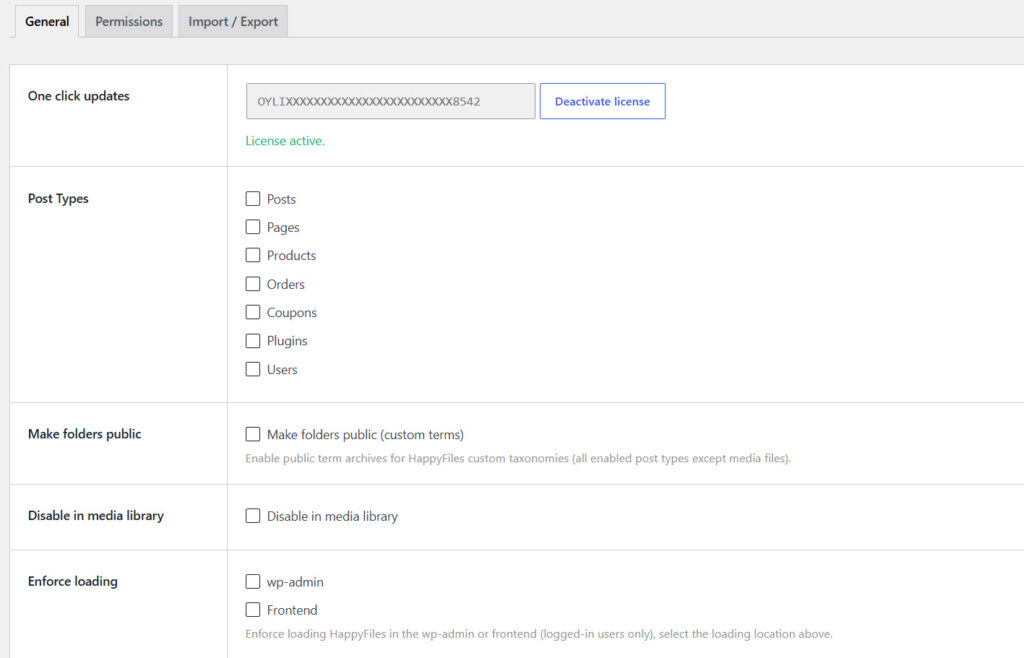
In a nutshell, you could see options like:
- License management
- Post types
- Make folders public
- Disable in media library
- Enforce loading
- Assign multiple folders
And so on. Based on your liking, you can customize the options. Once you are done, open the Media Library.
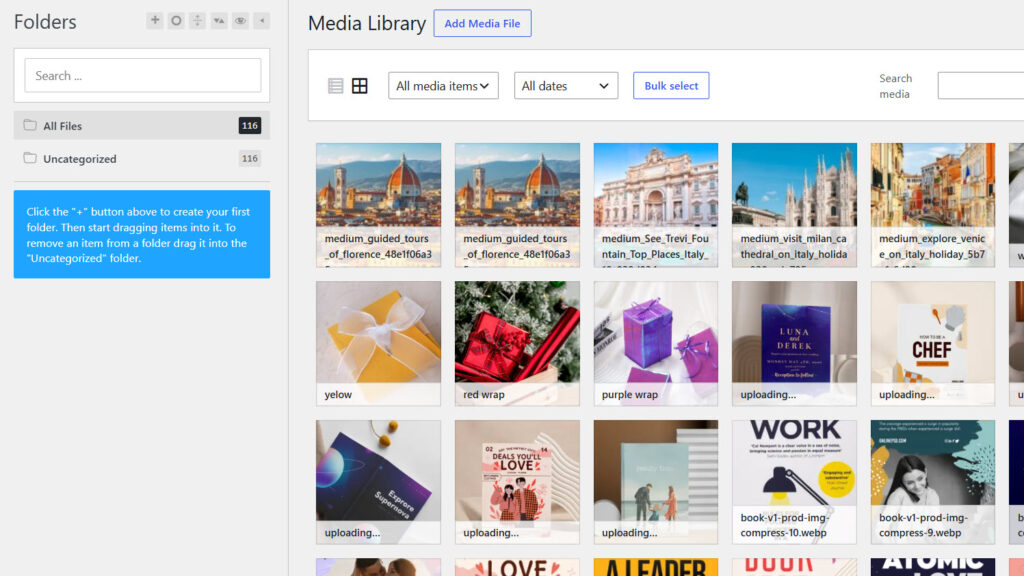
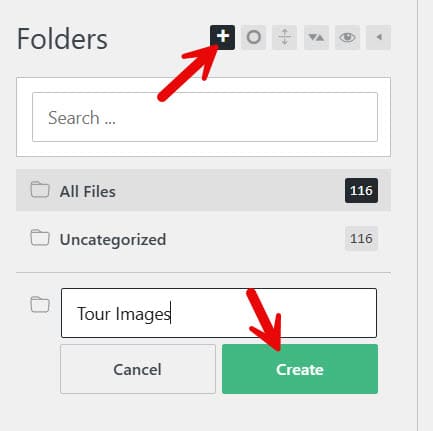
On the left-hand side, you can see the folder management. Click the + icon to create new folders.
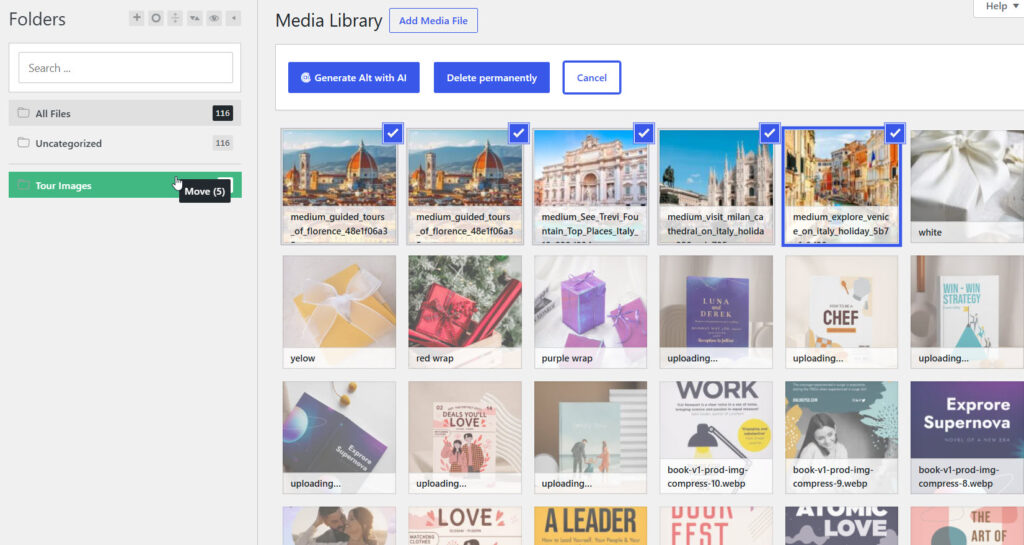
Now select the images you need to move and drop them inside the folder.
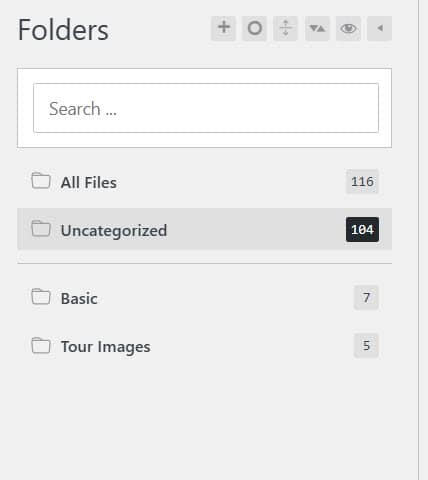
You can create as many folders as you need. And you can also see how many images are in each folder.
This is how you can use HappyFiles to manage and organize the media library.
HappyFiles Alternatives for Media Organizing
The best two alternatives for HappyFiles are:
- FileBird
- CatFolders
Let’s take a closer look at each plugin below.
1. FileBird
FileBird is one of the most popular media library folder plugins for WordPress. It lets you create unlimited folders and subfolders to organize images, videos, documents, and other media files with a clean drag-and-drop interface.
The free version already offers strong core features, while the Pro version unlocks advanced sorting, folder download as ZIP, better page builder support, and the ability to organize posts, pages, WooCommerce products, and custom post types.
Features
- Unlimited folders and hierarchical subfolders
- Drag-and-drop organization and bulk actions
- Smart context menu (right-click options)
- Powerful search and sort options
- Download entire folders as ZIP
- Organize posts, pages, and WooCommerce products
- Compatible with Elementor, Divi, Avada, and many builders
Pros and Cons
| Pros | Cons |
|---|---|
| Excellent free version with unlimited folders | Some advanced features require Pro |
| Fast and intuitive interface | |
| Strong compatibility with popular themes and builders | |
| Regular updates and good support |
Pricing
FileBird is a freemium plugin. The free version is available on WordPress.org. Premium plans start at $39 per year or $99 for a lifetime license.
2. CatFolders
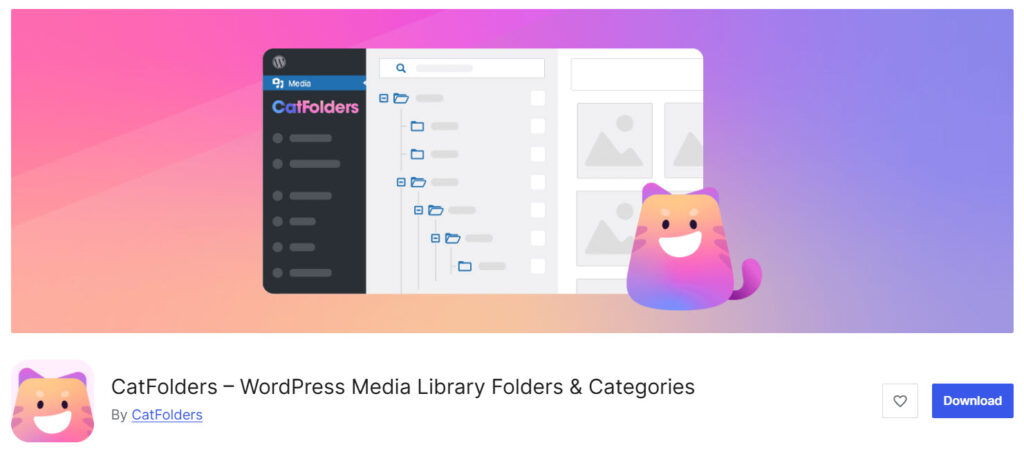
CatFolders is a modern media library folder plugin that helps you organize WordPress media files with a clean and fast interface. It focuses on speed and simplicity while offering unlimited folders in the free version.
The plugin supports drag-and-drop organization, bulk actions, and easy import from other folder plugins. The Pro version unlocks subfolders, advanced sorting, user role permissions, and the ability to organize posts, pages, and custom post types.
Features
- Unlimited folders in the free version
- Drag-and-drop file and folder management
- Import folders from FileBird, HappyFiles, Real Media Library, and others
- Collapsible sidebar and recent folder memory
- Subfolders and advanced sorting
- Organize posts, pages, and custom post types
- User role-based folder permissions
Pros and Cons
| Pros | Cons |
|---|---|
| Fast performance and clean interface | Higher pricing than some competitors |
| Good free version with unlimited folders | Advanced features locked in Pro |
| Easy migration from other folder plugins | |
| Strong page builder compatibility |
Pricing
CatFolders is a freemium plugin. The free version is available on WordPress.org. Premium plans start at $79 per year or $159 for a lifetime license.
HappyFiles vs FileBird vs CatFolders
| Feature | HappyFiles | FileBird | CatFolders |
|---|---|---|---|
| Free Version | No (retired) | Yes (very strong) | Yes (excellent) |
| Pricing | $59 lifetime | From $39/year or $99 lifetime | From $79/year or $159 lifetime |
| Unlimited Media Folders | Yes | Yes | Yes |
| Subfolders (Hierarchical) | Yes | Yes | Yes (Pro) |
| Drag & Drop Experience | Good | Excellent | Excellent |
| Organize Posts / Pages / CPTs | Yes | Yes (Pro) | Yes (Pro) |
| WooCommerce Support | Basic | Strong (Pro) | Strong (Pro) |
| Color-coded Folders | Limited | Yes (Pro) | No |
| Download Folder as ZIP | Limited | Yes (Pro) | No |
| Advanced Sorting Options | Basic | Excellent (Pro) | Excellent (Pro) |
| Page Builder Compatibility | Good | Excellent (Pro) | Excellent (Pro) |
| Import from Other Plugins | Yes | Yes | Yes |
| Performance | Good | Excellent | Excellent (very fast) |
| User Role Permissions | Basic | Good | Strong (Pro) |
| Overall Feature Depth | Moderate | High | High |
| Best For | Simple lifetime users | Most users & agencies | Users who want speed + modern UI |
Quick Recommendation
- FileBird remains one of the most complete and reliable solutions, especially if you want strong free features + powerful Pro tools.
- CatFolders is an excellent modern alternative with outstanding speed and a clean interface.
- HappyFiles is a decent lightweight option if you prefer a one-time payment, but it lacks the depth and flexibility that FileBird and CatFolders offer.
Frequently Asked Questions
Now, let’s take a look at some frequently asked questions and answers on this topic.
HappyFiles is a solid media management plugin that helps you organize files with folders. It works well for basic needs, but it lacks some advanced features found in more complete solutions. Overall, it is a decent option if you prefer a simple lifetime license.
Yes. HappyFiles lets you organize posts, pages, and custom post types into folders. You can also manage WooCommerce products. However, the folder structure and flexibility are more limited compared to other plugins in this category.
HappyFiles works with popular page builders and most common plugins. Still, some users report occasional compatibility issues with complex setups. Always test the plugin on a staging site before using it on a live project.
After purchasing, enter your license key in the settings. Once activated, you can receive one-click updates directly from your WordPress dashboard. Make sure the license stays active to continue receiving updates.
No. The free version of HappyFiles was retired in 2021. You can only use the premium version, which currently costs $59 for a lifetime license.
Yes. HappyFiles supports folders with multiple hierarchical levels. You can also copy and paste folders and organize files with a drag-and-drop interface, which makes managing your media easier.
It can organize WooCommerce products into folders, which is handy for larger stores. However, the feature set is more basic compared to dedicated media organizers that offer stronger WooCommerce integration.
HappyFiles supports right-to-left languages such as Arabic. It also works with multilingual setups, though advanced features for creating multilingual versions are limited.
Deleting a folder does not delete the actual media files. The files simply move out of that folder structure and remain available in your media library. This is a helpful safety feature.
HappyFiles is a lightweight and easy-to-use option with a one-time payment of $59. If you need stronger free features, better sorting options, or more advanced folder tools, other plugins may offer better long-term value.
Conclusion
HappyFiles is a lightweight and easy-to-use media management plugin that helps you organize files in the WordPress Media Library. It allows you to create folders, categorize images, and manage different post types with a clean interface.
The one-time price of $59 makes it an affordable option for users who prefer a lifetime license. While the plugin works well for basic organization needs, it lacks some advanced features found in more complete solutions.
If you need stronger folder tools, better sorting options, or a solid free version, other media management plugins may offer more flexibility. Overall, HappyFiles is a decent choice for simple projects. Just make sure to test it properly and choose the tool that best matches your workflow and long-term needs.
Would you still pick HappyFiles?
Or would you like to give FileBird or CatFolders a try?
Let us know in the comments below.
We hope you found this article helpful and enjoyed reading it. If you need to learn more WooCommerce tips and tricks, check out the YayCommerce blog. Also, feel free to check out our social media handles, such as Facebook, X, Instagram, and YouTube, for more interesting content.