
Are you looking for the ultimate guide to WooCommerce product reviews? In this post, we are going to show you everything you need to know, starting from setup to some pro tips that will help you convert more visitors into customers.
Customer reviews are one of the most powerful tools for any WooCommerce store. They build trust, reduce hesitation, and can increase your conversion rates by 15% to 68%. In fact, products with reviews often sell significantly more than those without.
However, WooCommerce’s default review system is quite basic. It lacks modern features like photo and video uploads, automated reminders, and beautiful display options that today’s customers expect. In this ultimate guide, you will learn everything you need to know about WooCommerce product reviews.
We will walk you through a complete step-by-step setup using YayReviews, share 12 powerful pro tips, and show you how to turn customer feedback into a strong sales driver for your store.
Whether you are just starting out or looking to improve your existing review system, this guide will help you collect more authentic reviews and use them effectively.
Table of contents
- Why Product Reviews Matter for Your WooCommerce Store in 2026
- Default WooCommerce Reviews: Setup & Limitations
- Which Is the Best WooCommerce Review Plugin
- The Ultimate YayReviews Setup Guide
- How to Migrate Reviews from Other Review Plugins
- 12 Pro Tips to Collect More Reviews & Maximize Results
- 1. Optimal timing for review reminders
- 2. Smart incentive strategies that convert (without looking fake)
- 3. Using YaySMTP for better email delivery
- 4. Leveraging photo & video reviews for visual products
- 5. Displaying reviews strategically across your site
- 6. Using AI summaries for better UX
- 7. Implementing review schema for rich snippets
- 8. Turning reviews into marketing content (social proof campaigns)
- 9. Handling negative reviews professionally
- 10. Analyzing review data to improve products
- 11. A/B testing review forms and incentives
- 12. 2026 trends (video reviews, UGC contests, shoppable reviews)
- Common Mistakes to Avoid with WooCommerce Reviews
- YayReviews vs Other Review Plugins (Quick Comparison)
- Frequently Asked Questions
- Conclusion
Why Product Reviews Matter for Your WooCommerce Store in 2026
Customer reviews have become one of the strongest factors that influence buying decisions online. In 2026, their importance is even greater due to increasing competition and higher customer expectations.
Here are the main reasons why product reviews are essential for your WooCommerce store:
- Build Instant Trust: Shoppers trust real people more than brand claims. Reviews with photos and videos make your products feel more authentic and reliable.
- Boost Conversion Rates: Products with good reviews can sell up to 270% more than products with no reviews. Even a few positive reviews can significantly increase sales.
- Improve SEO Performance: Google loves fresh user-generated content. Reviews with proper schema markup can generate rich snippets in search results, which improves click-through rates.
- Reduce Returns and Refunds: Honest reviews help customers choose the right product, leading to fewer returns and lower refund rates.
- Increase Customer Loyalty: When customers see others having great experiences, they feel more confident buying from you again and recommending your store.
- Provide Valuable Insights: Reviews give you direct feedback on what customers like and dislike, helping you improve your products and marketing.
In short, a strong review system is no longer optional. It has become a key driver for trust, sales, and long-term growth in competitive WooCommerce stores.
Default WooCommerce Reviews: Setup & Limitations
WooCommerce comes with a built-in review system. While it is simple and free, it is quite basic and often not enough for serious stores in 2026.
How to Enable Default WooCommerce Reviews
| Step | Action | Details |
|---|---|---|
| 1 | Go to WooCommerce Settings | Navigate to WooCommerce > Settings > Products |
| 2 | Enable Product Reviews | Check the box for “Enable reviews.” |
| 3 | Configure Review Settings | Choose whether to show reviews on product pages and allow only verified owners to review |
| 4 | Save Changes | Click Save at the bottom |
| 5 | Check on Frontend | Go to any product page and see the review tab |
This process takes less than 2 minutes. However, once enabled, you will quickly notice its limitations.
Limitations of Default WooCommerce Reviews
| Aspect | Default WooCommerce Reviews | Problem |
|---|---|---|
| Review Collection | Manual only | Very few customers leave reviews |
| Media Support | Text + star rating only | No photos or videos |
| Automation | No reminders or follow-ups | Low review volume |
| Display Options | Basic tab on product page | Not very attractive or visible |
| Rich Snippets / SEO | Very limited | Misses rich results in Google |
| Spam Protection | Basic moderation only | High chance of fake reviews |
| Customer Incentives | Not possible | No built-in rewards |
| Analytics | No reporting | Cannot track review performance |
| Mobile Experience | Average | Not optimized for modern users |
The default system is okay for brand-new stores with very few products. But if you want more reviews, better trust, and higher conversions, you will need a dedicated plugin like YayReviews.
Which Is the Best WooCommerce Review Plugin
After testing and using many review plugins, we confidently recommend YayReviews as the best WooCommerce review plugin for most store owners in 2026.
YayReviews stands out for combining modern features with excellent performance and simplicity. It is lightweight, fast, and easy to use while offering everything you need to collect more authentic reviews and display them beautifully.
Why YayReviews is the Best Choice?
It includes smart automated reminders, excellent photo and video review support, verified buyer badges, clean widgets, excellent customer support, and GDPR compliance. Whether you run a small store or a growing one, YayReviews helps you build trust and boost conversions without slowing down your website or complicating your workflow.
If you are serious about improving your product reviews, YayReviews is the plugin we recommend without hesitation.
The Ultimate YayReviews Setup Guide
Here’s a 7-step guide on setting up WooCommerce product reviews using YayReviews.
Step 1. Installation & Activation
The first thing you need to do is install and activate the plugin. If you are interested in the free version of the plugin, you can get it from the WordPress plugins repository.
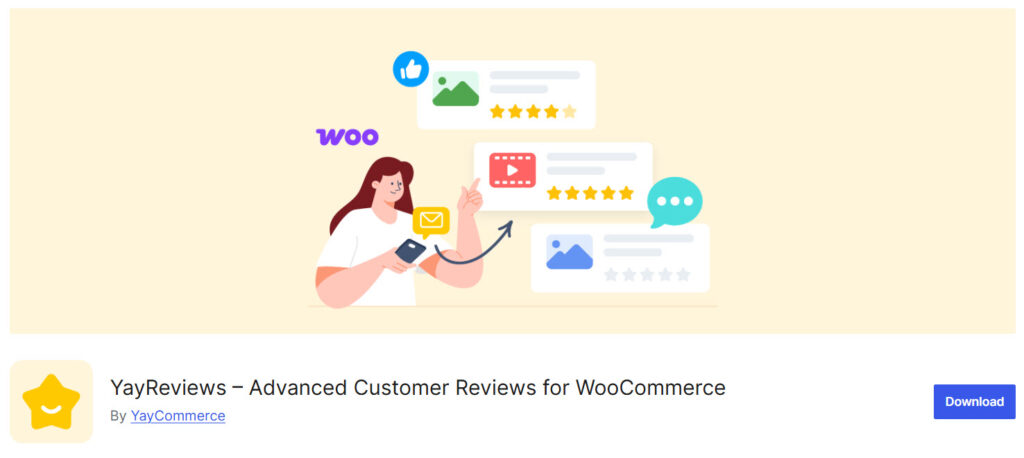
The lite version plugin is good if you just need the basic features. On the other hand, if you are looking for cutting-edge features, consider the premium version.
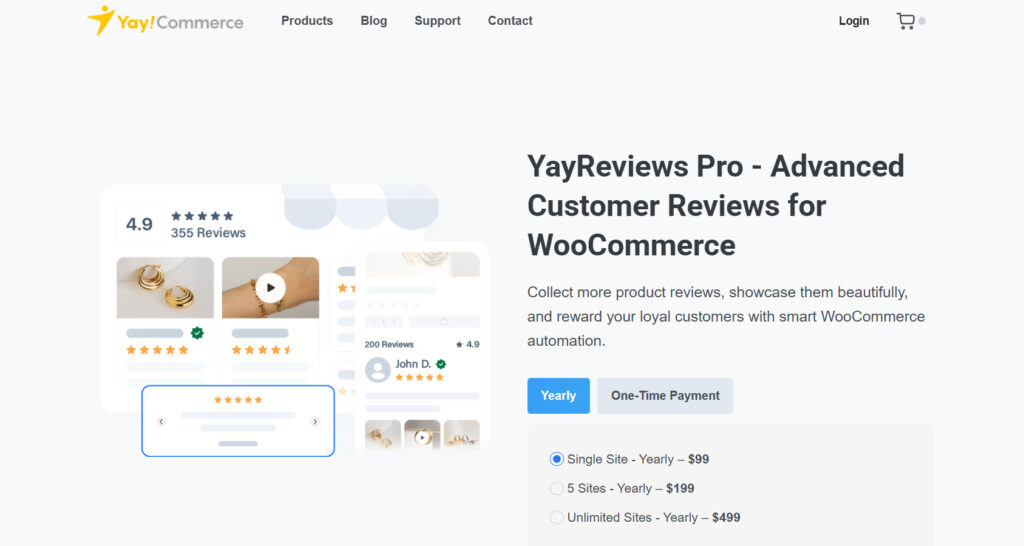
Install and activate the plugin on your WooCommerce store.
Step 2. Initial Configuration
If you are using the premium version of the YayReviews plugin, you are recommended to activate your license key. This way, you will receive regular updates, bug fixes, and more.
You can do it from the YayCommerce licenses settings.
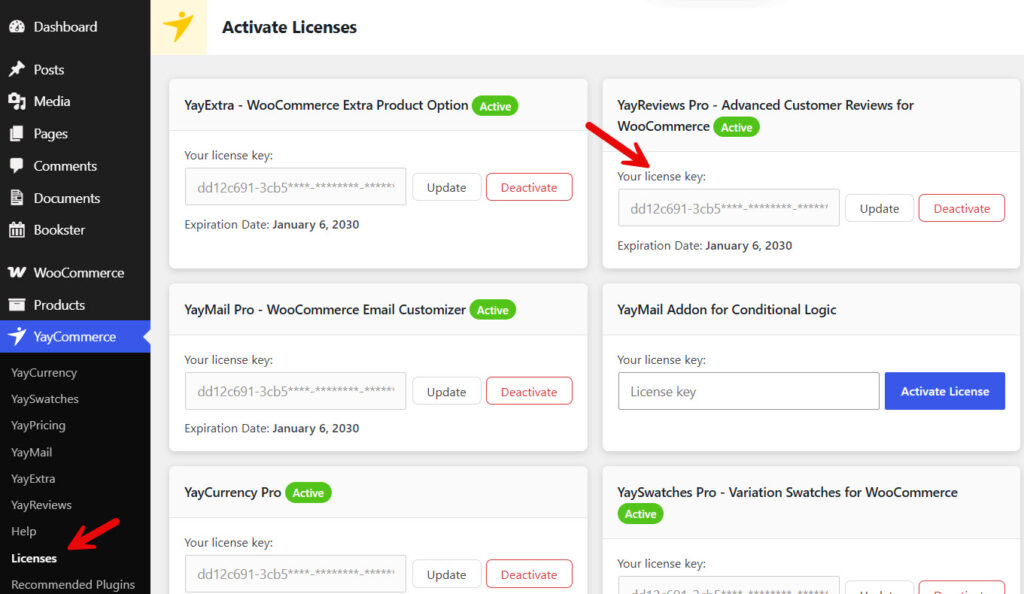
After activating the license, proceed with the main plugin settings.
Step 3. Enabling Photo & Video Reviews
After activating the plugin, it will automatically replace the default WooCommerce product reviews settings. In addition to text reviews, enabling photo and video reviews is a good idea. To do this, go to YayReviews settings, then media options.
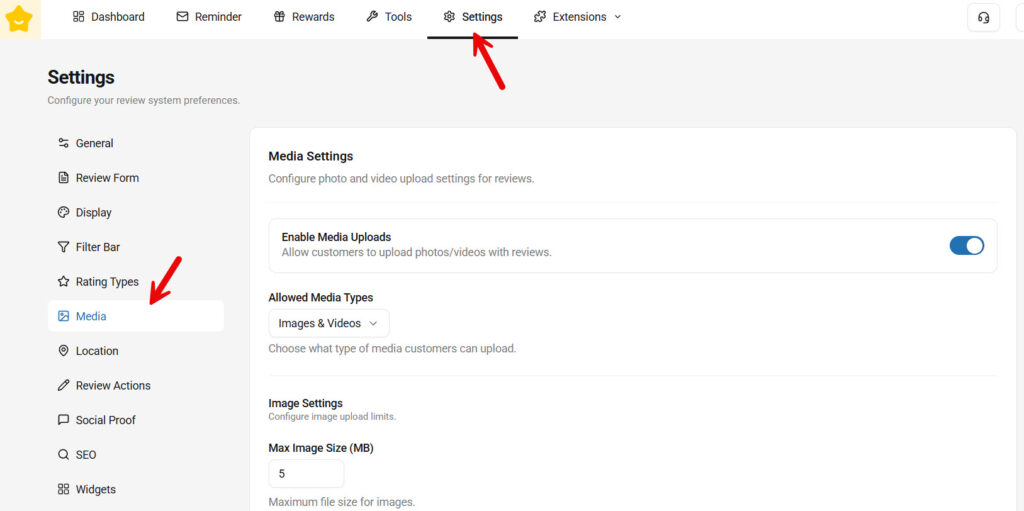
There, you can see all the settings. The main options are:
- Enable media uploads
- Allowed media types
- Max image file size
- Max images allowed per review
- Max video file size
- Max videos per review
- Max video duration
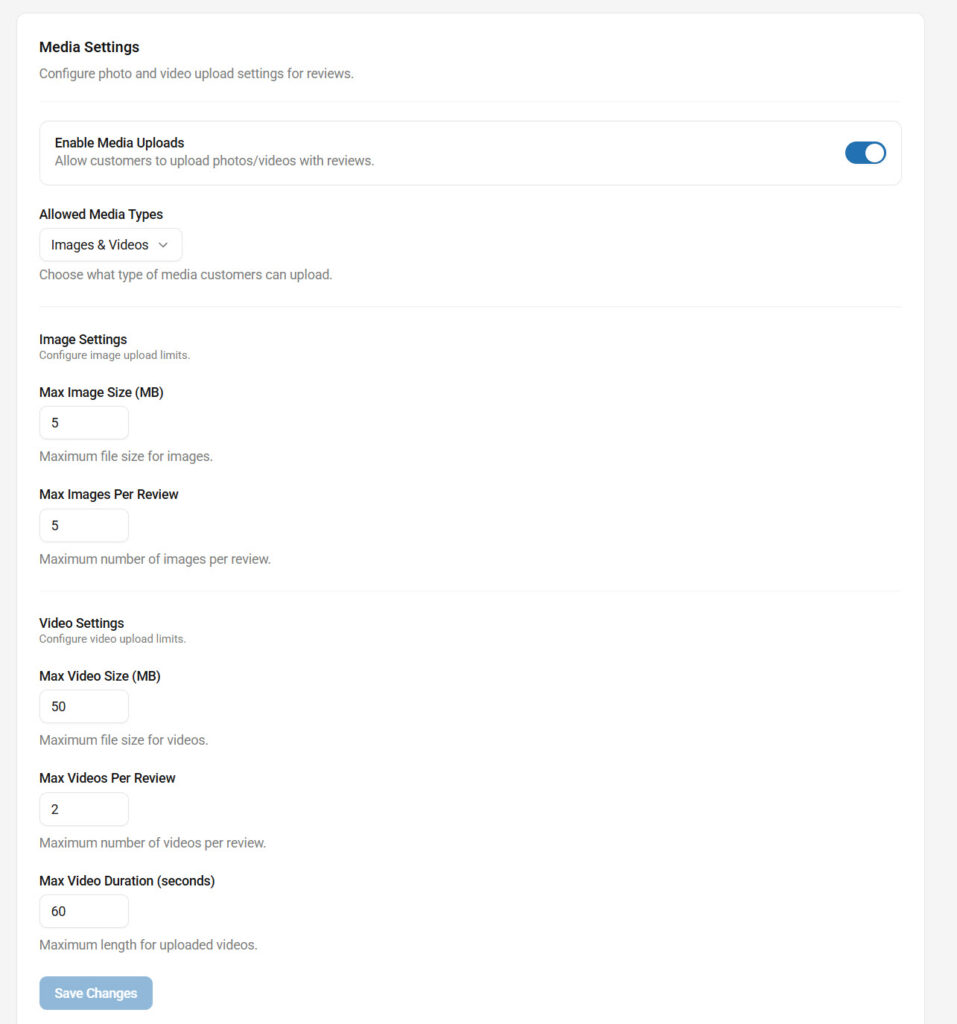
You can configure these options to suit your preferences. After that, save it.
From now on, when someone tries to leave a review, the plugin will show you an option to leave an image or video.
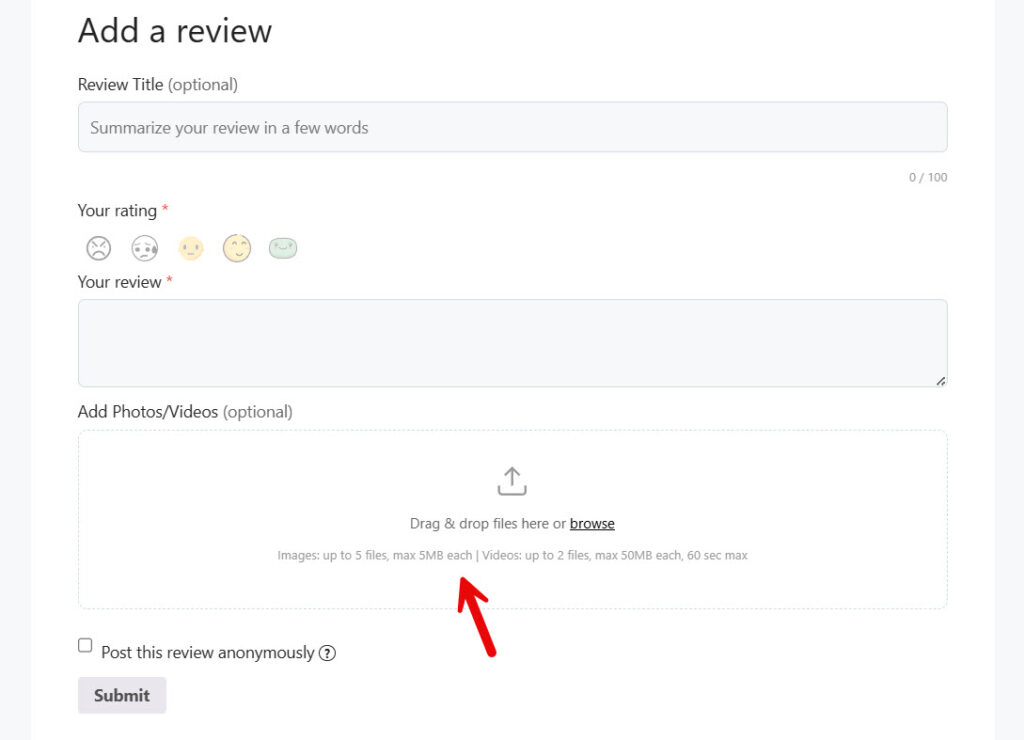
Pretty cool, right?
Step 4. Setting Up Automated Review Reminders & Incentives
Next, let’s see how to set up automated review reminders and incentives. After delivering a product, it is ideal to ask for a review. It would be better if we could automate it, right?
After X days, the review reminder email will be sent automatically. To set up this feature, go to the reminder options and create your first rule.
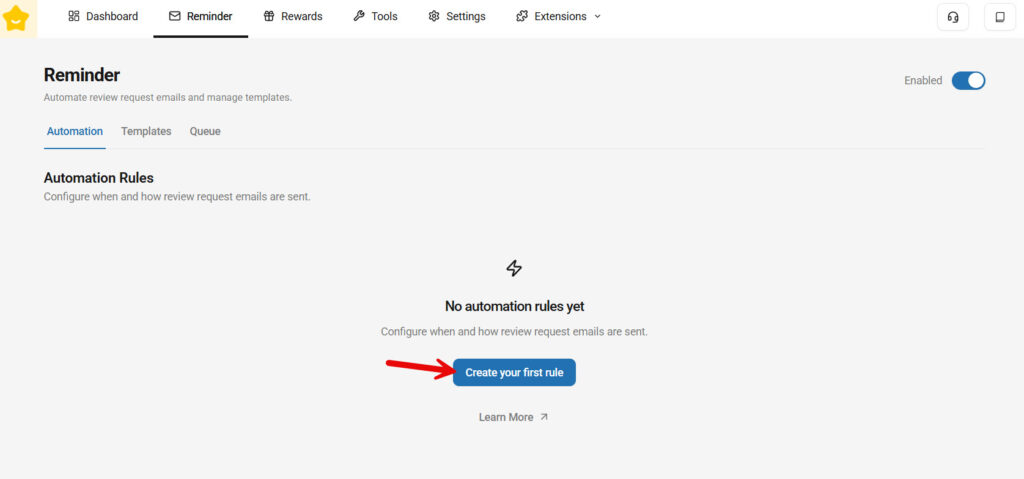
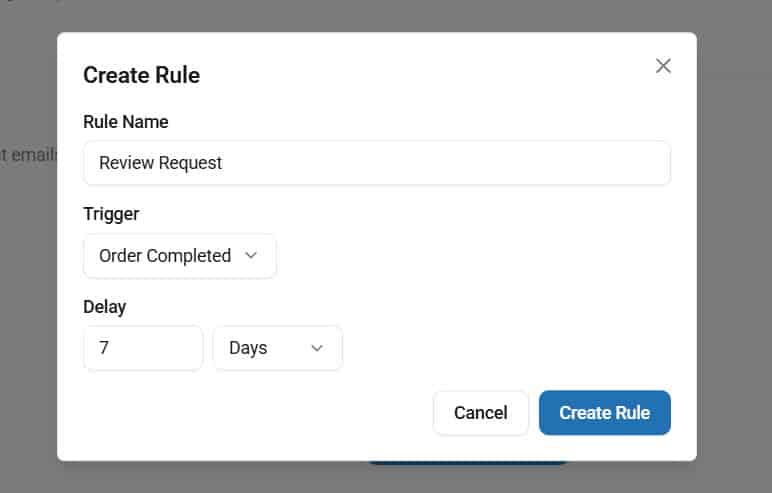
You can now name your rule and choose a delay.
Now, you can edit the email template.
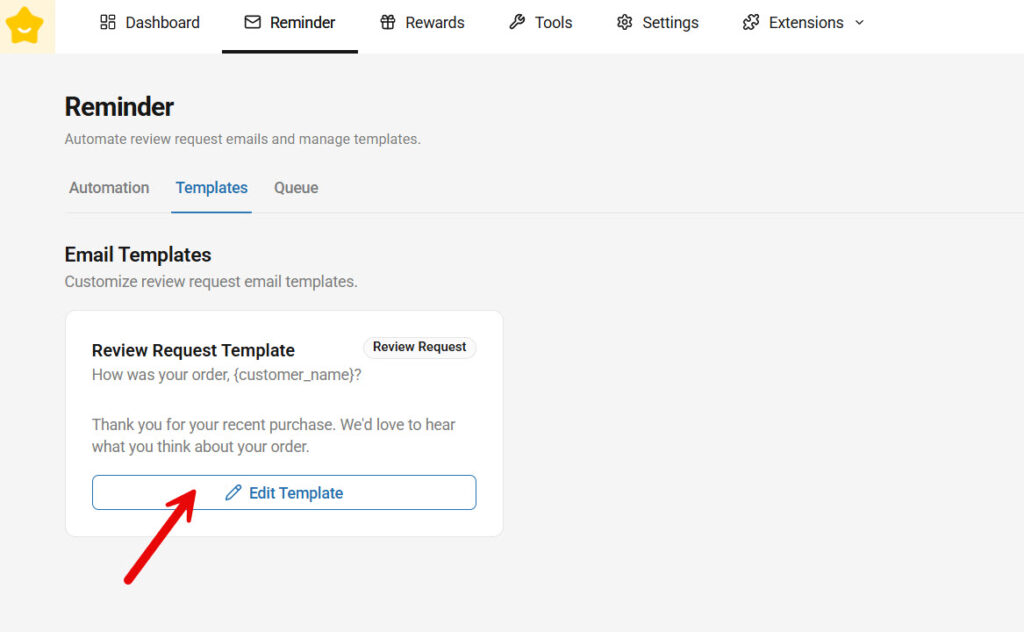
The built-in editor is basic.
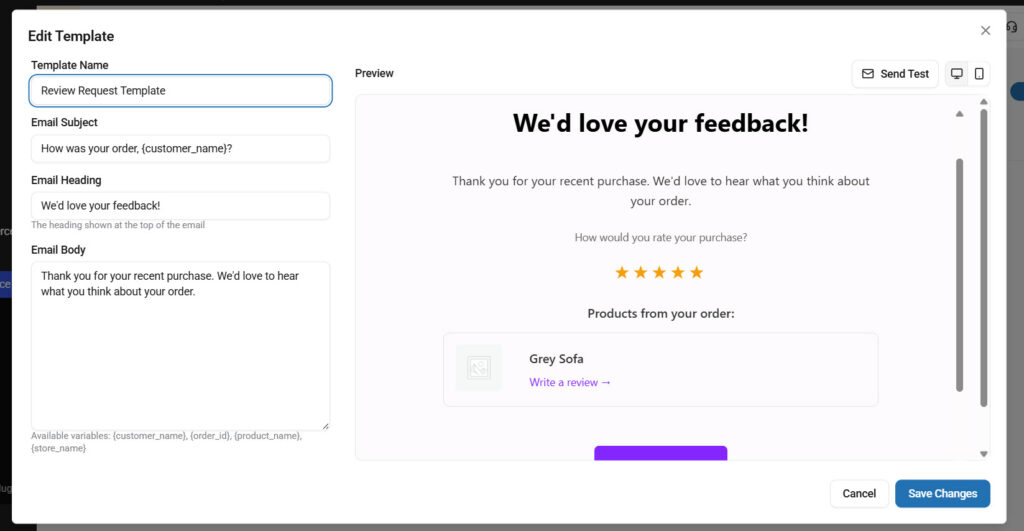
If you are serious about your business, you can use the YayMail plugin. It will help you further customize the email template. If you have configured a reliable SMTP plugin, such as YaySMTP, you can deliver emails without issues.
Next, let’s see how rewards work.
First, create your first reward.
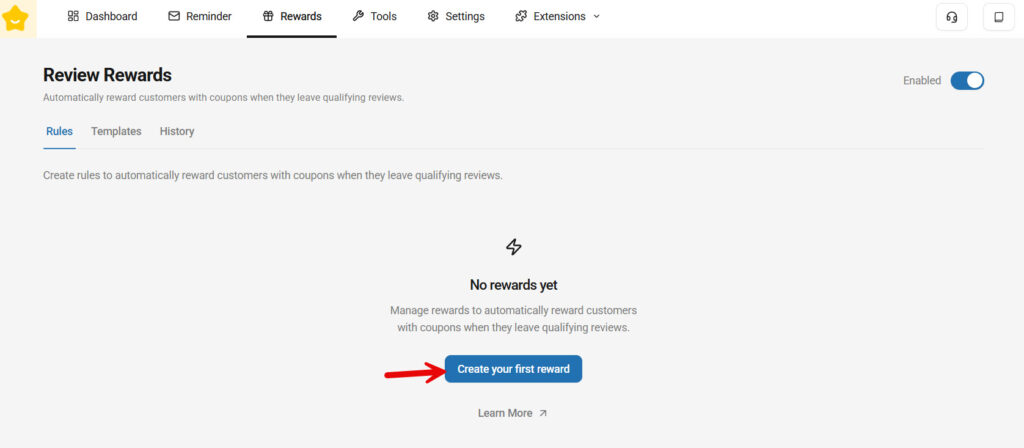
Next, you can choose conditions for the reward, the coupon discount rate, and so on.
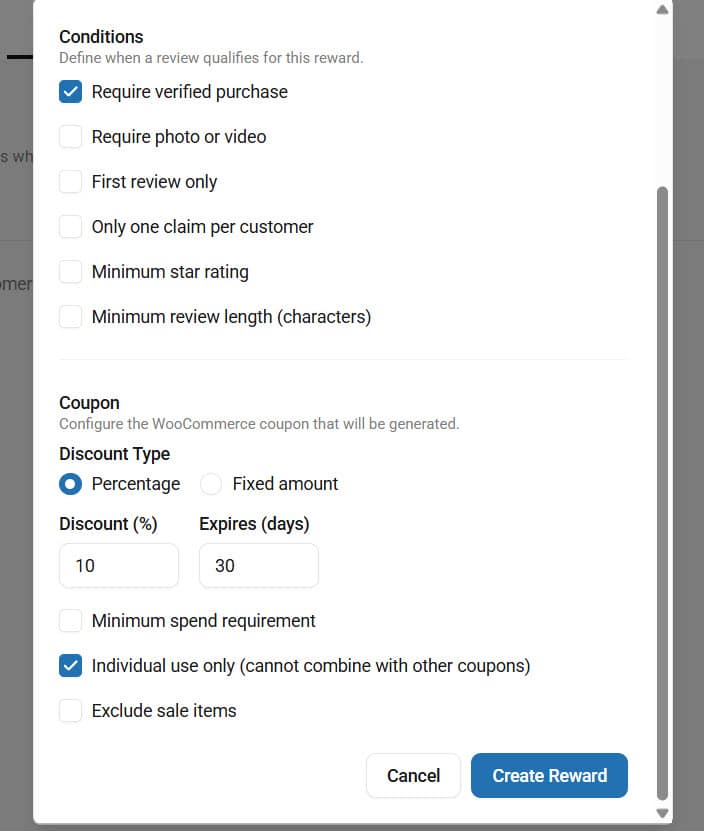
We would recommend offering a discount that won’t significantly affect your profit margins. You can also tweak the conditions to suit your preferences. Once you are ok with the conditions, create the reward.
Now, like last time, go to templates and edit it.
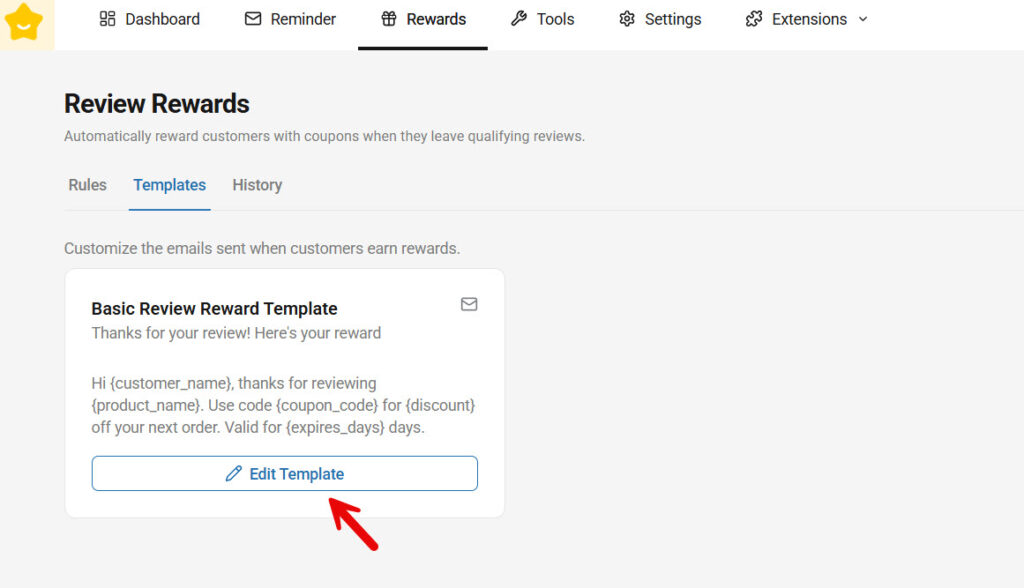
You can use the available variables to add dynamic content to the email template.
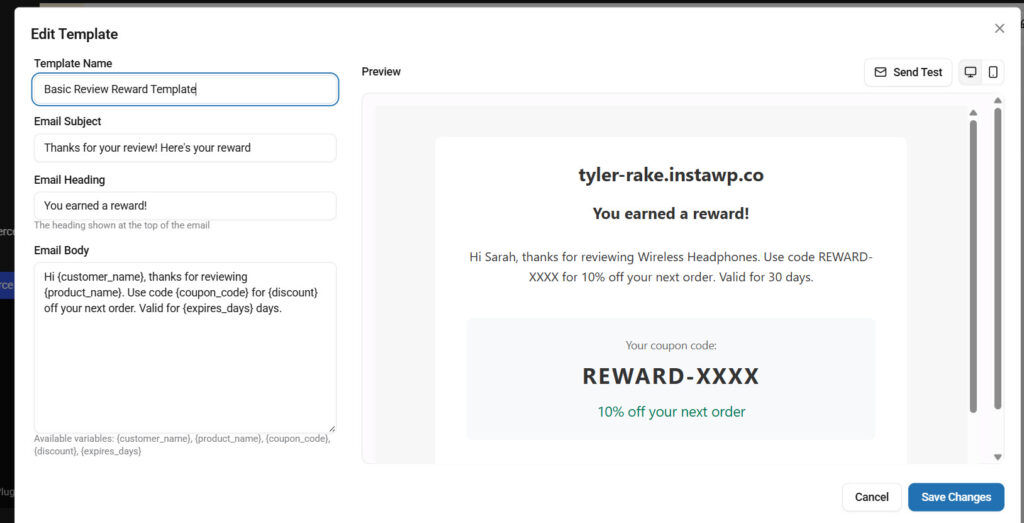
You can also customize this email template with the YayMail plugin.
Step 5. Customizing Review Display
Next, the plugin allows you to tweak the rating type.
To do this, go to the plugin’s settings and rating types.
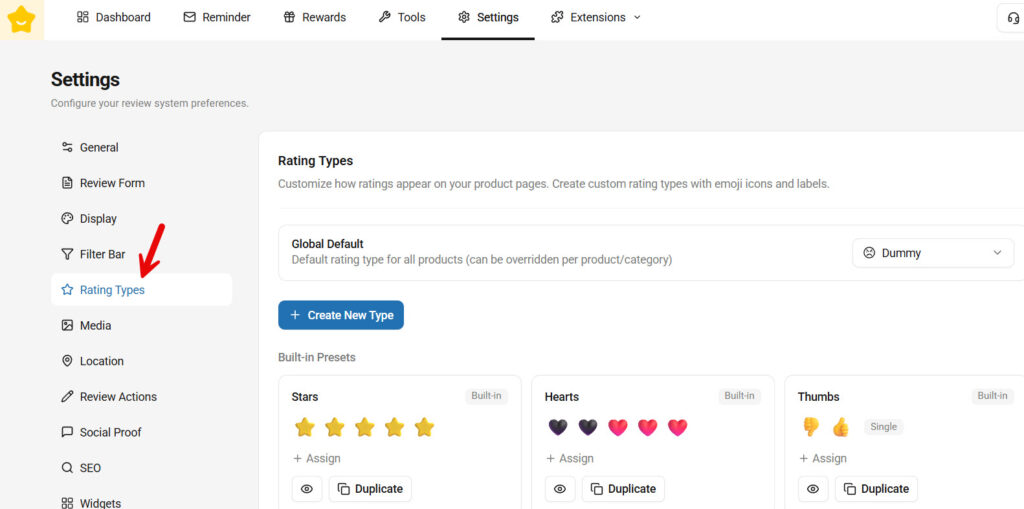
Depending on the business you’re in, you can customize the rating type. You can see several pre-made options on the screen. Those are alright. But if you need to start from scratch, that is possible too.
For the review type, you can use emojis or SVG images.
It is totally up to you.
Having a custom rating type on the website would be cool.
Step 6. Adding AI Summaries & Verified Buyer Badges
Under extension, we can see AI summaries and badges.
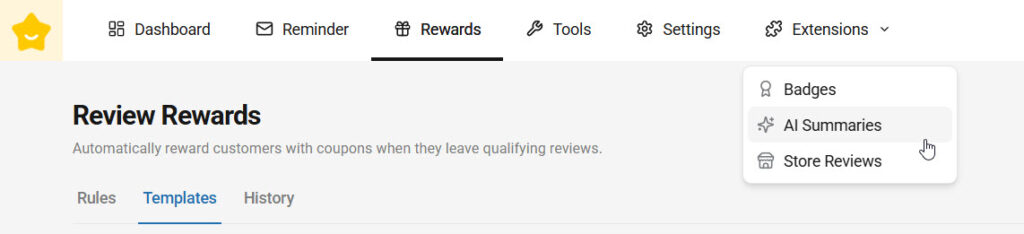
AI summaries are a feature that collects user reviews and generates a common review based on user inputs. It would look something like this in the front end:
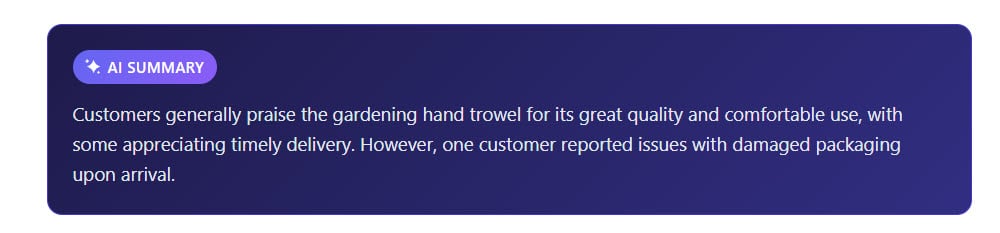
You can enable it from the settings, choose the conditions, and give it a go.
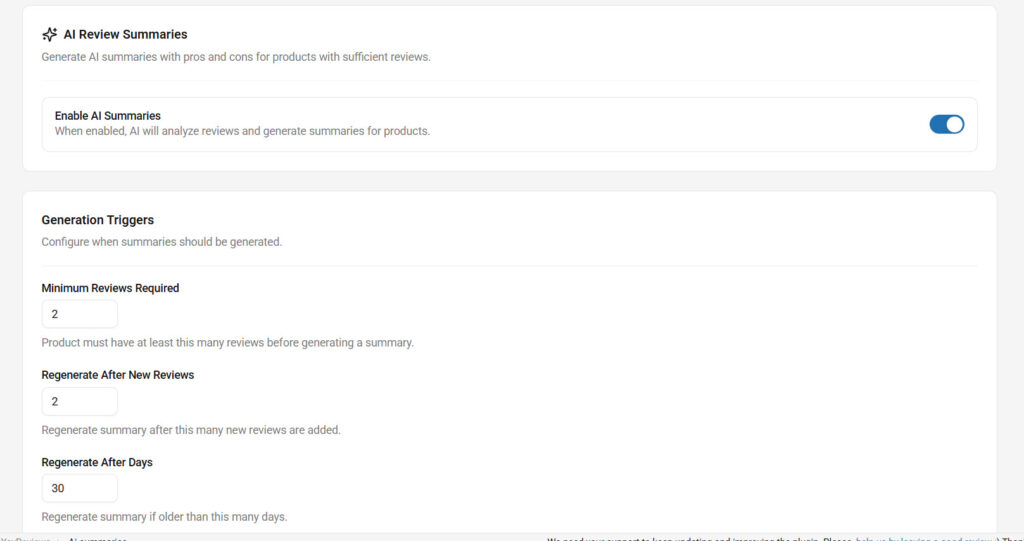
Daily, the maximum is 10 generations. You can also regenerate summaries whenever you need. This will help you update the summary manually rather than waiting for the plugin to auto-update after a set period.
Once you are done with that, move to badges.
There are some pre-made badges available. You can also add your own badge to the website.
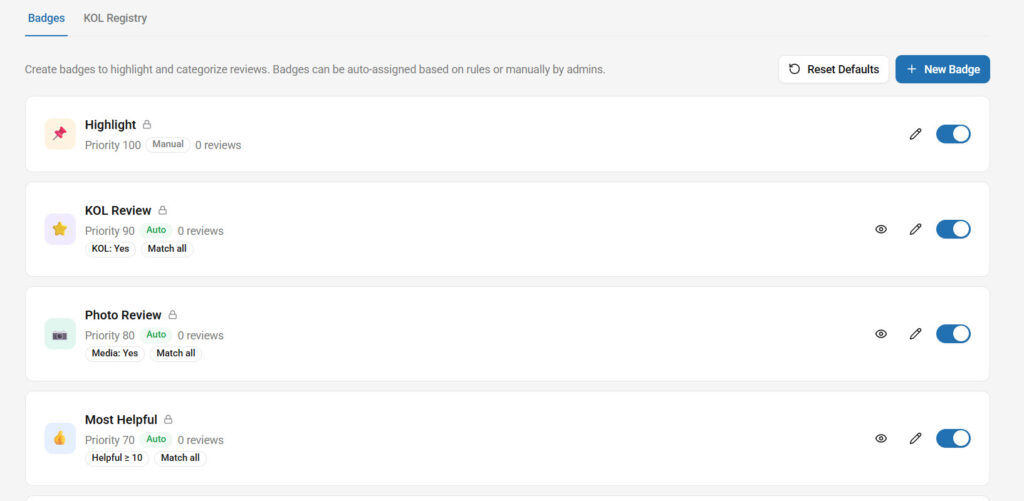
Setting up a rule is the main thing. If you go to the badge conditions, you can configure as many conditions as you need.
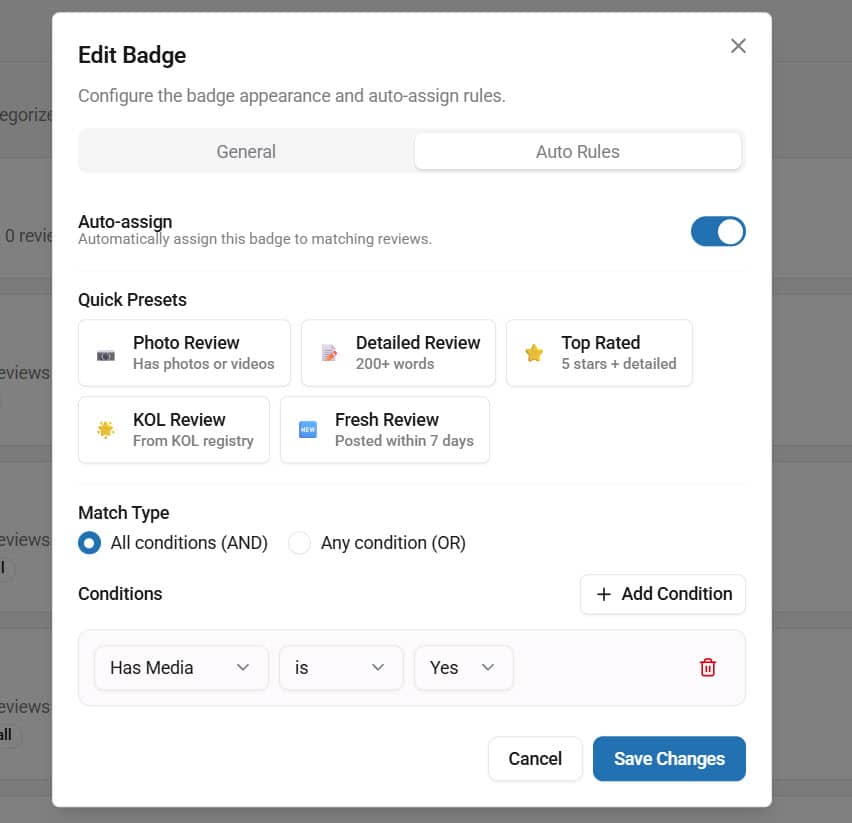
When these conditions are met, the badges will be displayed on the front end.
Step 7. Testing Your Review System End-to-End
Once you have configured the plugin, you need constant testing. See what users are saying to gauge whether the review rewards, reminders, and work are working, and so on.
Optimizing the review system will definitely help you increase your conversion rate.
How to Migrate Reviews from Other Review Plugins
YayReviews supports importing product reviews from:
- CusRev
- Judge.me
- Yotpo
- Custom CSV
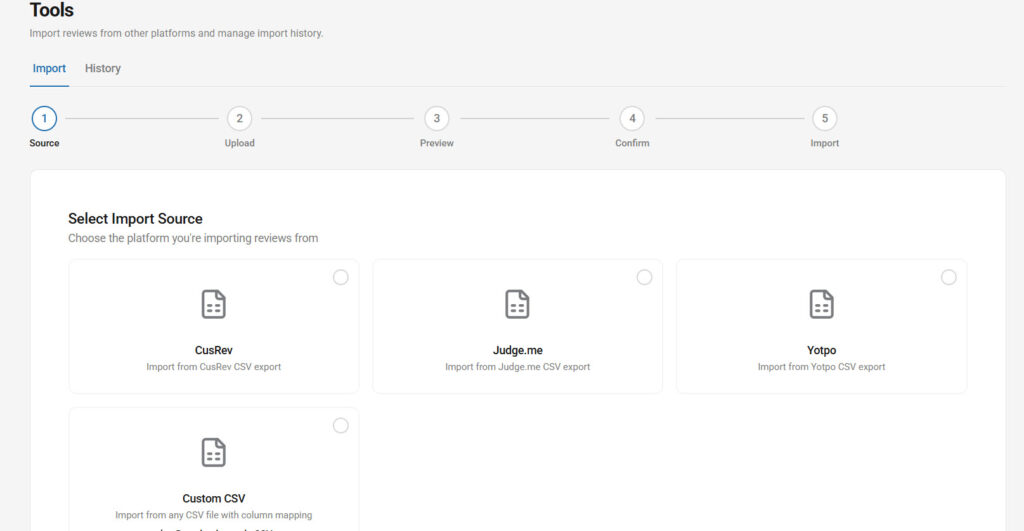
The process is simple. You choose an option, upload the CSV file, and that’s it. All the reviews will be imported.
12 Pro Tips to Collect More Reviews & Maximize Results
Once you have added the review feature to your WooCommerce store, it is time to maximize the results. To do that, follow these tips we have mentioned below:
1. Optimal timing for review reminders
The timing of your review request can make a huge difference. The sweet spot is usually 3 to 7 days after delivery, when customers have had enough time to use the product but still remember their experience clearly. YayReviews makes it easy to set smart, automated reminders with flexible scheduling, so you can test different timing options and find what works best for your audience.
2. Smart incentive strategies that convert (without looking fake)
Offering a small reward, such as a discount coupon, can significantly boost review rates. The key is to make the incentive conditional on submitting any honest review, not just positive ones. YayReviews allows you to automate this process smoothly while keeping everything transparent and trustworthy.
3. Using YaySMTP for better email delivery
Many review reminders never reach customers because of poor email deliverability. Installing and configuring YaySMTP solves this problem by sending emails via reliable services such as Gmail, SendGrid, or more. This simple fix can almost instantly double your review collection rate.
4. Leveraging photo & video reviews for visual products
Visual reviews build much higher trust than text-only reviews. Always enable photo and video uploads in YayReviews and gently remind customers in your emails to share images or short videos of the product in use. Stores selling fashion, beauty, electronics, or home goods see the biggest boost from this strategy.
5. Displaying reviews strategically across your site
Do not hide reviews in a tab. Use YayReviews widgets and carousels to show reviews on the homepage, category pages, and product pages. Placing reviews where customers can easily see them increases trust and significantly improves conversion rates.
6. Using AI summaries for better UX
Long review lists can overwhelm visitors. Enable AI-powered summaries in YayReviews to show a quick overview at the top of the review section. This helps customers quickly understand the overall sentiment and makes the review area much more user-friendly.
7. Implementing review schema for rich snippets
Proper review schema markup helps your products appear with star ratings in Google search results. YayReviews automatically adds structured data, which can dramatically improve your click-through rates from search engines.
8. Turning reviews into marketing content (social proof campaigns)
Do not let your reviews sit only on product pages. Share the best customer photos, videos, and testimonials on social media, email newsletters, and ads. YayReviews makes it easy to export or showcase these reviews across different marketing channels.
9. Handling negative reviews professionally
Negative reviews are inevitable, but how you handle them matters. Respond quickly, thank the customer, and offer a solution. This not only improves customer retention but also shows potential buyers that you care about service quality.
10. Analyzing review data to improve products
Treat reviews as valuable feedback. Regularly review common complaints and praise on YayReviews and use them to improve product descriptions, quality, or features. This creates a positive loop where better products lead to even better reviews.
11. A/B testing review forms and incentives
Test different reminder timings, email messages, incentive amounts, and review form designs. YayReviews makes testing easy, so you can continuously improve your review collection rate.
12. 2026 trends (video reviews, UGC contests, shoppable reviews)
Video reviews, shoppable UGC, and AI-generated review highlights are becoming very important. YayReviews is regularly updated with these modern features, helping you stay ahead of the competition and meet changing customer expectations.
Common Mistakes to Avoid with WooCommerce Reviews
Even experienced store owners make these mistakes. Avoiding them will help you collect better reviews and get stronger results.
- Asking for Reviews Too Early or Too Late: Sending review requests the same day as purchase or after several weeks both lead to low response rates. The best window is usually between 3 and 7 days after delivery.
- Hiding Reviews in a Tab: Many stores keep reviews tucked away in a separate tab. This makes them invisible to most visitors. Always display reviews prominently on the product page, using widgets or carousels.
- Over-Promising with Incentives: Promising rewards only for 5-star reviews or being unclear about incentives can hurt your reputation. Always encourage honest reviews.
- Not Using Automated Reminders: Relying on customers to leave reviews on their own results in very few reviews. Failing to set up automated reminders is one of the biggest missed opportunities.
- Poor Email Deliverability: Many review request emails end up in spam or never reach customers. Not using a proper SMTP plugin, such as YaySMTP, is a common and costly mistake.
- Ignoring Negative Reviews: Some store owners delete or ignore negative reviews. This damages trust. Always respond professionally to negative feedback, as it often builds more credibility.
Avoiding these mistakes will help you build a much stronger and more effective review system.
YayReviews vs Other Review Plugins (Quick Comparison)
When choosing a review plugin, it is important to pick one that is lightweight, easy to use, and actually helps you collect more reviews without slowing down your store.
YayReviews stands out as the best overall choice for most WooCommerce store owners because it offers the perfect balance of modern features, excellent performance, and simplicity.
Here is a quick comparison:
| Feature | YayReviews | Other Popular Plugins |
|---|---|---|
| Performance & Speed | Very lightweight & fast | Often heavier and slower |
| Photo & Video Reviews | Excellent support | Available but sometimes limited |
| Automated Reminders | Smart & flexible | Good, but usually more complicated |
| Review Display Options | Clean widgets & carousels | Varies, some look dated |
| Ease of Use | Very beginner-friendly | Can feel complex |
| Pricing Value | Affordable & generous free version | Often more expensive for full features |
| AI Summaries | Built-in | Rarely available or limited |
| Overall Recommendation | Best for most stores | Good for specific needs |
YayReviews is designed to be simple yet powerful. It helps you collect more authentic reviews, display them beautifully, and boost conversions without any unnecessary complexity or performance issues.
If you want a modern, reliable, and hassle-free review system in 2026, YayReviews is the plugin we recommend.
Here are some related posts you might be interested in:
- Photo & Video Reviews in WooCommerce: Why They Convert Better Than Text
- 7 WooCommerce Discount Strategies That Actually Increase Average Order Value
- How to Get More (and Better) Product Reviews on Your WooCommerce Store
- How to Add a Request a Quote Button to Your WooCommerce Store
- What’s New in YayExtra 2.1.0
Frequently Asked Questions
Now, let’s take a look at some frequently asked questions and answers on this topic.
You can enable reviews by going to WooCommerce > Settings > Products and checking the “Enable reviews” option. However, the default system is very basic. For better results, we recommend using a dedicated plugin like YayReviews that adds automation, photos, videos, and beautiful displays.
YayReviews is currently the best overall choice for most WooCommerce stores. It is lightweight, modern, and easy to use, offering excellent features such as automated reminders, photo and video support, and clean review displays.
The most effective way is to send automated review reminders 3 to 7 days after delivery and offer gentle incentives, such as discount coupons. Using YayReviews makes this process automatic and effortless.
This is a very common issue. WooCommerce uses the default PHP mail () function, which often ends up in spam. Installing YaySMTP (our reliable SMTP plugin) fixes this problem by sending emails through professional SMTP servers such as Gmail, SendGrid, or Amazon SES.
Yes. YayReviews has excellent built-in support for customer photo and video uploads with moderation tools, file size limits, and beautiful gallery display on the frontend.
YayReviews includes easy import tools. You can migrate all your old reviews, ratings, and images from the default WooCommerce system or other plugins without losing any data.
Yes, you can. YayReviews allows you to automatically send discount coupons after a customer submits a review. Just make sure you clearly state that the review should be honest.
Display reviews prominently on product pages using widgets or carousels. You can also show them on the homepage, category pages, and footer to maximize social proof.
Yes. YayReviews is designed to be simple and user-friendly. You can have it fully set up and collecting reviews within 10-15 minutes, even if you are new to WooCommerce.
YayReviews has a generous free version available on WordPress.org that works well for small stores. The Pro version is affordably priced ($99 a year) and unlocks unlimited reminders, video reviews, advanced widgets, and priority support.
Conclusion
Setting up a strong product review system is one of the smartest investments you can make for your WooCommerce store.
From enabling basic reviews to implementing advanced strategies like automated reminders, photo and video uploads, and beautiful display options, a well-managed review system builds trust, boosts conversions, and helps your business grow.
YayReviews makes the entire process simple, fast, and effective. With its lightweight design, powerful automation, and modern features, it gives you everything you need to collect more authentic reviews and turn them into powerful social proof.
Now it is time to take action. Install YayReviews, follow the setup steps in this guide, and start applying the pro tips. The sooner you build a strong review system, the faster you will see improvements in trust, sales, and customer loyalty.
We hope you found this article helpful and enjoyed reading it. If you need to learn more WooCommerce tips and tricks, check out the YayCommerce blog. Also, feel free to check out our social media handles, such as Facebook, X, Instagram, and YouTube, for more interesting content.
Ready to get more reviews and grow your store?
Try YayReviews today and see the difference for yourself.
